
A canonical issue may not sound serious, but it can quietly hurt your website’s search visibility. It happens when the same content appears on more than one URL, and search engines can’t tell which version is the main one.
As a result, they might pick the wrong version to rank or split the value across several links. This can lower your search performance and reduce traffic to your site. The good news is that canonical issues are easy to fix once you know how to find them.
With a few simple checks and steps, you can help search engines understand your content better. This guide will explain what a canonical issue is, why it matters, how to spot it, and what you can do to prevent or fix it.
Get a free digital marketing consultation from BThrust's Singapore team and find out what's holding your growth back.
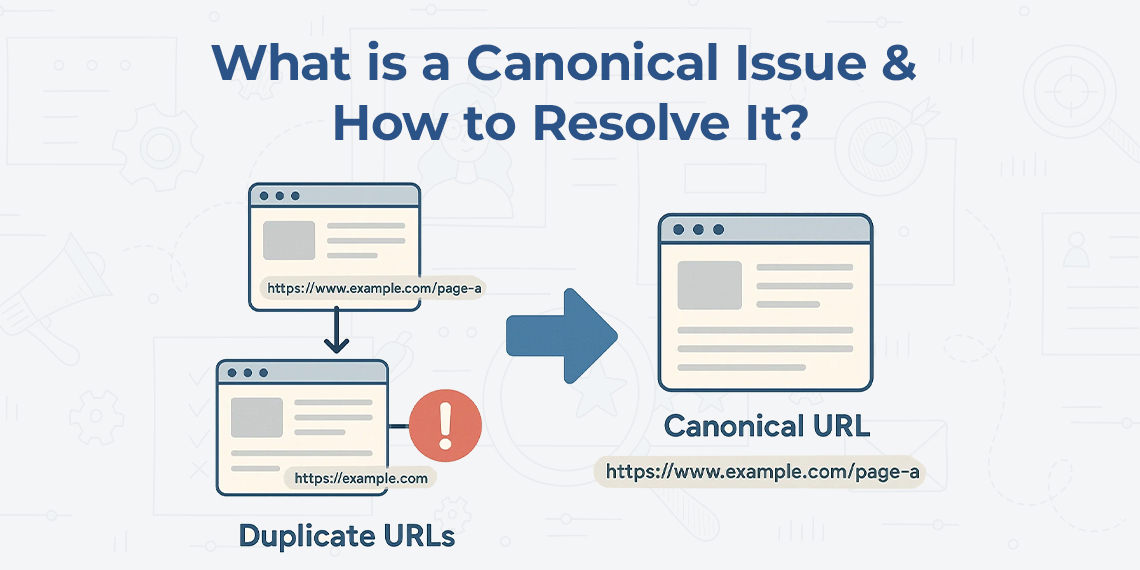
A canonical issue occurs when identical or very similar content is available on more than one URL. This creates confusion for search engines. They don’t know which version of the content should be listed in search results. Without clear direction, they may index the wrong page or split the value across versions. This can lower your visibility and weaken your page’s ranking.
Let’s look at a simple example. You might have your homepage available through:
To you, these are the same page. But search engines see them as four separate ones. Each has a different web address, which causes a canonical issue.
If you don’t fix it, search engines may treat them as duplicates, pick the wrong one to rank, or reduce your page’s authority. That’s why it’s important to sort it out early.
Canonical issues may seem minor, but they can have a real impact on your website’s performance. When search engines get mixed signals about your content, it leads to problems like these:
If other websites link to different versions of the same page, those links don’t all help the same page. Your link value spreads out across versions. This reduces the impact on your search rankings.
Search engines will pick one version of your page to show. It may not be the one you want. You might have an old version ranking instead of your main page.
Too many versions of the same content can make your site look messy. It becomes harder for search engines to know which pages matter most.
Canonical issues often happen without you even realising it. They’re usually the result of how your site handles links or how content is shared. Here are some common causes:
If your site works with and without “www” or both “http” and “https”, you may have a canonical issue. Each version may be treated as a different page.
Some websites create new URLs based on search filters or sort options. For example, product pages with filters for colour or size can create extra URLs.
Sometimes you publish the same blog post or product description on multiple pages. If these copies don’t point to a single page, that causes a canonical issue.
If you post your content on other sites without pointing back to your page, search engines may choose the copy instead of the original.
Go to your site using different versions:
Do they all lead to one version? If not, you have a canonical issue.
Check if the same text appears on more than one URL. If so, decide which version is the main one.
Fixing a canonical issue is about making things clear. You want to show search engines which version of your content is the main one. Here’s how:
Decide if you want to use “www” or not, and always use “https” for secure access. Set your website so that all other versions point to the one you choose. This avoids confusion.
A canonical tag tells search engines which page is the main one. You place it in the code of each page. It looks like this:
<link rel=”canonical” href=”https://www.example.com/page-name”>
This helps search engines index the right page and ignore the copies.
All links on your site should use the same format. Avoid linking to different versions of the same page. This helps search engines stay focused.
If other sites use your content, ask them to refer back to your page. This tells search engines you are the source.
The best way to deal with canonical issues is to stop them before they start. By following a few simple habits, you can keep your site clean and search-friendly:
Always use the same structure. Don’t mix “www” and “non-www” or “http” and “https.” Pick one and stick with it.
Don’t publish the same content on many pages. If you need to do that, make sure all copies point to a single main version.
Even if your site doesn’t have issues now, adding canonical tags from the start is a smart move. It prevents problems in the future.
Sometimes changes happen without notice. It’s a good idea to check your site now and then to make sure everything is working as planned.
A canonical issue is often overlooked but can affect how well your website performs in search results. When the same content appears on different URLs, search engines may get confused. They might show the wrong version of your page or split link value, which weakens your overall rankings.
The solution is to stay clear and consistent. Choose one main version of each page, use canonical tags, and make sure all other versions point to the right one. Keep your internal links clean, avoid duplicate content where possible, and check your site regularly.
By following these steps, you help search engines do their job more easily and that improves your chances of being seen by the right people online. Taking a little time now can save a lot of trouble later.
At Bthrust, you get proven SEO strategies that tackle issues like canonical errors and boost your site’s visibility. Whether you’re aiming for better rankings or cleaner site structure, our expert team helps you achieve lasting digital growth.