

Reap In Maximum Profits with the Best E-Commerce Website

Reap In Maximum Profits with the Best E-Commerce Website

One of the best businesses that you can start with very low investment is an eCommerce business. Many people have earned a lot of revenue in this business. With more and more people preferring to buy their products online, there is much scope for eCommerce business anywhere in the world and Singapore is no different that way. Many products can be sold through an eCommerce website. If you can invest a lot of money you can start your own manufacturing and sell online through these websites. But you can also sell others’ products through the eCommerce site. The main requirement for a successful business is a perfect ecommerce website design.

Understanding the Expectations from an E-Commerce Website

The best eCommerce website design will include features that will help both the customers and the sellers to comfortably operate the website and complete their tasks. The customers must be able to easily browse through the site and complete their purchases. People expect the purchase experience to be quick and smooth. The major reason for people abandoning their carts in the online purchase is because the path from selecting the product to checking out is not smooth. Many times, they have to go back and forth before completing the purchase process.

Good eCommerce website design ideas will include features that will help customers to easily find what they want. Easy search filters are a necessity in any site. Customers must be able to find their needs by typing just a couple of letters. They should be led quickly to the section that will have their products. They must also be able to see other products related to what they are searching for. This will help them in buying related things easily and also increase the business for your site.

Good Content Is Essential For Increasing Sales

People are not satisfied just with seeing one or two photos and the price. People like to see the product in detail. It is also essential for them to see how it is used and what are its features. This will mean that the eCommerce website development should facilitate uploading various photos and videos of the products. Customers also are interested in seeing the photos of actual customers using the product. Making it possible for uploading Instagram photos is an essential feature.

Products and prices keep changing. New products and new features in existing products must be updated immediately. Such changes must be incorporated quickly so that you can take advantage of these and get increased sales. For this, the site owner must be able to add, delete or change the content easily without calling for help from the developers every time. The eCommerce website development process must include the best content management system that will allow the site owner to alter content easily.

There is no doubt that the site must be mobile-friendly. Today more people like to use their smartphones to make all their purchases. Your site must give the same experience on the mobile devices as it does on the desktop. You must have a responsive website that will function the same way in any device. The pages must load fast and the images and videos must be as attractive as in the desktop site.

Order Processing and Inventory Management

It is not just the customers that need ease of operating the site. The site owners must also find it easy to operate the site. Many functions need to be done very quickly on the eCommerce site. One of the most important features is processing the order. All the orders received from different customers or other eCommerce sites must be processed properly and in order of receipt. Nobody should complain that their order was delayed or incomplete. For this, the site needs excellent order processing features.

The web development company must also ensure that it is easy to manage the inventory on the eCommerce site. Proper inventory management will help to ensure that products don’t go out of stock. There should be an automatic ordering facility when the product reaches a low stock level. The website must ensure that products that not in stock don’t show so that customers are not disappointed by not receiving the item.

Intelligent Reporting and Security

Every business needs reports for taking it forward correctly. The website must provide for any information with just a click. Daily, weekly or monthly sales must be easily accessible. It should generate reports of inventory. Sales analysis is very important to plan future marketing campaigns. High security should be provided to prevent leakage of customer or payment details. Customers should feel confident about buying products on the site. The site must have secure payment methods.

Your Small Business Needs SEO for Better Growth

Your Small Business Needs SEO for Better Growth

There is a common misconception that small businesses don’t benefit from SEO. It is wrong as these businesses can achieve quick growth if SEO is done. It helps them to spread their brand wider and get more customers. This is one of the most economical ways to publicize their business and get long-term benefits. SEO helps to make your websites perform better. This means better user experience and repeated visits. You also have more relevant and richer content after SEO. This also helps to get you more user visits.

The Relevance of SEO to Small Businesses

The fact is that small businesses must compete with businesses of their class and the big corporates when they are in the online business. While the bigger corporates have a wider reach, the small businesses can score in the location-based searches. SEO in Singapore is the best way for small businesses to get visibility on the web. Advertising doesn’t help much and the results are short-term. Advertising will not help to target the right audience.

When you do good SEO, you provide interesting content to the users. You will get a chance to make the right audience to visit your site for the excellent content. SEO targets only those people who are already searching for your products. This means that there are more chances of conversion. You develop better leads with SEO because the user is ready to buy the product. This is why investing in SEO is good for small businesses. Further the effects of SEO are long-term when compared to advertising.

Analyzing Internet User Behavior

The behavior of those using the internet has seen a major change in recent years. There has been a huge shift from desktop to mobile phones for searching and shopping. It has been found that more half of the website traffic in the world was generated through mobile phones. When you avail SEO service your website becomes more responsive and the user experience on the mobile devices becomes better. If you don’t do SEO then you are losing half the prospective customers.

Another change in behavior is that more people are looking for local results. Voice searches are on the increase and more voice searches are “near me” searches. This is a great opportunity for local and small businesses. When SEO is done the businesses can include geo-tagging. They can also build links from local blogs and websites. Including the name in local directories is also important to get more business. These are all part of search engine optimization.

SEO Helps Small Businesses Get New Customers

We have seen why SEO should is essential for small businesses as the searching trends of the customers change. SEO gives many benefits to small businesses. Small businesses must keep increasing their customer base. Availing SEO services to optimize the website ensures better visibility. When more people see the site there will be better traffic. By doing SEO your site will have better content this will make the visitors stay there longer. This will, in turn, improve your ranking on the search result page. You will get more visitors.

You will not only get more customers when you do SEO, but your company website will be visible to people from different regions. This will give you more marketing opportunities. With analytics, you can also find out which region has more opportunities for you and plan your marketing campaign accordingly. Analyzing the interest shown in your content you can also find what problems your website is solving and use that as a marketing strategy.

Improve the Credibility of Your Brand

One of the main aspects of SEO is link building. The company offering SEO marketing services will build links from influential websites and blogs. When there are links from such authentic websites, the credibility of your brand also rises. Users will be tempted to visit your sites and read the contents there. This will allow you to market your products. Good link building certainly improves your reputation and this will help in increasing your sales. Building links from local pages will help you get local business

Getting more visitors to your website also helps you to build a customer base. This will give you a good number of email ids to which you can send your marketing emails. Continuously sending emails will surely help you to convert these people as your customers. You can also use the information you collect on your website for doing social media marketing which is another effective channel.

Using SEO services in Singapore helps you to keep yourself updated with trends in online marketing. You will also know how people are using the internet for purchasing their needs.

SEO & ROBOTS.TXT: A DEEP DIVE TO UNDERSTAND THE TECHNICAL CHALLENGES

What is a robots.txt File?

intro to robots.txtrobots.txt file aka robots exclusion protocol or standard, is a tiny text file, which exists in every website. Designed to work with search engines, it’s been moulded into a SEO boost waiting to be availed. robots.txt file acts as a guideline for the search engine crawlers, as to what pages/files or folders can be crawled and which ones they cannot.
To view a robtots.txt file simply type in the root domain and then add /robots.txt to the end of the URL.

Why a robots.txt is Important for Your Website?

Index and Noindex
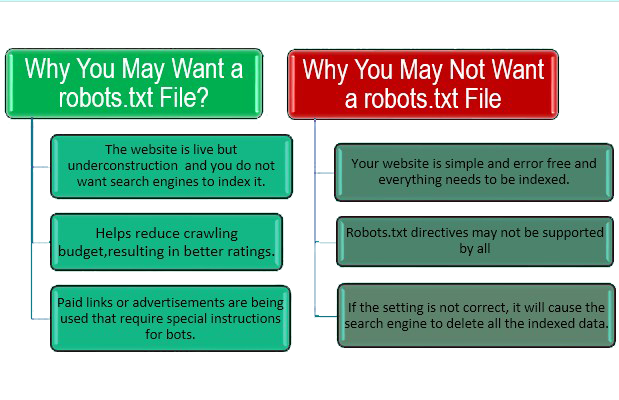
  • It helps prevent crawling of duplicate pages by search engine bots.
  • It helps in keeping parts of the website private (i.e. not to show in Search Results).
  • Using robots.txt prevents server overloading.
  • It helps prevent wastage of Google’s “crawl budget.”

How to Find Your robots.txt File?

  • If a robots.txt file has already been created then it can be accessed throughwww.example.com/robots.txt

How to Create a robots.txt File?

  • In order to create a new robots.txt file one needs to open a blank “.txt” document and commence writing directives.
  • For example, if you want to disallow all search engines from crawling your /admin/ directory, it should look similar to this:User agent : *
    disallow: /admin/

Where to Save Your robots.txt File?

  • The robots.txt file needs to be uploaded in the root directory of the main domain to which it is applied to.
  • In order to control crawling behaviour on www.bthrust.com, the robots.txt file should be accessible from.

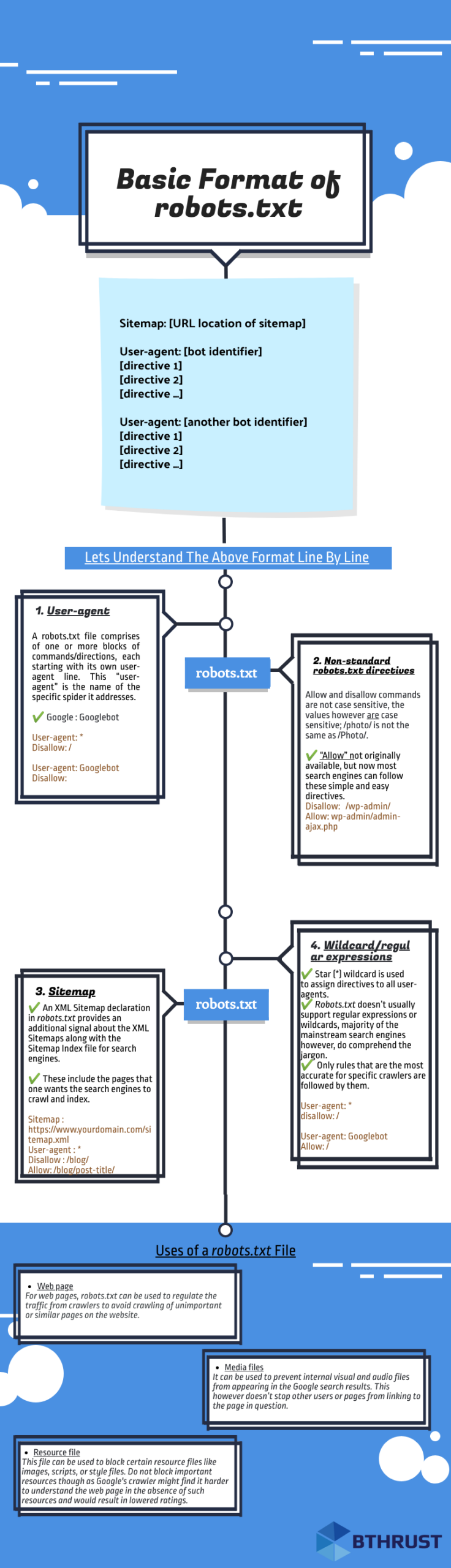
Basic Format of robots.txt

basic format of robots.txt

Lets Understand the robots.txt Format Line by Line

1. User-agent
  • robots.txt file comprises of one or more blocks of commands or directives, each starting with its own user-agent line. This “user-agent” is the name of the specific spider it addresses. A search engine spider will always pick the block that best matches its name.
  • There are various user-agents but the most prominent ones for SEO are-1. Google: Googlebot2. Bing: Bingbot3. Baidu: Baiduspider4. Google Image: Googlebot-Image5. Yahoo: Slurp

Note: It’s highly important for us to know that user-agents are case sensitive in robots.txt. Following example is incorrect because Google’s user-agent is “Googlebot” not “googlebot”

User-agent: googlebot
Disallow:
The correct example would be:

User-agent: Googlebot
Disallow:

2. Sitemap Directive
  • This directive is used to specify the location of your sitemap(s) for the search engines.
  • An XML Sitemap declaration in robots.txt provides a supplementary signal regarding the presence of XML Sitemaps for search engines.
  • Sitemap includes the pages you want the search engines to crawl and index. The code should look like this:Sitemap : https://www.example.com/sitemap.xml
  • The sitemap tells the search engine crawlers how many pages are there to be crawled, when the page was last modified, what of pages, and how often is the page likely to be updated.
  • The sitemap directive does not need to be repeated or duplicated multiple times for each and every user-agent. It is applicable to all.
  • It is optimum to include sitemap directives either at the start or towards the end of the robots.txt file.A code with sitemap directive in the beginning should look like:Sitemap : https://www.example.com/sitemap.xmlUser-agent: Googlebot
    Disallow: /blog/
    Allow: /blog/post-title/A code with sitemap directive in the end should look like:User-agent: Googlebot
    Disallow: /blog/
    Allow: /blog/post-title/
    Sitemap : https://www.example.com/sitemap.xml
3. Wildcard/Regular Expressions
  • Star (*) wildcard is used assign directives to all user-agents.
  • Every time a new user-agent is declared, that acts like a clean slate. Essentially, the directives declared initially for the first user-agent do not apply to the second, or third and so on.
  • Only rules that are the most accurate for specific crawlers are followed by the crawler’s name.User-agent: Googlebot
    Allow: /

The above rule blocks all bots except Googlebot from crawling the site.

4. Some Starter Tips:
    • Each and every directive should start from a new line.Incorrect
      User-agent : * Disallow: /directory/ Disallow: /another-directory/
      Correct User-agent : *
      Disallow: /directory/
      Disallow: /another directory/
    • Wildcards (*) can be used to apply directives to user-agents as well as to match URL patterns when declaring the said directives.User-agent: *
      Disallow: /products/it-solutions
      Disallow: /products/seo-solutions
      Disallow: /products/graphic-solutions
      This however is not that effective and it’s best to keep the wildcard as simple as possible. as shown below to block all files and pages in /products/ directoryUser-agent: *
      disallow: /products/
    • Always use $ sign to specify the end of the URL path, In order to allow or disallow content like PDF etc to the search engine.User agent: *
      Allow: /*.pdf$
      Disallow: /*.jpg$
    • Each user agent command should be used one time only. As all Search Engines simply compile all the prior mentioned rules into one and follow all of them. As shown below.User agent: Bingbot
      Disallow: /a/
      User agent: Bingbot
      Disallow: /b/Above code should be written as followsUser agent: Bingbot
      Disallow: /a/
      Disallow: /b/
      Google will not crawl any of these folders but it is still far more beneficial to be direct and concise. Chances of mistakes and errors are also reduced when there are lesser commands to code and follow.
    • In case of a missing robots.txt file, search engine crawlers crawl through all the publicly available pages of the website and add it to their index.
    • If an URL is neither disallowed in robots.txt nor it is in XML sitemap, it can be indexed by search engines unless a robot meta tag of noindex is implemented in that page.
    • If search engines cannot understand the directives of a file due to any reason, bots can still access the website and disregard the directives that are in the robots.txt file.
    • Use separate robots.txt file for every domain and sub-domain, like for www.example.com and blog.example.com

, even if the main domain is same.

  • Use single robots.txt file for all subdirectories under single domain.
5. Non-Standard robots.txt Directives
  • Allow and Disallow commands are not case sensitive, the values however are case sensitive. As shown below /photo/ is not same as /Photo/, but Disallow is same as disallow
  • There can be more than one Disallow directive, specifying which segments of the website the spider cannot access.
  • An empty Disallow directive allows the spider to have access to all segments of the website as it essentially means nothing is being disallowed and the command would look like:User –agent: *
    Disallow:
  • Block all search engines that listen to robots.txt from crawling your site and the command would look like:User –agent: *
    Disallow: /
  • “Allow” not originally available, but now most search engines can follow these simple and easy directives to allow one page inside a disallowed directory.Disallow: /wp-admin/
    Allow: wp-admin/admin-ajax.php
  • If not for “Allow” directive, one would have to categorically disallow files and that is a tedious task.
  • One has to give concise “allow” & “disallow” commands otherwise there might be a conflict between the two.User-agent: *
    Disallow: /blog/
    Allow: /blog
    In Google and Bing, the directive with the most characters is followed.Bthrust.com ExampleUser-agent: *
    Disallow: /blog/
    Allow: /blog
    By above code, bthrust.com/blog/ and pages in the blog folder will be disallowed in spite of an allow directive(5 characters) for such pages because disallow directive have longer path value((6 characters)).

Most Commonly Used robots.txt Commands

  • No access for all crawlersUser-agent : *
    Disallow: /
  • All access for all crawlersUser-agent : *
    Disallow:
  • Block one sub directory for all crawlersUser-agent : *
    Disallow: /folder/
  • Block one sub directory for all crawlers with only one file allowedUser-agent : *
    Disallow:/folder/
    Allow: /folder/page.html
  • Block one file for all crawlersUser-agent : *
    Disallow: /this-file-is-not-for-you.pdf
  • Block one file type for all crawlersUser-agent : *
    Disallow: /*.pdf$

Uses of a robots.txt File

Page Type Description
Web page For web pages, robots.txt can be used to regulate crawling traffic to avoid crawling of unimportant or similar pages on the website.
robots.txt should not be used to hide web pages from Google, as other pages can point to the hidden web page with descriptive text, and the page would be indexed without visiting the page.
Media files robots.txt can be used to manage crawl traffic, and to prevent visual and audio files from appearing in the Google search results. This however doesn’t stop other users or pages from linking to the page in question.
Resource file robots.txt can be used to block resource files like certain images, scripts, or style files.

Google’s crawler might find it harder to understand the web page in the absence of such resources and would result in lowered ratings.

Why Your WordPress Needs a robots.txt File

Every search engine bot has a maximum crawl limit for each website i.e. X number of pages to be crawled in a crawl session. If let’s say the bot in unable to go through all the pages on a website, it will return back and continue crawling on in the next session and that hampers your website’s rankings.

This can be fixed by disallowing search bots to crawl unnecessary pages like the admin pages, private data etc.

Disallowing unnecessary pages obviously saves the crawl quota for the site and that in turn helps the search engines to crawl more pages on a site and index faster than before.

A default WordPress robots.txt should look like this:

User-agent: *
Disallow: /wp-admin/
Allow: /wp-admin/admin-ajax.php

The WordPress website creates a virtual robots.txt file when the website is created in the server’s main folder.

Thisismywebsite.com -> website
Thisismywebsite.com/robots.txt -> to access robots.txt file

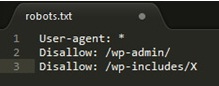
A code similar to this should be observed, it’s a very basic robots.txt file

User-agent: *
Disallow: /wp-admin/
Disallow: /wp-includes/
Allow: /wp-admin/admin-ajax.php

In order to add more rules, one needs to create a new text file with the name as “robots.txt” and upload it as the previous virtual files replacement. This can simply be done in any writing software as long as the format remains in .txt.

Creating a New WordPress robots.txt File:

Below we explained 3 methods of implementing robots.txt

Method 1: Yoast SEO

The most popular SEO plug-in for WordPress is Yoast SEO, due to its ease of use and performance.

Yoast SEO allows the optimization of our posts and pages to ensure the best usage of our keywords.

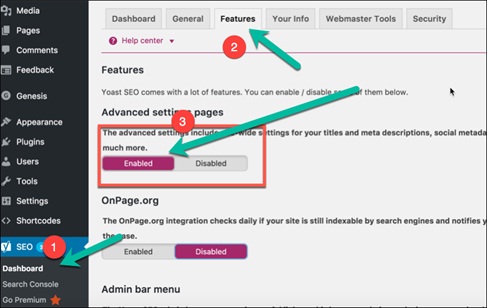
It’s Doable in 3 Simple Steps

Step 1. Enable advanced settings toggle button from features tab in Yoast dashboard.

yoast robots.txt step 1
Note: Yoast SEO has its own default rules, which override any existing virtual robots.txt file.

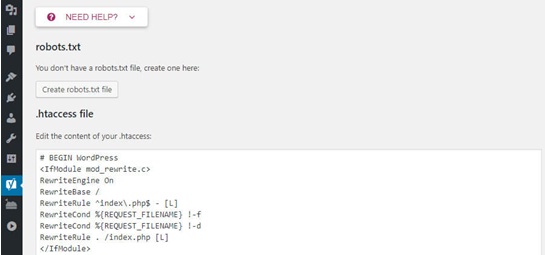
Step 2. Go to tools and then file editor. You will see .htaccess file and robots.txt creation button. Upon clicking “create robots.txt” an input text area will open where robots.txt file can be modified.

yoast robots.txt step 2
Under Tools>File Editor

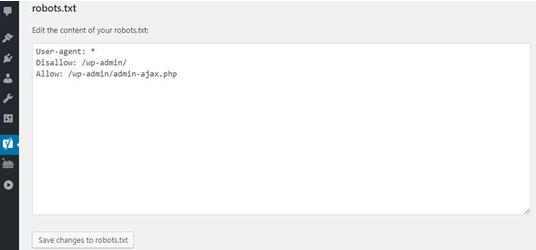
Step 3. Make sure to save any changes made to the robots.txt document to ensure retention of all the changes made.

yoast robots.txt step 3

Method 2. Through the All in One SEO Plug-in

Very similar to the above mentioned SEO plug-in, other than being a lighter and faster plug-in, creating a robots.txt file is also as easy in All in One SEO plug-in as it was in the Yoast SEO.

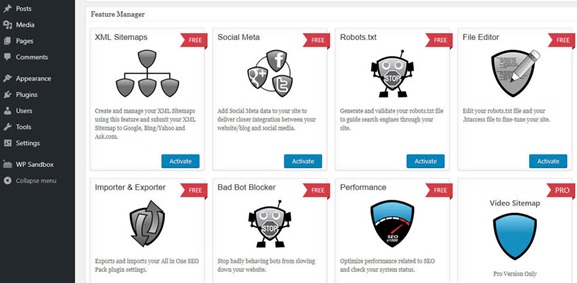
Step 1: Simply navigate to the All in One SEO and into the feature manager page on the dashboard.

Step 2: Inside, there is a tool which states robots.txt, with a bright activate button right under it.

All in One plug-in robots.txt step 1

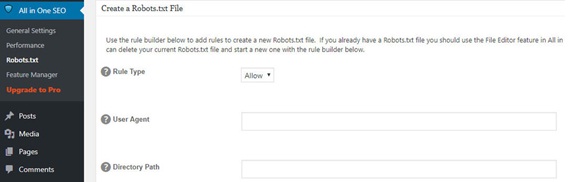
Step 3: A new robots.txt screen should pop up; clicking on it will allow you to add new rules, make changes or delete certain rules all together.

All in One plug-in robots.txt step 3
Note: Changes cannot be made to the robots.txt file directly using this plug-in. Add or remove input fields grouped with user-agent that automatically updates robots.txt file

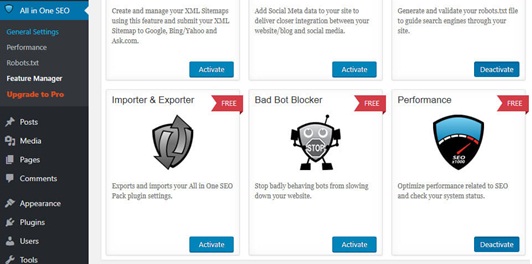
Step 4: All in one SEO also allows blocking of “bad bots” straight away via a plug-in.

All in One plug-in robots.txt step 5

Method 3. Create a new robots.txt file and upload it using FTP

Step 1: Creating a .txt file is one of the easiest things, simply open notepad and type in your desired commands.

Step 2: Save the file as .txt type

setup robots.txt through ftp step 2

Step 3: Once a file has been created and saved, the website should be connected via FTP.

Step 4: Upon establishing FTP connection to the site

Step 5: Navigate to the public_html folder.

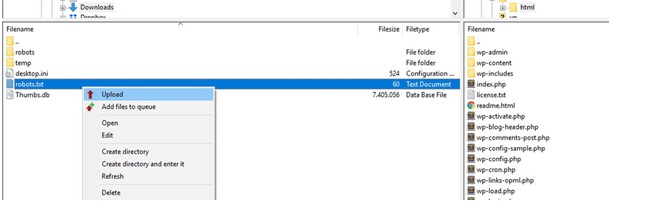
Step 6: All that is left to do is uploading the robots.txt file from your system onto the server.

setup robots.txt through ftp step 5

Step 7: That can be done via simply dragging or dropping it or it can be done by right clicking on the file using the FTP client’s local

Testing in Google Search Console

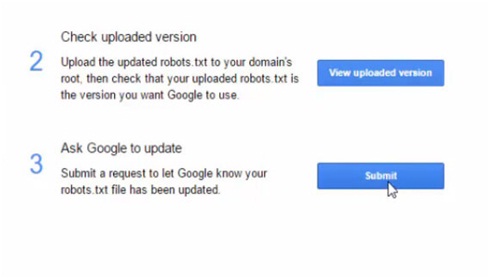
1) Upon creation of robots.txt or on updating the robots.txt file, Google automatically updates robots.txt, alternatively it can also be submitted to the Google Search Console to test before you make changes to it.

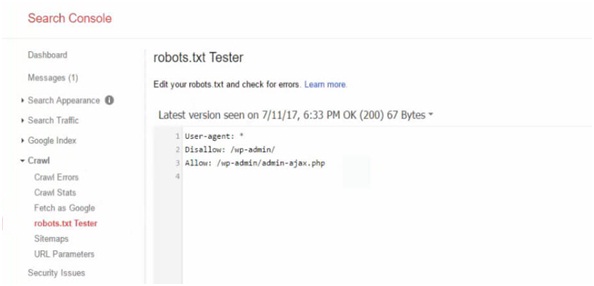
robots.txt tester
Google Search Console Robots.txt Tester

2) The Google Search Console is a collection of various tools provided by Google to monitor how the content will appear in the search.

3) In the search console we can observe an editor field where we can test our robots.txt.

submit robots.txt to Google search console4) The platform checks the file for any technical errors and in case of any; they will be pointed out for you.
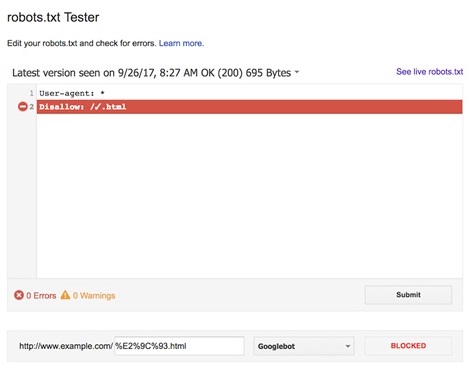

robots.txt errors in tester

  • For the website to excel on a global level, one needs to make sure that the search engine bots are crawling only the important and relevant information.
  • A properly configured robots.txt will enable searchers and bots to access the domain’s best part and ensure a rise in the search engine rankings.

Regularly check for issues in coverage report in the Google Search Console regarding any robots.txt updates

Some Common Issues Are:

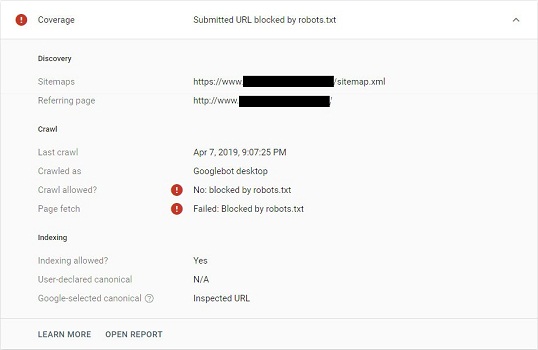
  1. Submitted URL blocked by robots.txt – This error is typically caused if an URL blocked by robots.txt is also present in your XML sitemap. Search Console shows it like this:
    submitted URL blocked by robot txt

    Solution #1 – Remove the blocked URL from the XML sitemap.

    Solution #2 – – Check for any disallow rules within the robots.txt file and allow that particular URL or remove the disallow rule.

    You can choose either solution depending on your priority and needs as to whether you want to block it or not.

  2. Indexed, though blocked by robots.txtThis is a warning related to robots.txt which basically means you have accidentlly tried to exclude a page or resource from Google’s search results for which disallowing in robots.txt isn’t the correct solution. Google found it from other sources and indexed it.Solution – Remove the crawl block and instead use a noindex meta robots tag or x robots-tag HTTP header to prevent indexing.

How to Manage Crawl Budget With robots.txt?

  • Crawl budget is an important SEO concept that is often neglected. It is the rate at which search engine’s crawlers go over the pages of your domain.
  • The crawl rate is “a tentative balance” between Googlebot’s desire to crawl a domain while ensuring the server is not being overcrowded.impact of crawl budget limit

Optimising Crawling Budgets with robots.txt

  • Enable crawling of important pages in robots.txt.
  • Within robots.txt disallow crawling of unnecessary pages and resources.

Bonus info:

Other Techniques to Optimise Crawl Budget :

  • Keep an eye out for redirect chains.
    Keepan eye out for redirect chains.
  • Use HTML as often as you can as majority of crawlers are still improving their indexing flash and XML.
  • Make sure there are no HTTP errors (http:// links in the page which may be redirected to https:// version).
  • 404 and 401 errors take up a huge chunk of a domains crawling budget. Don’t ever block a 404 URL, otherwise Search Engines will ever crawl it and will never know it’s a 404 page and needs to be deindexed.
    404 not found401 authorization required
  • Unique URLs are accounted as separate pages and led to wastage of crawling budget.
  • Keep your sitemaps updated, that makes it easier for internal links to be understood much faster and with ease by the crawlers.
  • <link rel="alternate" hreflang="lang_code" href="url_of_page" /> should be included in the page’s header. As even though Google can find alternate language versions of any page, it is better to clearly indicate the language or region of specific pages to avoid wastage of crawling budget.

Meta Robot Tags vs robots.txt

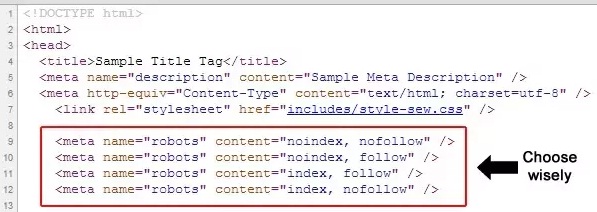
meta robots tagMeta robot tag provides extra functions which are very page specific in nature and can’t be implemented into a robots.txt file; robots.txt lets us control the crawling of web pages and resources by search engines. On the other hand, Meta robots lets us control the indexing of pages and crawling of link on the page. Meta tags are the most efficient when being used to disallow singular files or pages whereas robots.txt files work to its optimum capacity when being used to disallow sections of sites.



The difference between the two lies in how they function; robots.txt is the standard norm for communicating with crawlers and other bots and it helps set specific commands that guides crawlers to areas of the website that shouldn’t be crawled.

Meta robots tags are exactly what the name suggests, a tag. It guides the search engine like a crutch as to what to follow and what not to. Both can be used together as neither one has any sort of authority over the other.

The meta robots tag should be placed in the <head> section of the website and would look like: <meta name= “robots” content = “noindex”>

Most common meta robots parameters

  1. Follow:Every search engines is able to crawl through every internal link on the webpage. This signals the search engines that it can follow the links on the page in order to discover other pages.
    Example: <meta name= “robots” content = “follow”>
    Note: This is assumed by default on all pages – you generally won’t need to add this parameter.
  2. No follow: It prevents the Google bots from following any links on the page.
    Example: <meta name= “robots” content = “nofollow”>
    Note: It’s unclear and highly inconsistent between the search engines whether this attribute prevents search engines from following links, or prevents them from assigning any value to those links.
  3. Index: It allows search engines to add pages to their index, in order for it to be discovered by people who are searching for content similar to that being provided by you.
    Example: <meta name= “robots” content = “index”>
    Note: This is assumed by default on all pages – you generally won’t need to add this parameter.
  4. No-Index: It disallows search engines from adding pages into their index’s, and as a result disallows them from showing it in search results.<meta name= “robots” content = “noindex ”>
  5. Noimageindex: Tells a crawler not to index any images on a page.
  6. Noarchive:Search engines should not show a cached link to this page on a SERP.
  7. Unavailable_after:Search engines should no longer index this page after a particular date. Reasons may inculde deletion, redirection etc.

Not To-Do in robots.txt File

  • Block CSS, JavaScript and Image files: Blocking these contents in the robots.txt file cause harm as Google will not load the page completely. This means it is unable to see how the page looks like, what is the structure etc. Google may mark it as Not Mobile Friendly as critical resources are blocked by robots.txt and you will lose your rankings.
  • Ignorantly using wildcards and de-indexing your site: For example you may want to block something but don’t exactly how the directives work and you end up blocking the whole site or important pages which may result in deindexing of your web pages or even whole site from Search Engines.

IT Services-outsourcing or in house

It’s the 21st century and every business these days needs IT solutions ranging from a quick new website revamp to SEO, CRM etc. Genic Solutions allows you and your employees to work freely on your tasks and while we deal with the workload coming your way allowing us to provide satisfactory services to you. The question is not whether you need an IT specialist or not, every company nowadays does. The question is do you want to hire a full-time, in-house talent or hire IT experts on contractual bases. That is what we hope to address today, whether outsourcing or in-house; which option suits your needs impeccably.

Outsourcing

The benefits of outsourcing IT professionals are quite obvious as you call upon these professionals when you require their assistance. So it is only logical to hire them for only the duration of a project you need their aid on. This is a financially sound decision as well as provides a competent resolution to your problems. Whilst allowing full time employees to focus on the tasks they excel at.

When you outsource manpower, you save money in terms of the equipments and software. It’s either provided by the company you are outsourcing to or the cost of utilization of said equipments is billed to you in the end and that is invariably less than what purchasing the equipment would have been.

The disadvantages of outsourcing are fairly obvious one’s are well. There are initial setbacks with choosing the correct person to outsource to as companies are often stumped as to who exactly to hire as investing time on a person who might not be the fight fit for a company your size, or doesn’t have the desired skill set or simply is taking too long to learn the ropes of your company.

Outsourcing marketing image

There is also a chance the IT company/person you are outsourcing to can be charging much higher than your current in-house operative. The issue of trust also arises as you have to provide them with access to sensitive information. With time, a company will build up a book of contacts they rely on for outsourced IT support, but this will need to be constantly updated.

In-House

Having an In-house IT team, which has been trained under you as per your needs, is familiar with all your company policies & is available within the office premises, is invaluable especially in times of need. These are optimum conditions which do not require any outsourcing and require less preparatory time as well.

Outsourcing marketing image

The company in case of any in-house team trains the team to a certain extent of functionality and holds onto the mavens who made a difference.

The cons of building and maintain an in-house IT team are primarily the financial expenditure you’d have to bear initially. Unearthing exceptional talent and then training them is a costly & long ordeal. The need to constantly hone skill set and knowledge is also essential.

The workforce also demands a constant remuneration along with employee benefits, and as time progress and the skill set of the employees improves, they also command a higher salary in order to be still contracted by your company. However In-house workforces have a greater personal stake in delivering top quality service as they know what is desired of them by the company and are acquainted with all aspects of the company. Whereas outsourcing requires time to reap the benefits of their services.

Evidently there is no universally correct solution when it comes to choosing between In-house & outsourcing services.

Hybrid Approach

A lot of companies utilize a hybrid approach where the in-house IT team overlooks customer feedback, security, online marketing and other areas that require constant vigilance. Outsourcing IT designers and IT specialists for more niched services is a plausible course of action.

Outsourcing marketing services

Building an ideal IT team mandates persistence, consistency & a vision for the future. Outsourcing on the other hand is instantaneous & profitable.

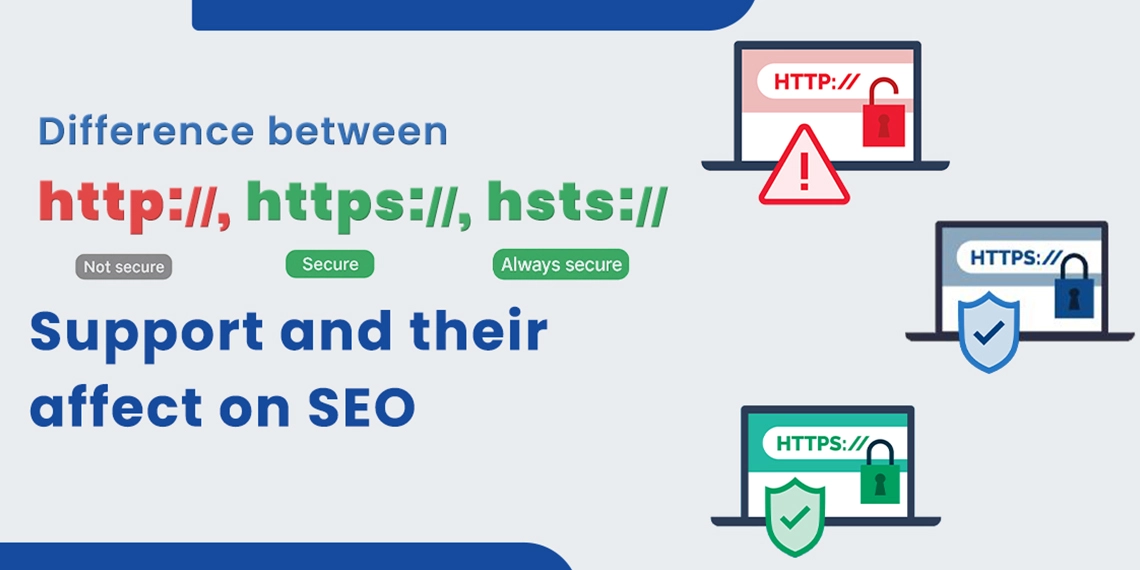
Difference Between HTTP, HTTPS, and HSTS Support and Their Affect on SEO

Website security is no longer optional because it directly influences your search rankings, user trust, and compliance. Understanding the difference between HTTP, HTTPS, and HSTS is crucial for any business investing in an effective SEO service.

As part of modern technical SEO, these protocols improve page speed, protect user data, and boost your position in search results.

In this guide, we explain how HTTPS and HSTS work together, why they matter for SEO in 2025, and how you can implement them to stay ahead in the digital race.

Increased Security Can Get Your Website a Better Ranking

Every company wants its website to appear at the top of the search results page. In the age of online transactions, secure websites are dominating positions on SERPs.

When more people visit the site, there is a chance for more sales. Promoting your website to the top of the search results page is done by Google, which analyzes your site’s ability to satisfy users.

While the usefulness of content is the major factor for ranking, there are other important aspects like the security of the page and page loading speed.

Both of these provide a better browsing experience, and that is what Google wants. This is why improving the security of the website can favorably impact your SEO and get you more visitors.

Know the Difference Between HTTP and HTTPS

SEO blog image

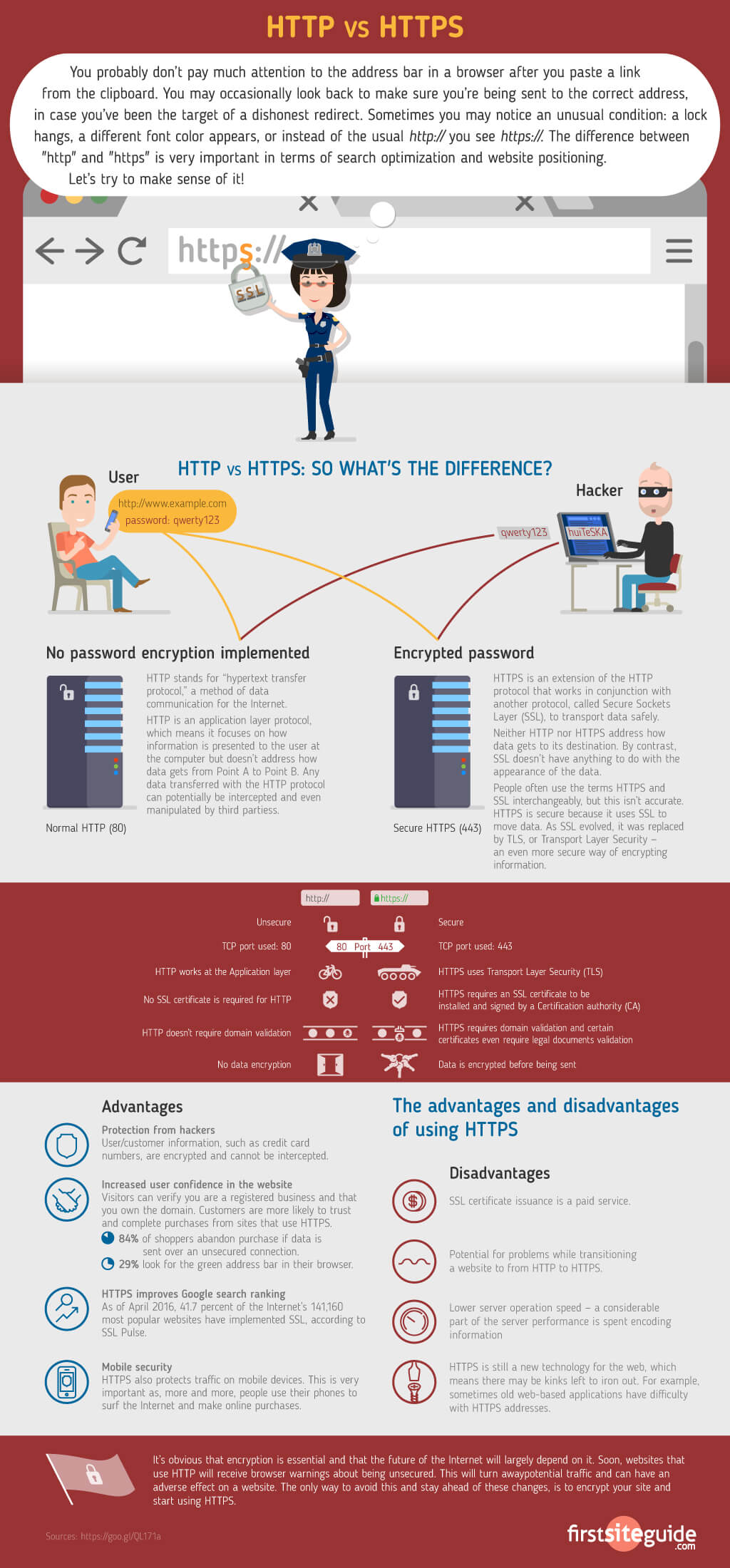
When you talk about HTTP and HTTPS difference then you must see how they move data.

HTTP (Hypertext Transfer Protocol) started as the first way to carry data between browsers and servers. It runs fast, but it never protects the information.

HTTPS (Hypertext Transfer Protocol Secure) adds strong locks with SSL/TLS, which protect private details from hackers.

The difference between HTTP and HTTPS is important as HTTP sends data without protection, but HTTPS keeps it safe and hidden.  Some new users often confuse and search for the difference between  HTML and HTTPS, but they serve very different purposes.

HTML (HyperText Markup Language) is the coding language used to structure and design content on web pages, like text, images, and links.

On the other hand, HTTPS (HyperText Transfer Protocol Secure) is a secure communication protocol that protects the data exchanged between your browser and a website.

With HTTPS, users see a padlock icon in their browser, which is a symbol that builds trust. This is why in HTTPS vs HTTP SEO comparisons, HTTPS consistently comes out on top as it enhances both security and search rankings.

The Relationship Between HTTPS and Ranking

Google wants every user to feel safe online, so it ranks secure sites higher. At first, HTTPS gave only a small rank lift, but with Google’s 2025 SEO Guidelines, it now stands as a strong ranking signal, which is even more when you join it with HSTS (HTTP Strict Transport Security) and Certificate Transparency logs.

In comparisons like HTTPS vs HSTS or HSTS vs HTTPS, remember that HTTPS encrypts data while HSTS enforces HTTPS-only access. They work together, but HSTS closes security gaps that HTTPS alone fully covers.

HTTPS plays a key role in boosting Core Web Vitals, which are Google’s key metrics that measure site speed, responsiveness, and visual stability by providing faster and more reliable connections.

If you’re unsure how to implement this, then a reliable SEO service provider like BThrust can guide you through every technical and strategic step.

Certificate Transparency (CT) Logs

Google now tells all public SSL certificates to sit inside Certificate Transparency (CT) logs. These logs prevent the misuse of certificates and allow site owners to monitor them using tools like crt.sh.

Adding Certificate Transparency (CT) logs builds greater trust, improves SEO, and verifies your site’s authenticity in the eyes of search engines.

It’s a subtle yet essential component of effective technical SEO.

Understanding the Dangers of Not Using HTTPS

Websites without HTTPS face serious risks, like:

  • User data is exposed.
  • Browsers show “Not Secure” warnings.
  • Rankings suffer due to a lack of trust signals.

Even sites with HTTPS can face vulnerabilities if poorly configured. For example, relying only on 301 creates a brief window where attackers can exploit the site through SSL stripping.

Another risk is mixed content, which occurs when an HTTPS page loads insecure resources such as HTTP images or scripts. This not only weakens overall security but can also break site functionality.

How to fix mixed content:

  • Implement Content Security Policy (CSP) headers to block unsafe or insecure assets from loading on your website.
  • Audit your site with DevTools to identify insecure resources.
  • Update all links and resources to HTTPS.

Get Improved Security with HSTS Support

HSTS (HTTP Strict Transport Security) instructs browsers to load your website exclusively over HTTPS, effectively eliminating the vulnerability window created by redirects.

Benefits of HSTS:

  • Stronger protection against SSL stripping.
  • Faster load times, supporting Core Web Vitals.
  • Provides stronger SEO signals in HTTPS vs HTTP comparisons, giving secure sites a competitive edge in search rankings.

This raises the question: HSTS vs HTTPS — which is better?

  • HTTPS encrypts data.
  • HSTS requires HTTPS-only usage.
  • Together, they form a stronger shield for both security and SEO.

HSTS Preload List

Websites can go a step further by submitting their domain to the HSTS Preload List, ensuring browsers enforce HTTPS-only access from the first visit. This builds trust, prevents downgrade attacks, and provides an SEO edge.

HTTPS Impact on Paid Campaigns

Security isn’t just for SEO, but it also affects Google Ads and PPC campaigns.

  • Broken redirects or mixed content can interfere with conversion tracking.
  • Ad disapprovals may occur if landing pages are flagged as insecure.
  • After migration, always audit PPC URLs and tracking templates to ensure accuracy.

This protects your ad budget and ensures consistent ROI.

How to Implement SSL, HTTPS, and HSTS Support

SEO blog image

Step 1: SSL Certificate

Obtain and install an SSL certificate (or use free options like Let’s Encrypt).

Step 2: Server Configuration

For Apache servers, edit the httpd.conf or apache2.conf file. If you’re using WordPress, plugins like Really Simple SSL make the setup quick and easy.

Step 3: Redirect Rules

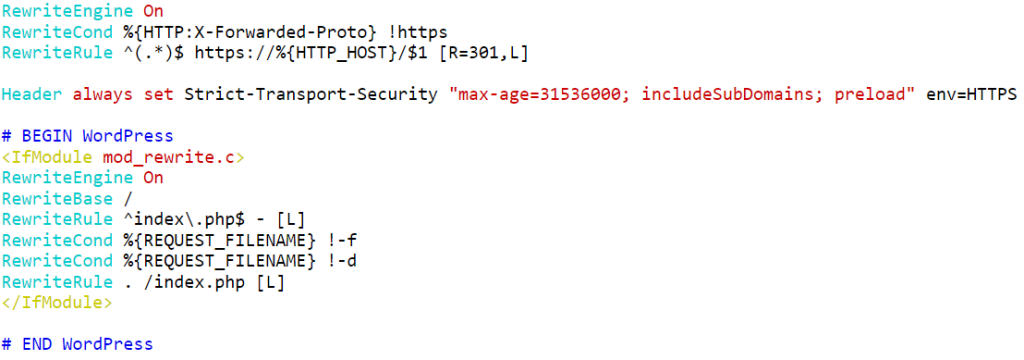
Updated .htaccess (2025 best practices):

RewriteEngine On

RewriteCond %{HTTPS} !=on

RewriteRule ^(.*)$ https://%{HTTP_HOST}%{REQUEST_URI} [L,R=301]

Step 4: Enable HSTS and Preload

SEO blog graphic

Strict-Transport-Security: max-age=63072000; includeSubDomains; preload

This ensures your site is preloaded in browsers as HTTPS-only.

Compliance and HTTPS

With global privacy regulations like PDPA in Singapore, HTTPS has become a compliance requirement, not merely an SEO best practice. Businesses that ignore HTTPS risk not only lose rankings but also face legal issues.

By adopting HTTPS, HSTS, CT logs, and fixing mixed content, your site aligns with both SEO best practices and legal compliance.

Final Thoughts

In 2025, the HTTP and HTTPS difference goes far beyond encryption, as HTTPS now works as a ranking factor, a compliance necessity, and a strong trust signal for users that guides them toward safer and more reliable websites.

Understanding the difference between HTTPS and HTTP and using HSTS vs HTTPS techniques makes your site SEO-friendly, quick, and safe.

By enabling SSL, activating HSTS, adding your site to the preload list, and fixing mixed content, you protect your users while also boosting your SEO in the long run.

What is Google’s First Core Algorithm Update 2020?

Since the inception of the Google SearchLaison account on Twitter back in November 2017, Google has announced many major core updates and their roll outs for better transparency and, of course, to guide the content owners and SEOs to serve their audience better.

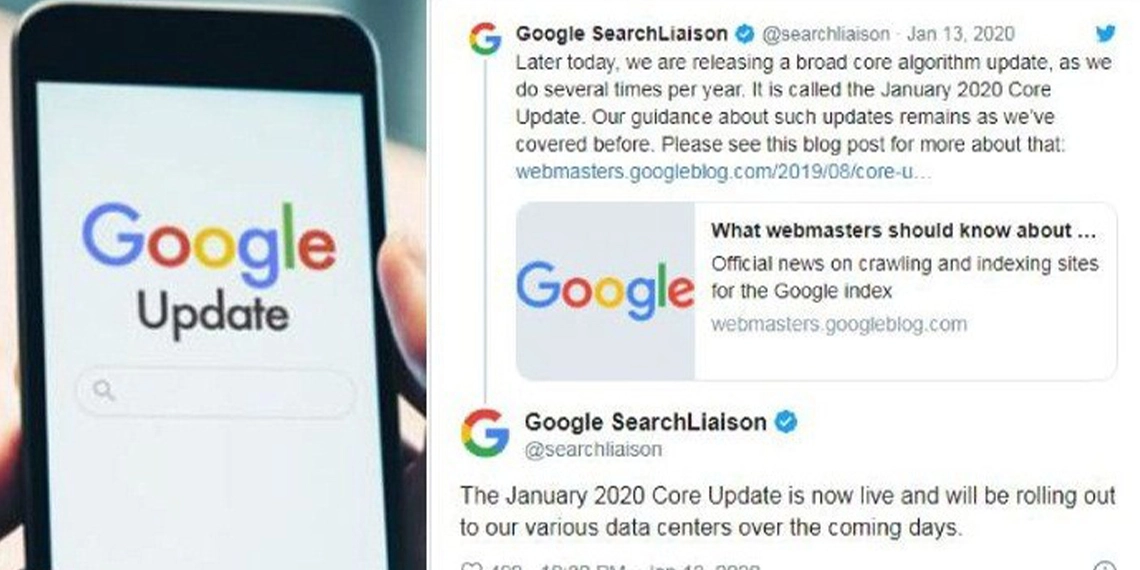
Similarly, this year on January 13, Google has announced the roll out of Google’s January 2020 Core Update. Update implementation might takes 2-3 weeks time as it is rolled out through multiple data centers, located across globe.

However, the impact of this update has not been explained by Google as of yet. Google has also updated the layout of the SERP recently and as per the update, it will show up company icons (favicons) whenever users search something in the desktop search engine.

Recap of Google Core Updates

Google has its first major update announcement back in 2018 with the Mobile Speed Update and of course, how can we forget the BERT update wherein Google has emphasized the importance of long-tail search queries in displaying more accurate results but again, that was slightly different from the core updates.

After the Mobile Speed Update, Google has come up with 4 more important core updates other than the January 2020 Update.

Google Core Update: March 2019

This update was largely related to Ranking shifts concerning health and other sensitive topics related keywords. In addition to this, Google also highlighted the importance of building trust and understanding important user signals.

Google Core Update: June 2019

Google made a major change to its core algorithm for the first time and all search queries that were associated with the acronym E-A-T (Expertise, Authoritativeness, Trust) had a sudden yet massive change. Google use it fight disinformation. Know how Google Fights Disinformation.

The impact of the update has been largely experienced by the health sector. While some health websites benefited largely from this update, a lot of them have experienced a sudden drop in their performance too.

Google Core Update: September 2019

In this update, Google emphasized the importance of content quality and its improvements for better ranking on the SERPs.

Google Core Update: November 2019

As per this update, there have been major changes felt in the food, health and travel sectors and this was somewhat considered to be a pretty aggressive update according to many SEO specialists.

Analysis of Google Update January 2020

Google has recently announced its core update 2020 and it happens to be the first core update of the year. The next best thing to do now would be to comprehend how this update can have its impact.

Since Google has not come up with a clear explanation about the update, it is important to figure out as to what all topics or search queries are going to be affected.

It will also be wise to spot the aspects that Google has tweaked in its algorithm. It is important to understand the way as well as the extent to which web content will be affected by it.

However, many content owners have already begun to feel the difference in terms of traffic. A lot of content owners have experienced a sudden change in the traffic rate and most of them happen to be from the health and medical sector.

Some SERP analysis tools detected following industries to be majorly impacted and seeing high ranking volatility and traffic up & downs.

  • Art & Entertainment
  • Games
  • Food & Drink
  • Finance
  • Online Communities

While some of them have experienced a drop of up to 80% of their website traffic, other content owners experienced a rise of around 30% in their website traffic

Improving Your Technical SEO in Just 3 Steps

The online world is characterized by constant competition among the various websites and blogs to be more relevant in the search. This is where technical SEO can be massively effective in improving one’s site’s performance in terms of its usability, crawlability, indexation and of course, its rankings.

The online world is characterized by constant competition among the various websites and blogs to be more relevant in the search. This is where technical SEO can be massively effective in improving one’s site’s performance in terms of its usability, crawlability, indexation and of course, its rankings.

This post will enlighten you about the three best practices that can largely strengthen your technical setup. However, this post only shares the best practices from the technical SEO perspective and one can do it in addition to keeping the on-page and off-page SEO really up to the mark.

1. Indexing and crawlability

For your pages to appear in the search engine results, they need to be indexed by Google first. Hence, you can ensure that your pages and posts are easily crawlable and indexable. This is certainly the first best thing to do.

Check if all the pages have been indexed

To check the indexing status of your website, all you have to do is enter site: domain.com into your target search engine or simply check it on the Google Search Console. Once you get there, click on Google index and then click on coverage.

Then, what you need to check is if the number of indexed URLs matches with the number of URLs in your database. There can be duplicate URLs or URLs with noindex Meta tag. The faster you identify the error, the better it is and once you identify the error, the next best thing you can do is follow Google’s recommended fix steps.

Check if all the important resources are crawlable

With Robots.txt, you can certainly know if your important pages are crawlable or not but there’s more to it and as a matter of fact, there can be a lot of other problems that you may need to handle just like the following:

● Orphan pages
● noindex meta tag
● X-Robot-Tag headers

Crawl Budget Optimization

Search Engine crawl budget stands for the number of times a search engine crawls on a website. Understanding as to how often Google crawls your website can eventually help you identify many technical problems that need to be immediately addressed. You can check your daily crawl budget by simply clicking on Crawl and then moving over to Crawl Stats in your Google Search Console.

Here are some of the best ways to augment your crawl budget organically:

● Remove duplicate content and pages.
● Restrict indexation of pages with no SEO value such as terms and conditions, privacy policies, and outdated promotions.
● Fix broken links.
● Grow your link profile with your off-page SEO campaigns.

Employ structured data

You can help search engine attain a very clear understanding of your content by using rich snippets. Subsequently, the Schema markup improves your CTR by showing up a very clear snapshot of what your company does. Explore some important and common questions about rich snippet and structured data.

Mobile-first indexing

With mobile first indexing, it has become extremely important to consider voice search into the keyword research. Also, it is important to be completely aware of the pros and cons of AMP pages while you are creating your content. Most importantly, check if most of your mobile users are local and if they are, you certainly need to emphasize more on local SEO campaigns.

2. Site structure and navigation

A clean and easy to navigate site can be the key to great success for a website in terms of SEO as well. It can help both bots and users understand the content of your website clearly. Hence, it is directly proportional to the UX and crawlability of your site.

Review your sitemap

Sitemaps are used to tell search engines about the structure of your site and also, to help search engines understand your fresh contents. If you don’t have one as of yet, it’s time to build one and submit it to Google Search Console and Bing Webmaster tools.

Also, it is important to keep the sitemap, up to date and free from errors, redirects, and blocked URLs. You can check if the Sitemap codes are working properly by using the W3C validator.

Audit internal linking structure

It is important to eliminate the broken links and orphan pages. Most importantly, anchor each internal link with text clearly for the users to have a perfectly clear understanding of where it is going to take them to. This not only gives a clear idea to the users but also, helps the search engine comprehend your website’s content properly.

Use a logical hierarchy

All the pages and posts should be put in the most logical order that will help the users get access to any content in not more than 3 clicks.

Check your hreflang tags

If you are using hreflang tags for your website, it is important to keep them error-free by constantly monitoring and troubleshooting the implemented hreflang tags. Also, it is important to update the hreflang tags for the mobile versions.

3. Site speed

As a matter of fact, there is no magic button to let your site become faster. However, it has been found that with improvement in site speed improves site’s performance as well with lower bounce rates and higher conversion rates.

Here are a few tips to improve site speed:

Limit redirects

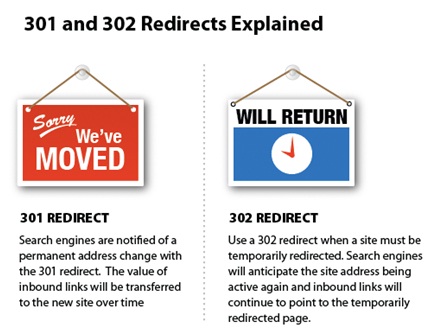
With every page having not more than one redirect and every page using 301 for permanent redirects and 302 for temporary redirects, it tends to load faster.

Enable compression

Deleting unnecessary data and using Gzip or Brotli to compress content and reduce file size usually gets the site faster.

Reduce response time to less than 200ms

Using HTTP/2, enabling OCSP stapling, enabling IPv6 and IPv4 can largely help you reduce the response time.

Use a Caching policy

You can use browser caching to control how and for how long a browser can cache a response. In addition to that, you can use Etags to enable efficient revalidations.

Minify resources

Using minification is a great way to remove all the unnecessary code from all of your assets, including CSS, HTML, JavaScript, images, and videos.

Optimize your images

It is important to pick the images of the best format. Also, don’t forget to compress and resize them.

Optimize CSS delivery

With small inline CSS files placed directly into the HTML document, you can actually optimize the CSS delivery to a certain extent.

Prioritize visible content

Organizing HTML markup to quickly render above-the-fold content is an excellent way to prioritize visible content. Also, the size of that content should be 148kB at the most.

Remove render-blocking JavaScript above the fold

An excellent way to decrease rendering time is placing the Inline critical scripts and defer non-critical scripts and 3rd party JavaScript libraries until after the fold. In case, you have JavaScript above the fold, you can always mark your script tag as async to ensure that it’s non-render blocking.

Conclusion

This post will certainly help you see more to the picture than it meets the eye. However, it is equally important to get the basics right. Hence, find innovative ways to use SEO in optimizing your content and linking profiles. As a matter of fact, there’s a lot you can actually do to optimize a website provided that you prioritize your steps really well.

Custom Software vs Readymade Software for Business

Need of Custom Software for Business

Nobody can today deny the need for software for business. It is the only way to speed up your tasks and ensure better efficiency. It is the way to reduce depends on the human workforce and frees you valuable workers for more creative jobs. Instead of wasting manpower on repetitive tasks the software helps to do these tasks themselves and that too without any errors. But the doubt remains in most companies today whether they should go for custom software development or purchase a readymade software.

Factors To Consider For The Decision

There are certain factors the company must consider when they decide on software. The first thing is to know where you will be using the software. More specifically you should know what problems will be solved by the software. You must check the cost for both custom software and off-the-shelf software. This will certainly be one of the deciding factors because you must be sure that the money you invest will give you that much benefit.

You must study the product and see what it offers. The next thing is to know more about the vendor that sells the product. Whether you are buying an off-the-shelf product or getting it built by a custom software development company you must make sure you know the company well enough. You must also check the security that you will need and whether the product offers the same. The most important thing is to see that the product offers all the solutions that you need.

What Are The Advantages And Disadvantages Of Readymade Software?

Advantages

The main advantage of off-the-shelf products is that they are far less expensive than custom software. As these products have been in the market, many people will have used it and there is no need for any special training for your staff. There are also many user communities for the readymade software that can come to your aid when there is a problem. They can also be trusted better because the products are tested and all the problems have been removed from them.

Disadvantages

The main disadvantage of the off-the-shelf products is that you must spend much time and money to customize it to your requirements. Often the software is not updated with the latest requirements of the industry. There are many features in the readymade software that are not useful to you. In fact, they may sometimes interfere with your smooth working.

All readymade software packages are created with a wide base of customers in mind. This means that you may have to change your systems to make use of the software. Security is another big issue with off-the-shelf software as they are already in use and the hackers might know the weaknesses of the software. It makes them easy for penetration.

Pluses And Minuses Of Custom Software

Pluses

Readymade software is usually made for specific tasks and you may have to purchase different ones for different tasks in your company. when you get a software development company in Singapore to create custom software for you, they can create one single software for all the tasks in your company. This will improve the efficiency to a great level. It also helps to save a lot of time which you can use for more useful tasks.

Custom software can largely help with company’s growth. When the number of transactions increases, the custom software can accommodate them. Most off-the-shelf software comes with a limit of usage. After that, you may have to go for upgrades. You can program custom software to work for any number of users that you want. You can make provisions for adding users later. Custom software is also good when you want to include multiple locations.

One of the misconceptions of many people is that custom software is costly. Considering the biggest advantage that it gives of making your work more efficient, custom software does give you a better ROI on your investment. When you can free your employees you automatically use them for work that will earn you money. This is another way custom software helps you earn a better return on what you pay for it.

When you use custom software, you don’t have to make any changes to your working style. This will also help in making the work more efficient because your employees don’t have to learn anything new. Most custom software development companies include training your employees at their cost. You also don’t have to do any customization later with custom software. You can get increased security with custom software because the hackers don’t know the software.

Minuses

The main disadvantage of custom software is the cost. If yours is a small company with very limited transactions the cost may not be justified. The time taken to develop the software is another drawback of custom software. It can take a long time to develop depending on the features that you want to be included in it and the company that develops the software for you. One way to tackle this is to develop the software in stages.

There is always the risk that your choice of the developer is wrong. If you choose the wrong software company you could end up spending more money and wasting a lot of time. Another thing is that this software is not tested. There could be inherent problems with the software that will be known only when you start working with it. If the software company doesn’t offer you the proper support you will have a huge problem.

More Resources on Custom Software Development

Understanding the meaning of a custom software development

What is Google’s BERT Algorithm and How it Affects Search and SEO?

BERT stands for Bidirectional Encoder Representations from Transformers. It is an open-sourced neural network-based technique for natural language processing (NLP). This technology enables anyone to pre-train their own state-of-the-art question answering software. BERT has been pre-trained on Wikipedia content.

What Search Problems does BERT Solves?

Especially for longer, increasingly conversational search queries, or questions where relational words like “to” and “for” matter a great deal to the importance, Search will have the option to comprehend the setting of the words in your inquiry and extract true intent. BERT models can hence consider the full setting of a word by taking a gander at the words that precede and after it—especially valuable for understanding the goal behind search questions. You can search on Google such that it feels normal for you. BERT will affect around 10% of search queries. It will likewise affect natural rankings and featured snippets. So this is no little change!

For Example:

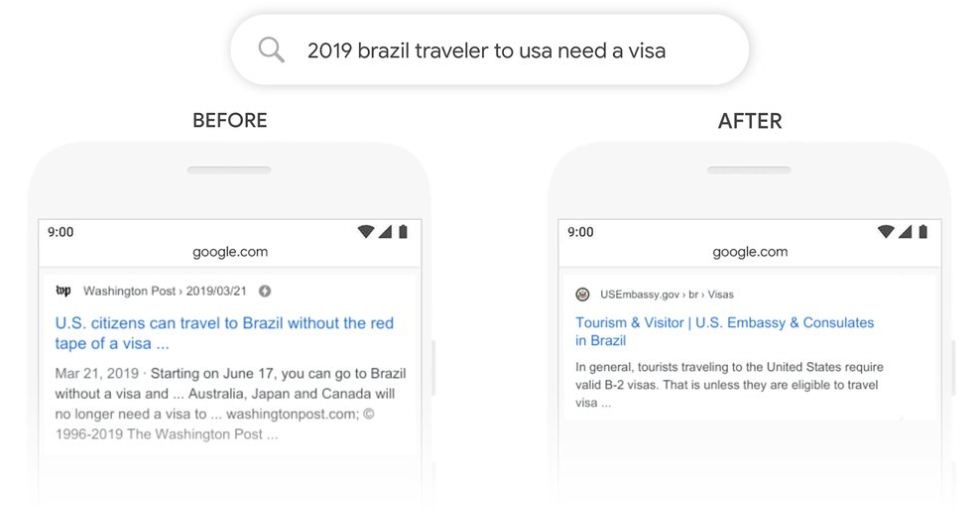
Here’s a search example provided by Google for “2019 brazil traveler to usa need a visa.” The word “to” and its relationship to the other words in the query are particularly important to understanding the meaning.

Serp For Bert

Does BERT solved the Search Problem?

Regardless of what you’re searching for, or what language you talk, Google want users to relinquish a portion of their keyword ese and search such that feels normal. In any case, regardless user will stump Google now and again. Indeed, even with BERT, Google don’t generally take care of this problem.

How Many Languages BERT Algorithm is Covering till Today? – 71

Initially it started with US English only and now it covers 71 languages. So international & multilingual websites will experience the BERT effect the most. Following are the languages that BERT applies to.

Afrikaans, Albanian, Amharic, Arabic, Armenian, Azeri, Basque, Belarusian, Bulgarian, Catalan, Chinese (Simplified & Taiwan), Croatian, Czech, Danish, Dutch, English, Estonian, Farsi, Finnish, French, Galician, Georgian, German, Greek, Gujarati, Hebrew, Hindi, Hungarian, Icelandic, Indonesian, Italian, Japanese, Javanese, Kannada, Kazakh, Khmer, Korean, Kurdish, Kyrgyz, Lao, Latvian, Lithuanian, Macedonian Malay (Brunei Darussalam & Malaysia), Malayalam, Maltese, Marathi, Mongolian, Nepali, Norwegian, Polish, Portuguese, Punjabi, Romanian, Russian, Serbian, Sinhalese, Slovak, Slovenian, Swahili, Swedish, Tagalog, Tajik, Tamil, Telugu, Thai, Turkish, Ukrainian, Urdu, Uzbek & Vietnamese, Spanish

How BERT Affects SEO?

BERT SEO update

  1. BERT Will Help Google to Better Understand Human Language – Individuals are looking clearly with longer, addressing inquiries. So now your page can rank for longer & tricky queries if some non relevant pages were ranking better earlier. Also it will help bring more traffic from long tail keywords to relevant pages. Following the system of making content around very specific long-tail phrases is compelling to such an extent that websites like Quora is visited by 60,428,999 users every month just from Google alone in the United States.
  2. BERT Will Help Voice Search – Intent of Voice search queries was more difficult to understand. So, while optimizing for voice search, SEO need to use conversational language for their content.
  3. International SEO is Highly Effected – BERT has this mono-linguistic to multi-linguistic ability because a lot of patterns in one language do translate into other languages. There is a possibility to transfer a lot of the learnings to different languages even though it doesn’t necessarily understand the language itself fully.
  4. Decreased Value of Long Content – Long content is devalued. BERT figured out that long content does not mean better information. Matching searcher’s intent even with short content can benefit you in terms of ranking and quality traffic.
  5. Structured Data and & Schema Mark Up – Schema mark up should have the content according searcher’s query and its intent, if the web page content is about a broad topic.

What BERT cannot Understand?

BERT isn’t very good at understanding negation or what things are not type of queries. Apply negation on a query and then searching it in Google will not show same results though intent is similar.

BERT’s Implications on Paid Search

With BERT, Google understands that all words should be translated together, returning more focused and better informational natural outcomes.

Paid search advertisements should be considerably more focused to persuade Google that they are sufficiently important to show up close by perpetually curated natural outcomes.

Because of spending plan and organizational requirements, it isn’t feasible to constantly support activities for every single specific topic in you niche and that can be something to make progress toward. Other than checking on organic result for main search terms, search inquiry reports likewise offer important bits of knowledge. In any case, if conceivable, it is ideal to make new advertisement bunches for these newly recognized terms.

Bing is Utilizing BERT

Bing revealed on 19-Nov-2019, that it has been using BERT in search results before Google, and it’s also being used at a larger scale. Bing has been using BERT since April, which was roughly half a year ahead of Google.

Featured Snippets FAQ

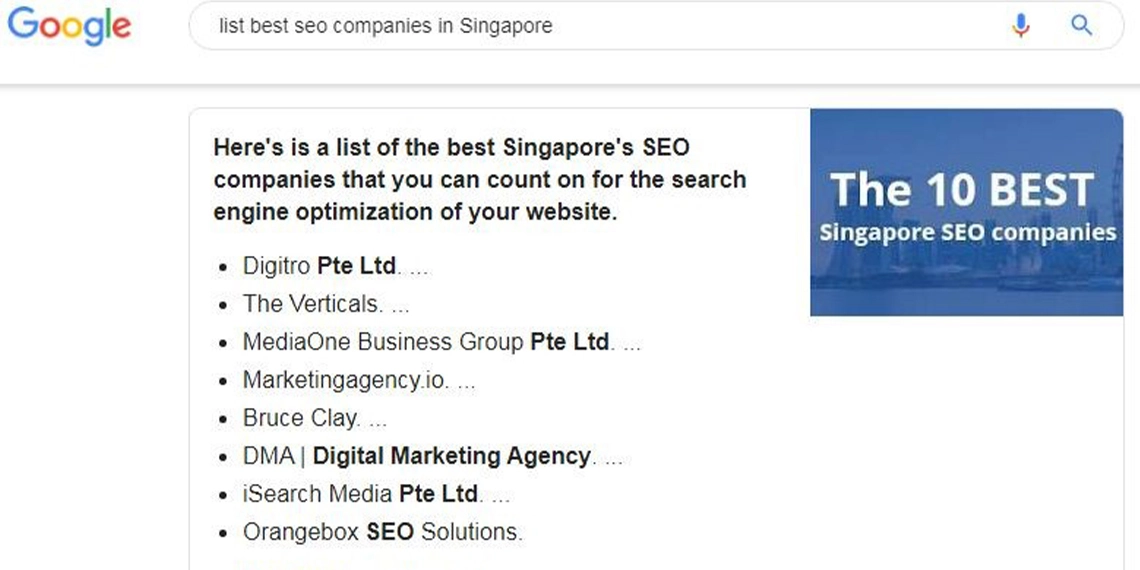
Getting a featured snippet from their website is probably the one thing most people would want right now. They appear right above all the organic search results. It doesn’t push the top search result away and so it gives a chance for a website to appear as featured snippet and as the first result on the search results page. As more people understand the importance of featured snippets, there arise a lot of questions in this regard. We would like to provide answers to a few common questions. For example search for SEO Singapore company list.

Not all keywords trigger featured snippets. But if your website is optimized for a keyword that Google considers for featured snippets and if your website is among the top ten results then it is possible that you can get a place as a featured snippet. It may not be easy for a new website to achieve this. But being new will not disqualify you from being a candidate to appear as featured snippet.

2. Does Google Have A Method To Identify Traffic From Featured Snippets?

Till now there is no separate Google tag to tell you what amount of traffic resulted from featured snippets. You cannot differentiate between the traffic that comes from your organic result and from featured snippet. There is till now no GTM that would help in getting you this information.

3. Do Long-Tail Keywords With Less Number Of Searches Help In Getting A Featured Snippet?

Long-tail keywords that can get you good returns are very good to convert customers. These low-volume keywords can help in getting your website a better ranking. There are lesser number of websites answering these long-tail questions and hence your website stands a better chance.

Whiles single word searches will turn up a high number of results. But queries that are specific will have lesser number of websites answering the query and your website will have a better chance. A search with just a product name will have too many results. But when it is qualified by size, gender or color, the results will be very less. Such keywords can be great for optimizing for featured snippets.

You must first select the likely queries. You must then find the keywords that will result in a snippet. Check whether there are keywords for which you rank on page one but you still don’t own those keywords. You can then select the keywords that will be best for your goals. Do you want to convert or do you want visitors to your page?

One way to find the right keywords to be to take the help of featured snippet carousels. Suppose there is a query for a service that triggers a featured snippet, you can check whether there are carousels which are state specific. The best part it that carousal snippets are not necessarily taken from sites that rank on the search results page.

5. If A Featured Snippet Appears For A Query In One Language, Will The Same Snippet Appear For The Same Query In Different Language If The Website Supports That Language?

There is no specific study done to know this. But there could be a difference in featured snippets when there is a change of language.

You could win a featured snippet and lose it after a few days. There is new content arriving on the web and this makes keeping a featured snippet very difficult. Sometimes Google first features a snippet from a site that is not ranked. This will mean that Google is still searching for the right snippet for the query. So that can change soon when Google finds the right featured snippet.

Google also changes the content for the snippets. The carousel topics for features snippets also keep changing. All these are reasons for the snippets changing frequently. Google is also constantly changing their search criteria and this also causes changes in the SERPs.

7. How Can Keyword List Help To Find Gaps In Opportunities For Featured Snippets?

They are a great way. You must first find the keyword list for the feature that you want on the search results page. In this case you must filter for featured snippets. Then you must use your present website ranking find the opportunities and gaps for the top featured snippets.

8. Is It Worth Studying The Content That Has Got A Featured Snippet And Using That Model?

You can learn a lot from studying a content that has got a featured snippet. You must find out how it answers the query. See whether it answers a voice search. Does the content give additional information that the user might be looking for? See if there are enough visual content. It is also worth checking out which part of the content, the featured snippet has been taken from.

9. Does Google Prefer Informational Websites Over Commercial Sites For Featured Snippets.

There is no evidence to show that there is any preference for informational sites. But these sites do better in most cases. Google only searches for the answer that will satisfy the user the most. Commercial sites can certainly create content that can answer queries better.


10. When Was “People Also Ask” Section Launched And What Is Its Future?

The “People Also Ask” section was first seen in July 2015 and since increased exponentially in appearance. Though the future is not very certain it is better for all SEO companies to be prepared for more of these.

11. What Does It Mean By Saying The Image URLs Are Not In Organic?

This means that the webpage that contains the images that are there on the features snippets do not appear in the first ten pages of organic results for the particular query that triggered the featured snippets.

12. What Should Be The Consideration Of Featured Snippets When Creating Content?

What the content writer should first think about is the searcher. The writer should understand the intention of the searcher and what exactly is the information that is sought. You must also know what form the searcher wants the information in. They may want it as text, image or video.

Voice search should be kept in mind while optimizing for featured snippets. Earning Featured Snippet in Google Search Results can help get traffic from voice search as well. Read the full post on the impact of featured snippets on voice search.

13. How Can Someone Write Content For The User And Not For The Search Engine? How To Ensure This?

The only tool for this is a readability test. But that is also not very useful as it could block your creativity. Only another person can really say whether the content will satisfy the user who is searching on the internet. See if people can understand what you wrote when it is read to them.

There are some tools and publications that can help you with this. You can use MozCast to know the latest about Google algorithms. You can use tools that will alert when you get or lose a featured snippet. You can also see the people who are updated with the subject and follow them on Twitter.

The question remain is how to optimize for Google featured snippets. It can be done by implementing schema mark up to your content. You can also ask your SEO service provider to help you with schema and feature snippets.

whatsapp