Understanding the meaning of a custom software development

Understanding the meaning of a custom software development

Software can be mainly classified into two types; the commercial off-the-shelf software (COTS) and the Custom software. While (COTS) is basically software developed for meeting the requirements of a target group of users and it often needs marketing and promotion to reach more target users. An example of (COTS) is Microsoft Office.

Custom Software is build to fulfill the requirement of a specific user. The process of Custom Software Development involves many steps. One of the most important steps, of course, is comprehending the exact requirement of a client.

This is followed by designing, building, testing, deployment and most importantly, monitoring its performances as well as fixing the bugs. An example of Custom Software can be customized accounting software or a customized CRM.

Steps involved in Custom Software Development

You can either have Custom software developed by an in-house team of developers or you can outsource the task to a third party software development agency. However, the process of Custom Software Development is pretty much the same for both. Here are the steps involved:

Gathering information

This is certainly a very crucial step for any software developer since nothing could go right unless one is clear with the exact requirement of the user. Apart from allowing the user enough space to describe one’s requirement, it is also important for a developer to ask a few more important questions to ensure that nothing is left out and every bit of the user’s requirement can be perfectly addressed by the software.

Designing and planning

Once all the essential information pertaining to the user’s requirement is gathered, the developer or a development agency would then strive to create the most salient software design to address the requirement of the user based on the gathered information.

Coding

This phase comprises giving the design a perfect framework through coding. However, as a developer, one must strive to keep the coding as clean and lite as possible. This will not only help one a decent piece of software but also, it can be pretty helpful later if it ever comes to fixing bugs.

Testing

No matter how confident a developer is in relation to the software that one has created, things can go terribly wrong without proper testing. Also, one may need to test one’s software more than once to be perfectly sure that it is going to work as just expected.

Deployment

This is as important as the first step and has to be very meticulously done from deploying the software to training the user or a group of users on how to use the software.

Monitoring and bug fixing

Support is another important aspect of software development. There can be a lot of bugs experienced with a certain piece of software by a user. This is a pretty common thing but what is most important on the part of a software development company is the fact that one should offer brilliant support and should be easily reachable to the users to help them break out of every issue they face with a certain piece of software. This may take hours of deep monitoring and bug fixing sometimes.

How is Custom Software Development in Singapore?

Over the years, many good software development agencies have come up and most of these agencies had a brilliant journey so far. With more and more exceptionally competent Software Development companies coming up in Singapore, business as a whole has found amazing support. Businesses can now easily find the right software for their different task-operations.

This has eventually improved the overall productivity of many organizations over the years. Another salient thing about these software development companies is the fact that most of these companies are striving to offer their products and services at the most competitive pricing.

Confusion over Google Caching

There have been some confusions around the Google caching for the past some time. The issue has been experienced by many webmasters and SEOs. However, while some are really bothered by the outdated dates of Google caching, there are others who think it is not a matter of worry at all since it technically will not affect things in any way.

However, a lot of people thought if it did not mean anything at all, it should not have appeared right there in front users and also, it must surely represent something as this is not something pretty usual that Google has done in the past. Hence, people are a little too skeptical about it.

Understanding the actual issue

Recently, many people have found the caching dates for their websites to be either 09-April or 10-April. However, it did not actually seem to be specific to any certain industry as it has been experienced by users from all industries.

The fact that it actually happened at times when Google resolved the indexing issue bug makes it a bit more interesting as there could be a relation more than a coincidence.

Also Read:How to Fix Crawlability Issues in Google Search Console

Mismatch of Last crawl data with Schema ratings

For many websites, Google showed the wrong schema alongside the date issue as it actually displayed an almost 1-month-old rating. Many ratings have declined and fallen below four. This is the reason that a lot of webmasters think that it might affect their website ranking as they may have to miss on prospective traffic because of this decline in rating.

Is there any way it can be resolved?

You can probably check your other sites to see if Google is pulling the schema data correctly for those sites. Also, you can discuss it with various webmasters on different discussion forums.

Most importantly, it’s high time that Google provide users with clear information on this and in fact, Google should keep the users informed duly every time such an issue occurs to keep them out of worry.

Google search is going to get a lot better with the addition of How-to structured data and FAQ

Back in 2018, Google first emphasized the importance of How-to and FAQ markup in search engines. There have been a lot of anticipations around this update for quite a long time with no one actually having any idea as to when Google would materialize it. However, in a recent Google I/O earlier this month, Google has finally launched and brought these features to life.

As per Google, this is going to give an entirely new dimension to search results and make things a lot easier for users to comprehend the things or tasks that they are looking forward to finding on Google.

Most importantly, this is expected to save searchers ample of time as they will not actually have to read the entire post to find out how they can go about a certain task. Google will display the best How-to results to answer such queries from now on.

Understanding the way How-to Structured Data is going to work

To understand how the How-to Structured Data is going to work, let us illustrate it with an example. For instance, if one is looking to find as to how one can tie a Tie and type the phrase on Google and enter, Google will now display the entire task in 4 to 5 steps to simplify it or in other words, Google will display the details in a stepwise manner for your searches.

Of course, a searcher can always visit a certain webpage for more information just in case one wants. However, one’s query pertaining to a certain task will be answered at the SERPs itself. For website owners, it can be a ranking factor in times to come. “How to” structured data helps voice search optimization as well.

How do the webmasters go about it?

For the website owners and SEO service providers to capitalize on this excellent feature, they can refer to the documentation that Google has recently published. The documentation explains as to how you can add the markup to the web pages and Google Assistant. Also, it comprises valuable information pertaining to the tools, steps and different properties that you could add to the markup.

In addition to this, Google has added a How-to report in the search console wherein you could find the errors and warnings to fix them in no time for better enhancement.

Google displays FAQs in the search results

Google has a markup for the FAQs in search results feature as well. If you are wondering as to how it is going to work like, Google will pull structured data from the FAQ pages and show them directly in the Google search and Google Assistant results.

However, Google has clarified that the feature is pretty different from QA pages or forums.

Search results on Google are certainly going to a lot better than ever before with the launching for these two features and most of the searchers are certainly going to have excellent ease of searching things on Google from now on.

However, considering the importance of these features for the searchers, it would be a very wise thing on the part of any website owner to start adding these markups to one’s WebPages as it may turn out to be a ranking factor in times to come.

As per Google, Page Speed goes up by 15 to 20% among the sites that are slow

As per Google, the web has got faster and the fact has been admitted by many website owners and SEO service providers too.

There has been an improvement of 15 to 20% in performance among the slowest traffic which is about one-third even since Google has launched its Speed Update back in July 2018. This isn’t true for 2017 as there were no such improvements noticed in 2017.

For those who are not much familiar with the Google’s Speed Update, back in January 2018, Google announced that search engine rankings of the websites with slow mobile pages will be reduced and launched it later in July in the same year. Website owners and marketers actually got around 5 months to work on their websites and get their websites compliant to Google’s Speed Update with the help of a few advanced tools and reports provided by Google.

As a matter of fact, this subsequently helped 95% of the countries improve website speed. Such an update was important considering the fact that users tend to abandon the page navigation while sites are slow. Also, this affects the organic traffic to a very large extent. However, with the Speed Update, it has brought about a 20% reduction in the rate of such abandonment.

Page speed is a direct ranking variable, a reality known shockingly better since Google’s Algorithm Speed Update back in July 2018. Google doesn’t care for ranking websites that give terrible user experience. PageSpeed Insights is a web tool by Google that helps you improve speed, the score there doesn’t really mean anything in reality.

Hence, it is always wise to use the page insight tool and work on every suggestion to improve your site’s performance on a regular basis.

Mueller explains as to what status code invalid URLs should return

John Mueller from Google shared some important pieces of information regarding how URLs that are invalid are treated by Google. According to Mueller, every webmaster must make sure that their invalid URLs always return 404 errors and not 5XX errors. Otherwise it will negatively affect SEO work.

404 errors help Google understand the fact that these URLs are independent of any site. On the contrary, 5XX errors are quite different from those and are essential indicators of server errors. Here is what he exactly tweeted in the recent past:


“Got an alert from Google Search Console
today that one of our pages is 5XX – after
investigation, it’s a mention of our link in the
footnotes of a scientific pdf article: as there is a
semicolon right after the url, the url is not valid. Had
no idea @googlewmc was this thorough!”


Also, Mueller suggested that owners of websites should avoid such URLs that can lead to 5XX errors. According to him, Google keeps on crawling the 404 pages as long as there is any signal on the internet.

Google: Changing the Index and Noindex settings on URLs much often is not a wise thing to do

Although a lot of users might already know it, a recent tweet by Google spokesperson, John Mueller has made it clear that adding and removing the noindex setting on URLs quite frequently might get Google a little confused and slow it down to an extent that it may not index that page over again. Subsequently, this will adversely affect the page’s performance on the search engine.

Also, he said that one can, of course, use noindex as items are sold out from the stock and one refill one’s stock with items back again but using it too often is a terribly bad choice for sure. According to him there is absolutely nothing wrong in applying noindex for a page that one doesn’t want search engines to index but it is important to bear in mind that one ought to maintain great consistency when it comes to this sort of setting and one shouldn’t change the index and noindex settings often to keep things really simple for the Google crawlers.

It is a little funny though but “Pornyness” is a ranking factor too

A recent update by Google’s webmaster trends analyst, Gary Illyes has been a little erratic yet true. It is actually a very basic thing and in fact, some of the people who were present there in that event were like “hey, it should have crossed my mind after having heard Gary Illyes. According to Google’s Gary Illyes, “Pornyness” is a ranking factor too. As a matter of fact, Google actually has a classifier for adult content.

A lot of us must have already noticed that Google allows users to filter the adult content and also, it has a different way of treating this sort of content. Hence, it can be an easy factor to capitalize on. However, as Gary Illyes shared this piece of information, a lot of people actually were a little too surprised for nobody actually thought of it before.

Signs of a new change in Google Algorithm

Google seems to be making some changes in its Search Ranking Algorithm. Recently, a lot of Webmasters have experienced a sudden growth in traffic especially from the UK and also, it especially holds true for results displayed by SEO tools such as SERPMetrics, Accuranker, RankRanger, and SEMRush sensor. However, the SEO tool Moz is still not showing such a sudden increase in traffic. Best SEO agency in Singapore always use such tools to tack visitors on your website.

Some people are of the thought that it might have to do something with the holidays in the UK. However, no one could reach a definite reason for this strange behavior of the traffic as of yet. There is a lot of fuss going on among the Webmasters for quite a while now. In fact, a lot of speculations are going on and a lot of people are anticipating a new update in Google Search Ranking Algorithm over a month.

Performance Report in Google Search Console will now show Consolidated Data

Recently, Google has come up with a very important update for all webmasters and as per the update, all the data on Google console’s performance based report will show data on the basis of your website’s canonical URL. This means all the traffic-related data including that of your AMP will be consolidated to one canonical URL and at the same time, it means the www will comprise your AMP, URL related parameters, etc. You are most likely about to see the performance data of your website change by the last week of March.

Also, we will get about a couple of weeks for comparing the new data with the old data for high transparency. Although there is no denying the fact that even the technically genius people will have a bit less under their control, the change is expected to help people to a large extent. However, a lot of people are worried about the websites that actually have issues with canonical links as things pertaining to this has not been clarified by Google as of yet.

Ways to safeguard your website from negative seo

Over the past two years, the whole SEO field accomplished a huge change. Therefore, numerous e-commerce marketers have impressively altered their tactics. It is not as easy to rank competitive keywords high in Google as it was three years ago.

As black hat SEO has got so harder to carry out and got so down to produce results, a new kind of SEO has come up with the name, “negative SEO”.

This article will assist you to perceive the actual negative SEO and how to safeguard your online business from this attack. If you are planning to build your online website and keep it safe, do follow what is acquired in this article.

What is Negative SEO?

Negative SEO is defined as the procedure of making the use of a black hat and immoral methods to destroy the rankings of your competitors in search engines. There are different kinds of Negative SEO attacks which are as follows:
● Website hacking
● Creating more than hundreds of spam links to your website
● Duplicating your content and dispensing it all over the web
● Focusing links to your website with the use of keywords such as poker online, Viagra, and many more
● Forming fake social profiles and destroying your online reputation
● Detaching your website’s best backlinks

Is Negative SEO a Real Threat?

Obviously, with no doubt, Negative SEO is 100% real and various websites have to manage with this issue. It is better to prevent it rather than fix it.

More than 15,000 people desire to do the task of “Negative SEO” on Fiverr just for $5

In addition to this, people have said a lot about their successful techniques in the black hat forum.

The Disavow Tool has been released by Google to assist webmasters to manage with this issue, but the utilization of the tool should be done with utmost care and only as a last measure.

Take a look on Matt Cutts’s answer about negative SEO:

Usually, the tool will take 2-4 weeks to work. What if your website is penalized for one month? Can you bear it? It is not possible for anyone. I will direct the ways to you on how to prevent these attacks and make your business secure.

How to Prevent Negative SEO Attacks

1. Set up Google Webmaster Tools Email Alerts

● Google can notify you when:
● Malware attack your website
● Your pages are not marked
● Server connectivity issues arise
● You acquire a manual penance from Google
● if you have not already connected your website to the tools of Google Webmaster
● Sign in to your account and press “Webmaster Tools Preferences.”

Allow email notifications and select to get alerts for all kinds of problems. Press “Save.”

This is the initial step. Now, let’s shift to the significant one, monitoring your backlinks profile.

2. Keep Track of Your Backlinks Profile

This is the most vital step to take to stop spammers from succeeding. Often times, they will execute negative SEO as opposed to your website by creating poor redirects or links. It is necessary to get aware of someone building redirects or links to your website.

The tools like Open Site Explorer or Ahrefs can be utilized from time to time to check manually whether someone is creating links to your website, but I would suggest you use MonitorBacklinks.com. It is one of the easiest and best tools which can send email notifications when your website obtains or suffer the loss of essential backlinks.

Monitor Backlinks will send all the things you require to your inbox instead of getting your website to check manually. Here is the way how you can utilize it:

As you will create your account, you will need to append your domain and join it with your account of Google Analytics.

Even if it exhibits your backlinks instantly however there is a chance that it may take a few minutes. Your settings are placed to send you email alerts by default when your website gets new backlinks. An email notification will look like this:

3. Protect Your Best Backlinks

Spammers will strive to detach your good backlinks very frequently. By using your name, they will usually connect the website owner of the link and also, they will ask the webmaster to detach your backlink.
You can do two things to get away from this happening:
● Instead of using Yahoo or Gmail, always use an email address from your domain to communicate with webmasters. In this way, you can prove that you are the one who is working for the website and not someone else. The form of your email should be like this: yourname@yourdomain.com.
The time when you come in contact with webmasters, always
● Maintain a record of your best backlinks. And to do this, it is possible that you can observe backlinks again. Check your list of backlinks and classify them according to social activity and page rank.
Tag the backlinks the one which you prefer the most hence verification can be done if any of them are removed.
Choose your backlink and press “edit.”
In order to filter later and get the backlinks easily, add your tag.
As you complete with the creation of your list, filter them on the basis of your tags, and classify if their status alters. You should contact the webmaster if any of these links are removed and also ask them why they detached your link.

4. Secure Your Website from Malware and Hackers

Safety is very essential. The very last thing you require is spam on your site even without you are not having aware of it. Many ways have existed that you can do to protect your website :
● Install the Google Authenticator Plugin in case if you are using WordPress and form a two-step verification password. The time when you sign in to your WordPress website, you will be asked to append a code created by Google Authenticator on your iOS or Android version Smartphone as it is available in these versions only.
● A strong password should be created filled with special characters and numbers.
● Backups and database of your files should be created on a regular basis.
● If your website is allowing users to upload files, communicate to your hosting firm and ask them for the solution on how antivirus can be installed to avoid malware.

5. Check for Duplicate Content

Content duplication is one of the most common methods used by spammers. They simply take your website content and paste it almost everywhere. There is a huge possibility that your site will get penalized if your most of the content is copied and it will thereby lose rankings.

With the help of copyscape.com, you can know if your website has plagiarized pages on the web. You just add the body of the article or your website which you want to check and it will produce the results of whether your content is being copied and posted somewhere else without your permission or not.

6. Monitor Your Social Media Mentions

There are many spammers who will sometimes make fake accounts on social media by using your website or company name. Try to detach these profiles by pointing them as spam as soon as possible before they start following you.

With the help of tools like Mention.net, you can discover currently who is utilizing your company name.

But you will be informed soon if someone uses your name on any website or social media and at the same time, you can also come to the conclusion whether you should take any action or not.

Form an account and press “create an alert.” Give a name to your alert and append your required keywords which you want to be alerted. Multiple languages can also be used. Then press “Next step.”

Choose the sources you want Mention.net to search for, and append the domains you want to be avoided. Press “Create my alert,” and you will get notified whenever your keyword (brand name) appears on blogs, news, forums, and social media.

7. Watch Your Website Speed

In case if you will find your website has extensive loading time, check whether your server is getting thousands of requests per second or not. It is very necessary to do something to stop this or else spammers might crack down your server.

In that situation, the best tool Pingdom.com will assist you to observe your server loading time and uptime.

Make an account and enable “email alerts,” therefore you will come to realize when your site is down. Contact your hosting firm immediately if you find that your website is being attacked and ask for support as quickly as possible.

8. Don’t be a Victim of Your Own SEO Strategies

Ensure that you are not harming the rankings of your website with the use of techniques that are not allowable to Google. Certain things you should not do are given below:
● Never make a link to the websites which are penalized.
● Never purchase links for SEO and from blog networks.
● Never post a huge number of poor guest articles.
● Never create so many backlinks to your site with the use of “money keywords.” Your website name should be used by at least 60% of your anchor texts.
● Never sell links on your site without using the attribute “nofollow”.

9. Don’t Make Enemies Online

There is no specific reason existed to make enemies and never ever get in an argument with clients as you might be not knowing with whom you are dealing. Three different kinds of spammers are there and the reasons for their spamming are as follows:
● For entertainment
● For reprisal
● To get better rankings in competitive search engines

How to Combat Negative SEO against Your Website

If you find that somebody has begun a negative SEO campaign against your brand, here are the things that you can do:

1. Create a List with the Backlinks You Should Remove

Search for the links to your website that were formed recently and among them, select the bad ones in order to make a trial to detach them from your website. Tag your harmful links. Verify these without the use of a system and see which ones you want to remove that are harming your rankings.

Create this list as soon as you receive email alerts with new backlinks you are not aware of if they look like spam.

Form this list immediately as you get email notifications with new backlinks that you do not know about in case if they look like spam.

2. Try to Remove the Bad Links

After knowing the backlinks which should be removed, connect the webmaster of the site and ask them to remove your link. If you do not discover any contact page, take the help of Whois.com/Whois to discover a contact email ID.

The root domain of the website which you are attempting to contact should be added by you and then you can search for “Registrant email.”

You can contact the firm that is hosting the website and request them to detach the spam links if your link is not detached or you do not get an answer. Most of the hosting firms will definitely assist you to detach the links.

Also, verify who is hosting the site on WhoIsHostingThis.com.

3. Create a Disavow List

Use the tool called Google Disavow if you will get a manual penalty. Hence, in case if the above-mentioned techniques do not work, form a disclaimed list which you can submit later to Google Webmaster Tools.

With the help of your Monitor Backlinks.com account, you can easily form this list in it.

Conclusion

If you want your website to get success, always consider search engine impressions and website security which is very important. This is a short summary of the things that you can do to keep your website away from negative SEO attack:

Are you using any other techniques to avoid negative SEO? Have you ever come across such attacks? What other tools are you opting for this?

8 powerful SEO tools to increase your website ranking

SEO or the Search engine optimization is certainly one of most extensively used digital marketing techniques. Basically, it deals with increasing the organic traffic for websites. However, there is one thing for sure that it is the least expensive yet most effective online marketing option available these days.

SEO is a long process with a lot of optimization techniques involved in it. It certainly requires a lot of patience and of course, dedication. Most importantly, it requires the right mix of tools for keyword research, competitor analysis, gathering and processing of data and more.

In this post, we are going to share 8 of the most powerful SEO tools that can largely help you increase your website ranking. So, let’s get to the tools now…

#1- Google Search Console

Google Search Console is a free web service by Google that gives webmasters the ability to monitor and maintain their sites’ performance and indexing status. It also determines the following:

● Queries used that lead end users to their site
● The comparative execution of various questions
● The various sites that link to the website
● The extent to which the website is compatible with mobile devices

#2 – Google Keyword Planner

This is again a very useful yet free tool by Google. It helps users with their keyword research no matter what niche one is looking for. Most importantly, the tool helps in the following ways:

● Provides information for new and existing keywords
● Shows invaluable historical statistical and traffic forecast data
● Shows estimations in clicks and conversions
● Guide you about the bids and budgets for campaigns

#3 – Google Analytics

The Google Analytics tool by Google is a perfect tool to monitor how good a site is performing and also, monitor the areas where it is falling short. One can then work on the areas that need improvement and get one’s site rank higher.

Most importantly, it comes with a pretty user-friendly and customizable dashboard that displays up-to-date and real-time statistics. Some of the important aspects that you can view using this brilliant tool are:

● Number of active users
● Type of users (New vs. Returning)
● Demographics (Age and Gender)
● Geographical Location
● User Behavior
● Technology Utilized
● Users Flow
● Conversions
● Network Referrals
● Content
● Traffic Sources

#4 – Moz Keyword Explorer

The Moz Keyword Explorer or KWE is one of the most used and also, a leading SEO tool. You can obtain valuable information by simply entering the keyword or the root domain or a page URL. The tool helps users capitalize on the most accurate keywords for their websites.

Just like the other advanced SEO tools, Moz has a few advanced features that can be availed only by choosing the paid version. However, the features that it offers with the free account are quite useful and powerful too.

● Here are features of the Moz Keyword Explorer:
● Deep and accurate keyword research
● Offers various metrics essential to the SEO decision making process used by top SEO agency.
● KWE’s volume score is exceptionally accurate
● Keyword suggestions inside KWE come from the best sources
● Import and export functionality is strongly supported.

#5 – Buzzsumo

Buzzsumo is certainly one of the most common tools that marketers use these days. It can be very powerful if used in the appropriate way. What it does is help you find the most trending topics for content development and in some cases, it may work even better than a paid campaign. After all, it is always the content that wins the game, right?

The tool helps you find relevant trending topics to any niche. That way, you can develop the most relevant content and make it visible to the ones looking for it really fast. Of course, content needs to be pretty relevant with the right mix of the most powerful keywords as well.

#6 – Spyfu

The Spyfu which is also known as the Googspy works pretty much like Google’s Keyword Planner and Moz’ Keyword Explorer. However, it offers a lot of metrics pertaining to keywords, search volume, click-through-rate, cost-per-click and ranking difficulty and more.

One of its most powerful features is the fact that it can provide you with keyword data of your own campaign as well as that of your competitor.

#7 – Ubersuggest

Ubersuggest is one of those free SEO tools that internet marketers have been using for quite a while now. The tool has been recently acquired by the digital marketing expert, Neil Patel. There are many advantages of using this tool. Here are a few of them:

● Keyword Suggestions: It shows up the volume, competition, seasonal trends and even negative keyword and filtering have been made available completely for free.
● Keyword Difficulty: It shows up how hard/expensive certain keywords would be with an emphasis on the competitiveness of keywords and phrases.
● Competitive Intelligence: It displays data determining who ranks for what keywords.

#8 – Siteliner

Siteliner is a one of a kind tool that diagnoses websites and shows up the various issues in it that might affect its performance and search engine ranking. A few of the areas it checks are duplicate content, broken links, and page power.

Conclusion

Although there is no denying the fact that there are a lot of free and paid SEO tools available in the market, it is always wise to stick to only a few effective tools that you find most comfortable to use. Working with a lot of tools can get things a lot messy. Also, choose a tool after you fully understand the way it works.

Mueller Shares Some Valuable Information Related to the Google Image Search Changes

Let us walk you through all the highlights from a Google Webmaster that happened in the Google NYC office recently

John Mueller, a Google webmaster trends analyst and Martin Splitt of Google developer relations hosted a Google NYC meetup last Thursday. There were around 25 attendees in the meetup. Mueller presented a preview of some of the essential upcoming changes pertaining to image search. According to him, Google is switching websites to mobile-first indexing and also, will soon closedown the old version of Google Search Console.

Mueller said image search will change and will be a “bigger topic” this year for both the webmasters and the SEO agency. According to him, so far, people found images to include them for office presentations. However, a lot of thought is laid on giving it a much innovative and effective face this year; something like using image search for accomplishing tasks, buying online or learning something new and more. Once this becomes available and this becomes possible, the SEOs and webmasters will certainly have to start thinking in a different way to optimize image search.

Although Mueller didn’t get into more details, it will be interesting to learn as to how things are going to be like in the image search in the upcoming months and in what ways it is going to have an impact on the marketers. Also, Google is going to drop the old Google Search Console fully sometime in March, 2019. Apart from that, it is anticipated that Google will drop the crawl errors report, the property sets feature, Android app features, HTML suggestions report, and the blocked resources report. Hence, altogether, it makes a lot of room for new learning this year.

Recently, Google published a blog post after this update about the upcoming changes went live. However, Google said that there won’t be any replacement for the crawl errors API. Also, Google added saying that the new sitemaps have most of the functionality and the old sitemaps report will be turned off. Further, Google suggested that webmasters should use the Index Coverage report for tracking these URLs in addition to the sitemaps report.

The URL inspection tool is going to be the ultimate replacement for the Google search console tool. You can find your management access in the setting section in the new search console. Also, the older structured data will not be reported in the new Google search Console. Google further emphasized the fact that they are committed to provide reporting based on structured data comprising Jobs, Recipes, Events, Q&A and more. Also, Google mentioned that if ever encounters a syntax error parsing Structured Data on a page, it will be highlighted in aggregate to ensure that the webmasters don’t miss on anything critical.

As a matter of fact, Mobile-first indexing still going on and almost half of Google’s search results are now processed through mobile-first indexing. According to Mueller, Google is pretty soon going to move the rest to mobile-first indexing. It has been pretty easy for Google to move over the first 50 percent of the sites as they didn’t have complex issues pertaining to the parity between the mobile and desktop sites. However, for the next half with more issues relating to the desktop-mobile parity, Google is planning to communicate with the webmasters via Google search console to and help them fix the issues and get their sites ready for mobile-first indexing.

Google is certainly up to working very hard this year on moving more sites to mobile-first indexing.

Mueller also said that Google is planning to conduct more of such meetups in 2019 to educate the webmasters and developers more about the upcoming changes. He said that apart from conducting meetups at Google’s NYC or Mountain View offices, they are planning to host such meetups at various global offices as well.

Google Search Console Announces New Features

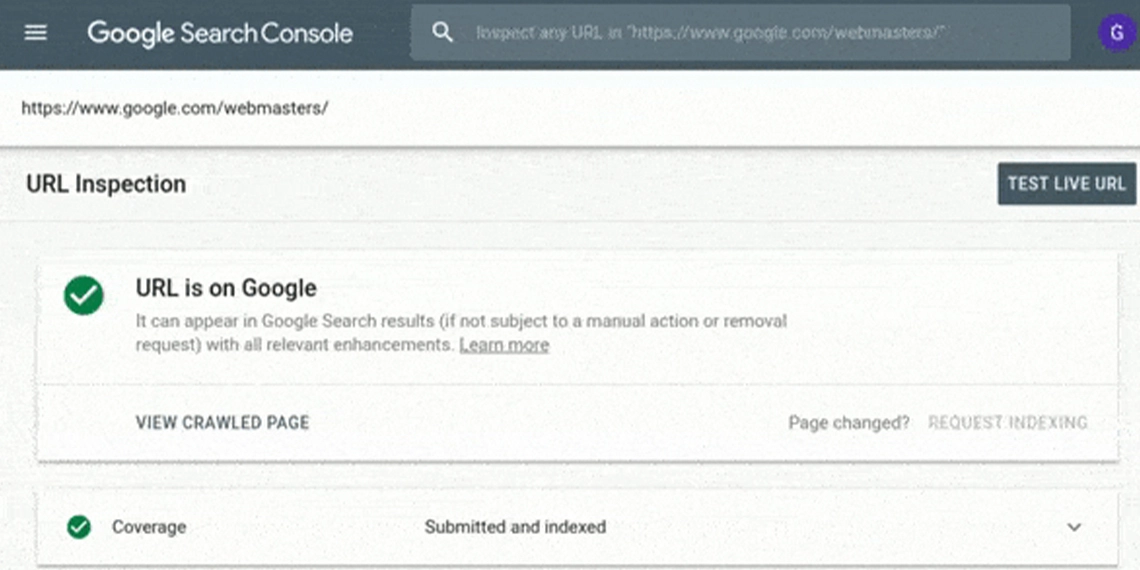
Recently Google has incorporated some new features in their URL inspection tool within the Google Search Console. Now, users can use this tool to view HTTP response code of a particular URL, the page resources, the JavaScript logs, and a rendered screenshot.

What is it going to be like?

If you are wondering as to how it is going to be like and how you can actually access it, here’s the GIF shared by Google to get the picture really clear for you:

How does one access this?

In order to access this, you would need to first login to your Google Search Console and click on the URL Inspection tool. Then, you could enter the URL and test it live. Right after you enter the URL to the URL Inspection tool, you get full access to the all the features set within the tool.

What is new?

As per this update, Google now allows users to view the HTTP response code. That way, you can check if Google is able to see the various pages and redirect codes of your website URL which may include a 200 OK code, a 404 page not found code, a 301 redirect code. Also, that way, you can see the page resources that Google can or cannot access. Most importantly, Google will show you how it renders the page using a screenshot and also, show you the JavaScript log.

This is what Google tweeted about this new feature recently: “You can now see the HTTP response, page resources, JS logs and a rendered screenshot for a crawled page right from within the Inspect URL tool.”

How much does it really matter?

Comprehending the way Google views and renders a page after it crawls it is pretty useful for the SEO in Singapore as well as other countries. It can be also pretty useful for the developers as this will help them develop a website in a way which is more convenient for the Googlebot to understand the page content. Using this tool you can actually see every single issue in a very specific manner so that you can address them in time and most importantly, address them in a very accurate way.

whatsapp