How Better SEO Visibility Fuels E-commerce Growth

Introduction

In today’s digital age, SEO for ecommerce websites is more important than ever. Imagine having a great store that nobody can find. That’s what happens without strong SEO. SEO stands for Search Engine Optimization. It’s the process of improving your website so that it appears higher in search engine results like Google. The higher your site ranks, the more visitors you’ll attract, which leads to ecommerce growth. This blog will explore why better SEO visibility is crucial for the success of your online store and how it can lead to ecommerce growth.

Understanding the Role of SEO Visibility in E-commerce

Search Engine Rankings Drive Traffic

When people search for products online, they usually click on one of the first results they see. If your site is not among those results, you’re losing potential customers. This is why ecommerce website optimization is critical. By optimizing your website, you can improve its visibility on search engines, which in turn drives more traffic to your site. This traffic is often the lifeblood of ecommerce SEO optimization because more traffic means more potential sales.

Why Visibility Matters

Visibility on search engines directly impacts how much traffic your site receives. If you’re not visible, you’re invisible to potential customers. This is why SEO is so important for e-commerce. When your website is optimized for search engines, it’s easier for customers to find you, leading to increased ecommerce SEO.

The Connection Between SEO Visibility and Organic Traffic

What is Organic Traffic?

Organic traffic refers to visitors who find your website through unpaid search results. This traffic is incredibly valuable because it means people are finding your site naturally, rather than through paid advertisements. High SEO visibility ensures that your site appears in these organic search results.

Targeting the Right Keywords

To rank high in search results, you need to target the right keywords. Keywords are the words and phrases that people type into search engines when they’re looking for something. For instance, if you sell running shoes, you’ll want to rank for keywords like “buy running shoes online” or “best running shoes 2024.” By targeting these keywords, you can increase your chances of appearing in the top search results, which leads to more organic traffic and ultimately, online commerce growth.

Impact on Customer Acquisition and Retention

Attracting New Customers

One of the major benefits of SEO for ecommerce is that it helps attract new customers. When your site ranks high in search results, more people are likely to click on it. This increases your chances of acquiring new customers. People trust search engines, so if your site appears at the top, they are more likely to trust your brand.

Retaining Existing Customers

SEO isn’t just about attracting new customers; it’s also about keeping them. A well-optimized site not only ranks well but also offers a great user experience. This includes fast load times, easy navigation, and mobile-friendliness. When customers have a positive experience on your site, they are more likely to return, increasing customer retention.

Enhancing User Experience Through SEO

Site Speed

One of the key factors in SEO is site speed. Search engines like Google consider how quickly your site loads when ranking it. A slow site can frustrate users and cause them to leave, leading to a higher bounce rate. Optimizing your site for speed can improve both your search rankings and user experience, leading to better ecommerce SEO optimization.

Mobile-Friendliness

More people are shopping on their mobile devices than ever before. If your site isn’t optimized for mobile, you’re missing out on a huge audience. Google also ranks mobile-friendly sites higher in search results. Therefore, ensuring your site is responsive and easy to navigate on a smartphone is crucial for SEO.

Easy Navigation

A well-structured website is easier for both users and search engines to navigate. Clear, intuitive navigation helps users find what they’re looking for quickly, which improves their experience and encourages them to spend more time on your site. Search engines also use your site’s structure to understand its content, so good navigation can improve your rankings.

Measuring the ROI of SEO in E-commerce

Tools and Metrics

Measuring the return on investment (ROI) of your SEO efforts is crucial for understanding how effective they are. Tools like Google Analytics and SEMrush can help you track key metrics such as organic traffic, bounce rate, and conversion rate. These metrics give you insight into how well your SEO strategy is working.

Long-Term Value

Unlike paid advertising, which stops bringing in traffic as soon as you stop paying for it, the benefits of SEO can last a long time. By investing in SEO, you’re building a foundation for sustained online commerce growth. Over time, as your site climbs higher in the search rankings, you’ll continue to see returns on your investment, even if you scale back on other marketing efforts.

Practical Tips to Improve SEO Visibility

On-Page SEO Techniques

On-page SEO involves optimizing individual pages on your site to rank higher in search engines. This includes:

  • Content Optimization: Ensure your content is relevant, informative, and includes the right keywords. For instance, if you’re targeting “best running shoes,” include this phrase naturally in your product descriptions, blog posts, and headings.
  • Meta Tags: Use relevant keywords in your meta titles and descriptions. These tags help search engines understand what your page is about and can improve your click-through rate.

Off-Page SEO Strategies

Off-page SEO refers to actions taken outside your website to improve its rankings. This includes:

  • Link-Building: Acquiring high-quality backlinks from other websites can boost your site’s authority and improve its rankings.
  • Social Media Integration: Sharing your content on social media platforms can drive traffic to your site and increase its visibility.

Regular SEO Audits

Search engine algorithms are constantly changing, so it’s important to stay up-to-date with the latest trends and best practices. Regular SEO audits can help you identify areas for improvement and ensure your site remains optimized. This includes checking for broken links, ensuring your site is mobile-friendly, and updating old content with new keywords.

Conclusion

SEO visibility is essential for ecommerce growth. By improving your site’s SEO, you can increase your visibility in search engine results, attract more traffic, and ultimately, drive more sales. Whether you’re just starting or looking to improve an existing store, investing in SEO is a key strategy for long-term success. Remember, the benefits of SEO for ecommerce extend beyond just attracting new customers; it also helps you retain them by providing a better user experience. So, take the time to optimize your site, and you’ll see the results in the form of sustained ecommerce growth.

Technical SEO Issues in E-commerce Websites: A Simple Guide

Introduction to Technical SEO in E-commerce

Technical SEO helps e-commerce websites show up on Google and other search engines. It makes sure your website is easy to find and works smoothly. If you have an online store with lots of products, good technical SEO will help your website load quickly, rank better, and give visitors a good experience. Without it, your website could lag behind competitors, struggle with slow speeds, and make it hard for people to shop.

Understanding the Challenges of E-commerce Websites

E-commerce websites often face many tricky problems. They usually have lots of product pages, categories, and filters, making them hard to manage. This is one of the biggest challenges in e-commerce because these websites must be simple for both people and search engines to use.

When a website has too many pages or categories, search engines can get confused and not find them easily. If search engines can’t find your pages, they won’t rank your site well. These technical challenges of e-commerce can hurt sales because fewer people will see your website.

Common Technical SEO Issues in E-commerce Websites

Many e-commerce sites face problems that can slow them down and make them harder to find online. Here are some of the biggest challenges in e-commerce related to SEO.

Slow Page Loading Speeds

When a website takes too long to load, people get frustrated and leave. They don’t like waiting! And guess what? Google doesn’t like slow websites either. If your pages load slowly, you can lose customers and hurt your ecommerce site ranking. Large images, too much code, and slow servers can all make your website crawl like a snail.

Broken Links

Broken links are links that don’t go anywhere. If a product gets removed or a page moves without fixing the link, people who click on it will end up on a 404 error page. This is bad for SEO because Google sees it as a sign that your site is not well-maintained. These challenges faced by e-commerce sites can make people leave your store and never come back!

Poor Site Architecture

When your website is messy, it’s hard for visitors and search engines to find what they need. Good site architecture means organizing your website like a well-arranged store. When everything is in the right place, people will find products faster, and search engines will easily navigate and index your site. If not, it becomes another challenge faced by e-commerce sites that may push away customers.

Identifying and Fixing Slow Page Loading Speeds

You don’t have to guess why your site is slow. Use tools to detect the challenges of e-commerce websites related to speed and fix them.

Tools to Measure Page Speed

Here are a few tools to measure how fast your site loads:

  • Google PageSpeed Insights: This tool checks your website speed and tells you how to make it faster.
  • GTmetrix: This shows you what’s slowing down your website and offers tips to speed it up.
  • Pingdom: It gives a clear report on how fast your site is and what needs to be improved.

Best Practices for Optimizing Page Speed

Here’s how to make your e-commerce site zoom:

  • Shrink images: Big pictures take longer to load. Resize and compress them to save space.
  • Faster servers: If your server is slow, switch to a better hosting service.
  • Use browser caching: This saves parts of your site on a visitor’s computer, so they don’t have to reload everything when they come back.
  • Combine files: Fewer files make your site faster. Combine CSS and JavaScript files to speed up your site.

Fixing broken links is important to avoid losing customers and hurting your SEO.

How to Detect Broken Links

These tools will help you catch broken links quickly:

  • Screaming Frog: This tool crawls your website like Google and finds all the broken links.
  • Ahrefs: Ahrefs has a site audit feature that will show you which links are broken.
  • Google Search Console: It can tell you about 404 errors and any broken links on your website.

Strategies for Fixing and Preventing Broken Links

Here’s how to fix broken links:

  • 301 Redirects: If a product is no longer available, make sure it redirects to a new page so customers don’t land on a dead link.
  • Regular Audits: Keep checking your website to catch broken links before they hurt your e-commerce SEO.
  • Clear URL Structure: Use clean, simple URLs, and don’t change them unless necessary.

Improving Site Architecture for Better SEO

A neat and tidy website helps both people and search engines find what they’re looking for.

Importance of a Clear Site Hierarchy

When your website is easy to navigate, people will enjoy using it, and search engines will be able to crawl it smoothly. A clear hierarchy starts with main categories, followed by subcategories, leading to product pages. This keeps things simple and direct. Search engines reward easy-to-understand structures by giving you a higher ecommerce site ranking.

Tips for Organizing Categories and Filters

Follow these steps to organise your site:

  • Descriptive Categories: Use clear and simple category names so people and search engines understand what’s inside.
  • Breadcrumbs: Show users where they are on your site, making navigation easy.
  • Avoid Duplicates: Filters and options can create duplicate content. Use canonical tags to avoid this common SEO mistake.

Internal Linking Strategies

Linking between pages inside your website helps search engines and visitors. Here’s how to do it right:

  • Link to Important Pages: Give priority to linking key pages that need more traffic.
  • Use Descriptive Links: Instead of “click here,” use links that describe what’s on the page, like “Best Deals on Shoes.”
  • Logical Linking: Make sure each page has links that lead logically to related pages.

The Role of Technical SEO Audits

Regularly checking your website for problems keeps it healthy and ranking well on search engines.

What to Include in a Technical SEO Audit

When doing an SEO audit, check these things:

  • Site Architecture: Make sure your website is easy to navigate.
  • Page Speed: Ensure all pages load quickly.
  • Broken Links: Find and fix links that don’t work.
  • Mobile-Friendliness: Your site should work perfectly on phones and tablets.
  • Crawlability: Make sure search engines can explore all your pages.

Tools and Resources for Conducting SEO Audits

Use these tools to help with regular SEO check-ups:

  • Google Search Console: Tells you if your site has any technical problems.
  • Screaming Frog: Crawls your website and gives you reports on broken links, duplicate content, and more.
  • SEMrush: This tool will show you what’s wrong with your site and how to improve it.

Conclusion

Good technical SEO helps your e-commerce site succeed. By solving technical challenges of e-commerce like slow page speeds, broken links, and poor site architecture, your site will rank higher and work better for users. Remember, SEO is not a one-time job. Keep doing audits, fixing problems, and making improvements to stay ahead of the challenges faced by e-commerce.

Marketing Tips For Cleaning Business In Singapore

Running a cleaning business in Singapore can be fun and challenging. Many cleaning companies want people’s attention, so you must shine bright. Marketing will help grow your business and bring in more customers. Here are some tips to help your cleaning company succeed.

1. Build a Strong Online Presence

You should build a powerful presence online. Most people look for cleaning services on the internet. That’s why your website must be up-to-date and simple to use. It’s like a friendly guide that tells people about your cleaning business.

Make sure your website shows what you do and how people can reach you. It should also work well on phones, as many people use their phones to search. Adding SEO marketing in Singapore can help your website appear at the top of Google searches, making more people see it.

2. Use Digital Marketing Services

You can boost your cleaning business by using digital marketing services. These tools help you promote your business on Google and social media like Facebook and Instagram. Through digital marketing, you can target people who might need cleaning services.

By running ads on social media, your services appear right where people are looking. This way, you save money and reach more customers, helping your business grow faster.

3. Shape Clear Marketing Strategies

Every cleaning business needs strong and clear marketing strategies. First, you should define who your customers are. Do you focus on cleaning homes, offices, or both? Once you know your target, you can plan your marketing moves.

One way to grab attention is by offering special deals, such as discounts for new customers. By making your services shine, people will want to try them, and once they do, they’ll likely return.

4. Master SEO Marketing

SEO Marketing Singapore is a tool that helps people find your cleaning business online. Use important words like “cleaning services in Singapore” or “professional cleaning” on your website so it shows up in searches.

You should also make sure your business appears when people search for services near them. This is called local SEO. It brings customers right to your door by putting your company at the top of local search results.

5. Use Social Proof

Customers trust other people’s words more than advertisements. When your happy clients talk about you, more people will come. Ask them to leave reviews on Google and Facebook. Positive reviews not only draw in new clients but also improve your SEO.

You can also share those reviews on your website. If potential customers see that others are satisfied, they will feel confident hiring your services.

6. Offer Referral Incentives

Invite your current customers to spread the word about your business. Give them something in return, like a discount or a free service for every friend they refer.

This type of word-of-mouth marketing is both affordable and very effective. It gives people a reason to talk about your cleaning business and pulls in new clients easily.

7. Promote Your Services on Social Media

Social media platforms like Facebook and Instagram can help you promote your services. Post exciting updates that show off your cleaning work. You can show before-and-after pictures of the spaces you clean, or share customer stories.

Social media ads can also be used to target specific groups of people, like homeowners or businesses. Regular posts and interactions with your followers can help create a loyal customer base and build a strong reputation.

8. Embrace Digital Marketing for Cleaning Business

Make sure to embrace digital marketing for your cleaning business fully. Besides using social media and Google Ads, you can try email marketing. Send newsletters to your customers with tips and special offers.

For example, remind them when it’s time for a deep clean or share helpful cleaning tips. This keeps your cleaning business fresh in their minds and encourages them to call you when they need help.

9. Reward Loyal Customers

Create a loyalty program to keep your customers coming back. You can offer rewards, such as a discount after a certain number of cleanings or a free service.

This keeps your customers happy and gives them a reason to return. A loyalty program helps you build lasting relationships with your clients, which will grow your business over time.

10. Build Partnerships with Other Local Businesses

Forming partnerships with other local businesses can open new doors. Work with real estate agents, property managers, or even interior designers. They can recommend your cleaning services to their clients, and you can recommend their services in return.

By partnering with others, you can increase your reach within the community and discover new opportunities for your business to grow.

Conclusion

Growing a cleaning business in Singapore is exciting when you have the right marketing plan. Use digital marketing, create a great online presence, and keep your customers happy. You’ll stand out in this competitive industry by focusing on strong marketing ideas for cleaning businesses and using smart strategies.

Start with these marketing tips today, and soon you’ll see your cleaning business soar to new heights.

How to Prevent and Fix Duplicate Content on E-commerce Websites

Unique content is majorly a driver of SEO. It helps search engines to rank your site high, increasing the visibility of your site to many customers. Duplicate content is a situation whereby similar content is used in different pages on your site or in different sites. This normally confuses search engines and thus affects the ranking of your site.

Understanding Duplicate Content

There are two important types of duplicated content: internal and external. Since both can affect the SEO of the site, it becomes very important to know the differences and sources for the same.

Internal Duplicate Content

Internal duplicate content happens within your site. This is common in e-commerce sites for several reasons:

  • Product Descriptions: Often, the same product description is used on multiple pages.
  • Category Pages: These pages might show the same descriptions or listings.
  • User-Generated Content: Reviews and comments can be duplicated across pages.

External Duplicate Content

External duplicate content occurs when other websites copy your content. This can be intentional or unintentional:

  • Copied Product Descriptions: Other sites might copy your product descriptions.
  • Scraped Content: Some sites might scrape your entire content to use on their own.

The Impact of Duplicate Content on SEO

Duplicate content SEO

Duplicate content can lower your search engine ranking because search engines aim to show the best and most relevant results. When they find duplicate content, they get confused about which version to show, often leading to lower rankings for all duplicates.

Potential Penalties

Search engines may penalise your site for duplicate content. This can result in significantly lower rankings, making it harder for customers to find your site. Additionally, it can take time and effort to recover from these penalties.

Impact on User Experience

Duplicate content can confuse visitors. They may see the same information repeatedly, which can lead to frustration and a lack of trust in your site. Consequently, they might leave your site and not return, leading to higher bounce rates and lower conversion rates.

Strategies to Prevent Duplicate Content

To prevent duplicate content, you can implement several strategies. These strategies include creating unique product descriptions, using canonical tags, managing URL parameters, and following CMS best practices.

Unique Product Descriptions

Writing original product descriptions is essential. Do not copy descriptions from manufacturers or other sources. Instead, create unique, detailed, and engaging descriptions for each product. This not only helps with SEO but also provides a better user experience.

Canonical Tags

Canonical tags help tell search engines which page to consider as the original. This is important for preventing duplicate content issues. Implement canonical tags properly to ensure that search engines understand which version of a page to index.

URL Parameters and Session IDs

URL parameters can create duplicate content. For example, session IDs and tracking parameters can result in multiple URLs with the same content. Use tools like Google Search Console to manage these parameters effectively, ensuring they do not create duplicate content.

CMS Best Practices

Your Content Management System (CMS) can help prevent duplicate content. Configure your CMS to avoid creating duplicate pages. Use plugins and tools designed to manage and prevent duplicate content, ensuring your site remains unique and SEO-friendly.

Identifying Duplicate Content

Identifying duplicate content is the first step in fixing it. Several tools can help you find duplicate content on your site. Regular audits are also essential to maintain content uniqueness.

Tools for Detecting Duplicate Content

Several tools can help you detect duplicate content:

  • Google Search Console: This tool can identify duplicate content issues on your site.
  • Copyscape: Copyscape is useful for finding external duplicate content.
  • Screaming Frog SEO Spider: This tool can crawl your site and identify duplicate pages and content.

Regular Audits

Conduct regular audits of your site to identify and fix duplicate content. These audits should be a part of your routine maintenance. Regular checks help ensure that your site remains free of duplicate content and maintains its SEO health.

Fixing Duplicate Content Issues

Once you identify duplicate content, you need to fix it. There are several methods to address duplicate content issues, including 301 redirects, rel=”canonical” tags, and noindex, nofollow tags.

301 Redirects

301 redirects are useful for directing users from duplicate pages to the original page. This helps maintain your SEO by consolidating the authority of duplicate pages into a single URL. Implementing 301 redirects properly ensures that search engines and users reach the intended content.

Rel=”canonical” Tags

Canonical tags are crucial for indicating the preferred version of a page. They tell search engines which page to rank, helping to prevent duplicate content issues. Proper implementation of canonical tags is essential to avoid common mistakes that could negatively impact your SEO.

Noindex, Nofollow Tags

Noindex, nofollow tags tell search engines not to index certain pages. This can be useful for pages that do not need to be in search results, such as duplicate pages or administrative pages. Using these tags wisely helps prevent duplicate content from affecting your site’s ranking.

Best Practices for E-commerce Content Management

Managing content effectively is crucial for e-commerce sites. Implement structured data, utilise user-generated content wisely, and differentiate content for similar products to maintain a unique and SEO-friendly site.

Structured Data and Schema Markup

Structured data helps search engines understand your content better. Such structured data includes schema markup, relevant to SEO. Properly implemented, the schema markup can enhance the visibility of the website and not trigger problems with duplicate content.

Utilising User-Generated Content

User-generated content, such as reviews and comments, can improve your SEO. However, it can also create duplicate content if not managed properly. Ensure that user-generated content is unique and relevant, and moderate it to prevent duplication.

Content Differentiation Strategies

For similar products, use unique descriptions and images. This helps differentiate your content and prevent duplicate content issues. Offer detailed, varied descriptions that highlight different features and benefits of similar products.

Conclusion

The duplicate content will damage your e-commerce website concerning SEO and user experience. Therefore, prevention and fixing of duplicate content become very critical for a healthier and more effective online presence. Apply the strategies discussed in this guide to make sure that all your content has unique value. Be consistent with regular audits and proper implementational tools and tags to keep a high-ranking, user-friendly site. Hopefully, the above should help you avoid all the issues concerning duplicate content and increase the rankings, thereby improving the user experience and success overall in the e-commerce business.

How To Recover Instagram Account Without Email Or Phone Number

Instagram is an important platform for many people, influencers, and businesses. However, losing access to your account because of hacking, forgetting your login details, or other issues can be stressful. If you’ve lost access to your email or phone number, had your account hacked, or just want to know how to recover your Instagram account without email or phone number, this guide walks you through the recovery process step by step.

Step 1: Stay Calm and Understand the Problem

Before starting the recovery process, it’s important to stay calm and figure out what the problem is. Are you unable to log into your Instagram account because you can’t remember your email or phone number?  Knowing the issue will help you take the right steps to recover your Instagram account more easily.

Step 2: Use Your Username to Recover Your Instagram Account

If you’ve lost access to your email or phone number, you might think that recovering your account isn’t possible. However, Instagram gives you other ways, such as using your username. Here’s how to recover your Instagram account without an email or phone number:

  1. Go to the Instagram Login Page: Click on “Forgot Password?” just below where you enter your login details.
  2. Select “Use Username or Facebook”: If you can’t use your email or phone number, enter your Instagram username instead.
  3. Follow the Steps: Instagram will guide you through what to do next, which may include answering security questions or getting a recovery link sent to your connected account.

Using this option can be very helpful, especially if you can’t access your email or phone messages. Instagram makes this process fairly easy, so follow these steps carefully.

Step 3: Try Using Linked Accounts

Another way to recover your Instagram account without an email or phone number is by using linked accounts. For example, if your Instagram account is connected to Facebook, you can use your Facebook account to log back into Instagram:

  1. Go to the Login Page: Click on “Log in with Facebook” if your accounts are linked.
  2. Follow the Instructions: Enter your Facebook login details, and Instagram will let you back into your account.

Step 4: What to Do If Your Instagram Account Is Hacked

If your Instagram account has been hacked, it’s normal to feel a sense of panic. But knowing what to do if your Instagram account is hacked can stop further issues. Here’s what to do if your Instagram account is hacked:

  1. Check Your Email for Hacking Alerts: Instagram usually sends an email if it notices something suspicious. If you get an email saying your email address was changed, you can undo this change by clicking “revert this change” in the email.
  2. Report the Hacking: Go to the Instagram Help Center and under “My account was hacked,” follow the steps. Instagram will usually ask you to confirm your identity by taking a picture of yourself holding a security code they send you.
  3. Secure Your Account: Once you get back into your account, immediately change your password to something strong. Set up two-factor authentication (2FA) for extra security. This means even if someone gets your password, they won’t be able to log in without another verification step.

Knowing what to do if your Instagram account is hacked can save you from a lot of stress. Act quickly if you see anything unusual, and always keep your account secure.

Step 5: How to Get Back into Your Instagram Account When You Can’t Access Your Email or Phone Number

If you’ve lost access to both your email and phone number, don’t worry. Here’s how to get back into my Instagram account without an email or phone number in such cases:

  1. Use Your Facebook Account: As mentioned earlier, using your linked Facebook account can help.
  2. Contact Instagram Support: If nothing else works, you may need to contact Instagram directly. Go to the Help Center and send a support request. You may need to verify your identity by sending photos or documents that prove who you are.

Instagram takes security very seriously, so this process might be slow, but it helps protect your account. Following these steps can help you get back into your account.

Step 6: Take Preventive Measures to Avoid Future Problems

After you regain access to your account, it’s important to take steps to prevent this from happening again. Here are a few things you can do:

  1. Update Your Contact Information: Always make sure your email and phone number are correct. This makes it easier to recover your Instagram account in the future.
  2. Set Up Two-Factor Authentication: As mentioned before, setting up two-factor authentication (2FA) adds an extra layer of protection to your account. Even if someone has your password, they won’t be able to access your account without the second verification step.
  3. Check Your Login Activity: Instagram allows you to monitor which devices are logged into your account. Regularly check this to make sure there’s no unauthorized access.

Step 7: Additional Tips to Protect Your Account from Hackers

Besides setting up two-factor authentication, there are other things you can do to protect your account from hackers:

  1. Create a Strong Password: Make sure your password is unique and includes a mix of letters, numbers, and symbols. Avoid using obvious personal details like your birthday or pet’s name.
  2. Don’t Share Your Password: Even though this seems obvious, some people unknowingly share their passwords with scammers.
  3. Be Careful with Emails: Hackers might send emails pretending to be from Instagram to trick you into giving them your login details. Always double-check the email address and don’t click on suspicious links.

Step 8: Reach Out to Instagram for Verification Issues

If you’re having trouble with verifying your account, you might need to contact Instagram directly. To fix verification problems:

  1. Visit Instagram’s Help Center: Go to the Help Center and click “Request Support.”
  2. Follow the Instructions: Instagram may ask you for details like photos or documents to prove your identity.

These verification steps are there to keep your account safe, even though they might feel a bit slow or frustrating.

Conclusion

Recovering your Instagram account can be stressful, especially if you lose access to your email or phone number or your account gets hacked. However, understanding how to recover your Instagram account without an email or phone number, what to do if someone hacks your Instagram account, and how to regain access can make the process easier.

Remember to stay calm, follow the necessary steps, and take preventive measures to protect your account in the future. Whether you use your username, linked accounts, or contact Instagram support, stay persistent. With the right approach, you can recover your account and secure it against any future issues.

How to Recover Your Website from a Google Penalty: A Step-by-Step Guide

Have you ever seen your website suddenly drop in ranking on Google? Did your website go from being on the first page to almost invisible? Well, you might be facing a Google penalty. Google penalties can happen when a website doesn’t follow the rules that Google sets for websites. In this guide, we will help you recover from a Google penalty step by step. It’s easy, and by following these steps, your website can climb back up in rankings again!

What is a Google Penalty?

A Google penalty happens when Google notices that your website might be doing something against its rules. When this happens, your website ranking drops, and it can be hard for people to find you when they search online. These penalties can come from several issues, like link-building mistakes, content quality issues, or when Google’s algorithm updates its rules.

Step 1: Identify the Type of Google Penalty

Before you can fix your website, the first step is to know what kind of penalty you’re facing. There are two main types of Google penalties: manual penalties and algorithmic penalties.

  • Manual Penalty: This happens when someone at Google manually reviews your site and finds something wrong. Google will send you a message in your Google Search Console if this happens.
  • Algorithmic Penalty: This happens automatically when Google updates its algorithm. If your website doesn’t follow the new rules, your website ranking drops.

If you get a manual penalty, go to your Google Search Console, and you’ll see a message that tells you why. But if it’s an algorithmic penalty, you might not get a direct message. You will notice it when your website ranking drops after a Google algorithm update.

Step 2: Check Your Content Quality

One of the most common reasons for a penalty is content quality issues. Google loves websites with high-quality content that helps users. So, your first task is to check if the content on your website is good.

  • Does your content answer people’s questions?
  • Is it helpful and easy to read?
  • Does it have too many keywords? (Keyword stuffing is bad, as it makes the content hard to read.)

If you think your content has problems, take action now. Write new content or improve your old content. Make it simple, clear, and informative.

Step 3: Fix Link Building Mistakes

Link building can be tricky! Google looks at the links that point to your website to check if your site is trustworthy. However, some links can affect your website’s ranking. For example:

  • Spammy Links: These are links from bad websites. If you have a lot of these, it can affect your ranking.
  • Bought Links: Buying links is against Google’s rules. It’s called link-building mistakes.

To fix this, go to Google Search Console and see what websites are linking to yours. If you find spammy or bad links, disavow them using Google’s Disavow Tool. This tells Google to ignore these links.

Step 4: Fix Technical Issues

Sometimes, it’s not the content or the links but technical problems that affect your website. For example, your site might be slow, or it might not work well on mobile phones. Google likes websites that are fast, easy to use, and mobile-friendly. So, to fix technical issues:

  • Make sure your website loads fast. Slow websites can annoy users, and Google might lower your ranking because of it.
  • Check if your website works well on mobile phones. Use Google’s Mobile-Friendly Test to check.
  • Fix any broken pages or links. These can confuse Google’s crawlers and cause problems with your ranking.

Step 5: Submit a Reconsideration Request

If you had a manual penalty and fixed the problems, you need to let Google know! This is called a reconsideration request. When you send this request, explain to Google what you fixed. Be honest about what went wrong and how you corrected it.

Google will review your website and, if they see that everything is okay, your penalty will be lifted, and your website ranking can start to improve again!

Step 6: Stay Updated with Google Algorithm Updates

Google’s algorithm is always changing. Every few months, there’s a new Google algorithm update that can change the way Google looks at websites. To avoid future penalties, it’s important to stay updated.

  • Read Google’s updates: There are many blogs and news websites that tell you when Google makes changes.
  • Always follow best practices: Even if the algorithm changes, Google always wants good content, good links, and a well-functioning website.

Conclusion

Recovering from a Google penalty might seem hard, but if you follow these steps, you can do it! First, identify the problem, whether it’s content quality issues, link-building mistakes, or technical problems. Then, make changes, improve your website, and submit a reconsideration request if needed. Most importantly, always stay up to date with Google algorithm updates to avoid future penalties.

By fixing these issues, you will not only recover your website but also make it stronger. So, take action now and watch your website climb up the rankings again!

Google Business Profile July Update 2024

Google has removed the calls and chat data from the performance tab, however, businesses can still download the data through Google Takeout.

In July 2024, Google Business Profile (GBP) introduced significant changes. Notably, the chat feature has been removed. This means businesses can no longer use GBP to chat with customers directly. However, customers can still find and contact businesses through Google Search and Maps. They can learn more from business descriptions, website links, and photos. This update aims to streamline the platform and focus on other contact methods.

Additionally, businesses should download records of past chats via Google Takeout before August 30, 2024. This ensures no loss of important communication data. Businesses are encouraged to use alternative chat channels for ongoing customer conversations. This update impacts all users of the chat feature.

How to Collect the Data of July Month of Calls and Messages?

Here are the steps to collect your data:

  • Visit Google Takeout: Go to Google Takeout.
  • Select Google Business Profile: In the list of available data, choose ‘Google Business Profile’
  • Choose File Type, Frequency & Destination: Select your preferred file type, frequency, and destination for the export.
  • Create Export: Click ‘Create export’ to start the process.

By following these steps, businesses can efficiently download the old chat and calls of their google business profile.

Advanced SEO Strategies for Competing with E-commerce Giants In Singapore

Introduction

The e-commerce world in Singapore is highly competitive, with giants like Amazon and eBay dominating the market. However, smaller e-commerce businesses in Singapore can still thrive by using advanced e-commerce SEO strategies tailored to the local market. These techniques can help you improve your online presence, attract more visitors, and increase sales. This article will cover key strategies to help your Singapore-based e-commerce business compete effectively.

1. Long-Tail Keywords Optimization

Definition and Benefits:

Long-tail keywords are specific phrases that customers are more likely to use when they are closer to making a purchase. These keywords are usually longer and more detailed.

Examples:

  • A) Instead of “shoes,” use “women’s running shoes size 8.”
  • B) Instead of “laptops,” use “affordable gaming laptops under $500.”

Benefits:

  • A) With less competition, easier to rank higher in search results.
  • B) Higher conversion rates since they target customers ready to buy.

Researching Long-Tail Keywords

Tools and Methods:

Free Tools Paid Tools
Google Keyword Planner: Offers keyword suggestions and search volume. Ahrefs Keyword Explorer: Offers a comprehensive set of data including search volume, keyword difficulty, click-through rate, keyword ranking history, parent topics, and related keywords.
Ubersuggest: Provides keyword ideas and competitive analysis. SEMrush Keyword Magic Tool: Provides keyword suggestions, search volume estimates, keyword difficulty score, organic traffic potential, and related keywords. It also offers features like keyword trend analysis and competitor keyword research.
Moz Keyword Explorer (Free Limited Plan): The free plan offers a limited number of searches per month. KWFinder: Offers keyword suggestions, search volume estimates, keyword difficulty score, and SERP (Search Engine Results Page) analysis to see which websites rank for those keywords.

Analyzing Search Volume and Competition: Finding the Keyword Sweet Spot

Finding the right keywords is like finding the sweet spot on a Venn diagram. You want keywords with:

Decent Search Volume: Enough people search for the term to drive traffic to your site.

Low Competition: You have a reasonable chance of ranking well for the term.

Here are some techniques to analyze search volume and competition to find this sweet spot.

Understanding Search Volume:

Absolute vs. Relative Search Volume: Look beyond just the raw search volume number. Consider the relative search volume within your niche. A keyword with 1,000 searches per month might be fantastic for a small niche, but less impressive for a broader market.

Search Trends: Use tools like Google Trends to see how search volume fluctuates over time. Target keywords with stable or increasing search volume.

Long-Tail vs. Head Terms: Head terms (broad keywords) tend to have higher search volume but also much higher competition. Long-tail keywords (more specific phrases) have lower search volume but lower competition, making them easier to rank for and potentially converting better.

Analyzing Competition:

Keyword Difficulty Scores: Tools like Moz and SEMrush assign keyword difficulty scores based on factors like the number of competing websites and the strength of their backlinks. A lower score indicates less competition.

SERP Analysis: Manually review the top-ranking pages for your target keywords. Are they from large authority sites or smaller niche players? This can give you a sense of the competitive landscape.

Organic Traffic Estimates: Some tools estimate the amount of organic traffic a keyword can potentially drive. This can help you prioritize keywords with higher traffic potential.

Techniques to Find Keywords with the Right Balance:

Start Broad, Refine Narrow: Begin with broad seed keywords related to your niche. Use keyword research tools to generate long-tail variations and filter based on search volume and competition.

The “Goldilocks” Approach: Don’t just chase the highest search volume. Aim for keywords with a search volume that aligns with your traffic goals and a competition level you can realistically compete against.

Look for Niche Opportunities: Explore forums, social media groups, and industry publications to identify keywords used by your target audience that competitors might not heavily target.

Remember keyword research is an iterative process. As you gain insights and your website grows, you can refine your keyword strategy and target more competitive terms over time.

Implementing Long-Tail Keywords

  1. Product Descriptions: Include long-tail keywords naturally in your product descriptions.
  2. Meta Tags: Use these keywords in title tags and meta descriptions.
  3. Blog Content: Write blog posts targeting these keywords.

2. Content Marketing and Blogging
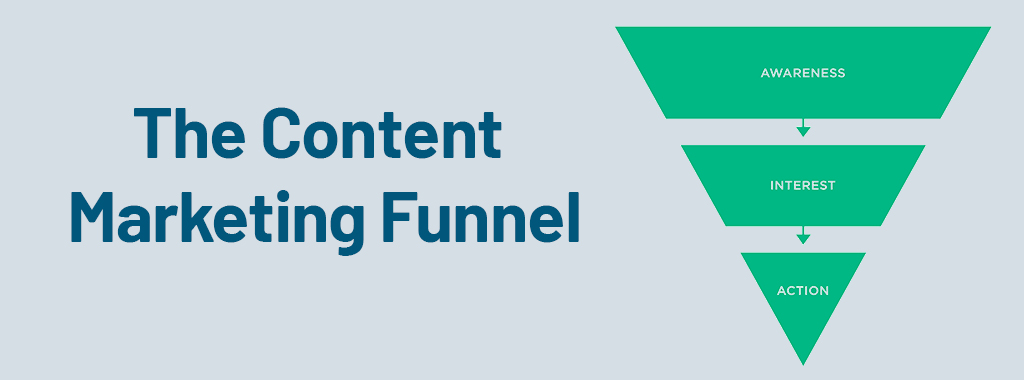
Content marketing funnel

Importance of Content Marketing

Content marketing can drive organic traffic and improve search rankings. It helps establish your brand as an authority in your niche.

Creating High-Quality Content

Types of Content:

  • A) Product Guides: Detailed guides on how to choose and use your products.
  • B) How-To Articles: Step-by-step instructions related to your products.

Tips for Writing Engaging and SEO-Friendly Content:

  • A) Use clear, simple language.
  • B) Include relevant keywords naturally.
  • C) Add images and videos for better engagement.

Example:

If you sell gardening tools, write a blog post titled “How to Choose the Right Gardening Tools for Beginners.”

Setting Up a Blog:

  1. Ensure your blog is part of your main website.
  2. Use a clean and easy-to-navigate design.
  3. Regular Posting Schedule and Topic Ideas:
  4. Post at least once a week.
  5. Plan topics in advance, such as seasonal trends, product updates, and customer stories.

3. Technical SEO Enhancements
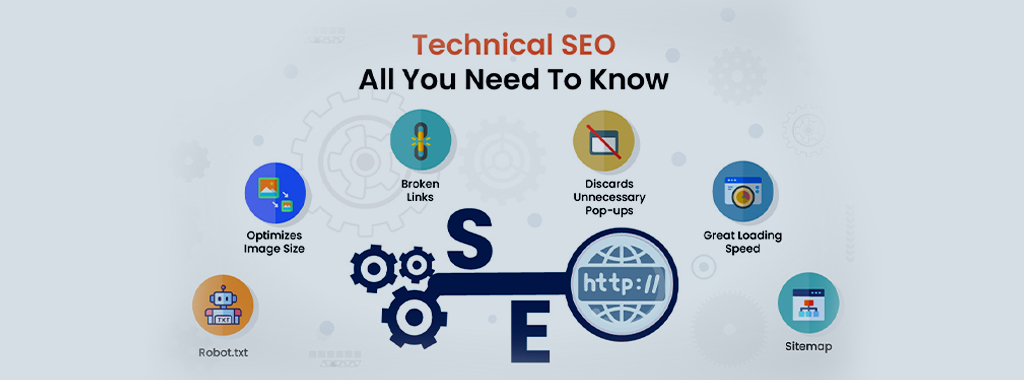
Technical SEO audit

Website speed is crucial for SEO and user experience. People are impatient, and slow loading times can lead to bounce rates and lost sales. Here’s how to optimize your website for speed:

Understanding the Problem:

  • A) Load Time Components: Website load time is impacted by various factors like server response time, image size, and the number of external files.
  • B) The Impact of Slow Speed: Studies show that even a slight delay can significantly increase bounce rates and decrease conversions.

Tools to Test Site Speed:

Google PageSpeed Insights

This free tool by Google analyzes your website’s performance on desktop and mobile devices and offers specific recommendations for improvement.

GTmetrix

Another free tool that provides detailed performance reports, including page load time, waterfall charts, and actionable optimization suggestions.

Techniques to Reduce Load Times:

1. Compress Images: Images are often the biggest culprit behind slow loading times.

Techniques: Use tools like TinyPNG or Kraken.io to compress images without sacrificing significant quality.

Consider: Explore different image formats like JPEG or WebP, which can offer better compression for specific image types.

2. Minify CSS, JavaScript, and HTML: Minification involves removing unnecessary characters like whitespace, comments, and formatting from code files.

Benefits: This reduces file size and improves loading speed.

Tools: Many free online tools and plugins can minify your code. minifier.org is one such tool.

3. Leverage a Content Delivery Network (CDN):

What is a CDN? A CDN is a network of geographically distributed servers that store cached copies of your website’s static content (images, JavaScript, CSS).

Benefits: When a user visits your site, their request is routed to the nearest CDN server, reducing latency and improving load times, especially for users in faraway locations.

Additional Techniques:

Reduce HTTP Requests: Fewer files mean fewer requests to the server, which improves speed. Combine multiple CSS and JavaScript files into single files when possible.

Optimize Server Response Time: Work with your web hosting provider to ensure your server has sufficient resources to handle traffic efficiently.

Enable Browser Caching: Caching allows browsers to store website elements locally, reducing the need to download them on every visit.

Optimize Database Queries: If your website uses a database, ensure queries are efficient and avoid unnecessary data retrieval.

Mobile Optimization

Importance of Mobile-Friendly Design:

Mobile Traffic Dominance: Over half of all web traffic now comes from mobile devices. If your website isn’t optimized for mobile, you’re missing out on a significant portion of your potential audience.

SEO and Mobile-First Indexing: Google prioritizes mobile-friendly websites in search results. A mobile-friendly design ensures your website ranks well on mobile searches.

Enhanced User Experience: Mobile users expect a seamless experience. A website that’s difficult to navigate or has elements that don’t display properly on a mobile device will frustrate users and lead to them bouncing off your site.

Responsive Design Principles:

Responsive design: It is the foundation of mobile optimization. It ensures your website automatically adjusts its layout and elements to fit the screen size of the device being used (desktop, tablet, mobile). Here are some key principles:

Flexible Layouts: Move away from fixed-width layouts. Use fluid grids and percentages to ensure your website elements resize and rearrange themselves for optimal viewing on any device.

Readable Text without Zooming: Fonts should be large enough to read comfortably on a mobile screen without the need for zooming in.

Optimize Images for Mobile Devices: Large images can slow down loading times. Use tools to compress images for mobile viewing while maintaining acceptable quality. Consider responsive image formats that adapt to different screen sizes.

Tappable Buttons and Clickable Elements: Ensure buttons and clickable elements are large enough for easy tapping on a mobile touchscreen.

Prioritize Content: Mobile users have smaller screens and shorter attention spans. Prioritize the most important content and functionality for the mobile experience.

Additional Mobile Optimization Techniques:

Fast Mobile Load Times: Implement the speed optimization techniques mentioned earlier, as they are even more critical for mobile users on slower data connections.

Avoid Flash and Pop-ups: Flash content is not supported on most mobile devices, and pop-ups can be intrusive on small screens. Opt for alternative solutions.

Test on Different Devices: Use browser developer tools or mobile emulators to test your website’s functionality and appearance across various mobile devices.

Importance of a Clean URL Structure:

Search Engines and URLs: Search engines use URLs to understand the hierarchy and content of your website. Clear and descriptive URLs help them categorize your pages effectively.

User-Friendly URLs: Human users also benefit from clear URLs. Short, descriptive URLs that reflect the content of the page are easier to understand and remember.

Best Practices for URL Structure:

Keep it Short: Aim for URLs that are concise and to the point, ideally under 60 characters.

Descriptive: Use keywords that accurately reflect the content of the page.

Readability: Use hyphens to separate words for better readability.

Avoid Complexity: Steer clear of excessive numbers, special characters, or dynamic parameters in your URLs.

Internal Linking Strategies:
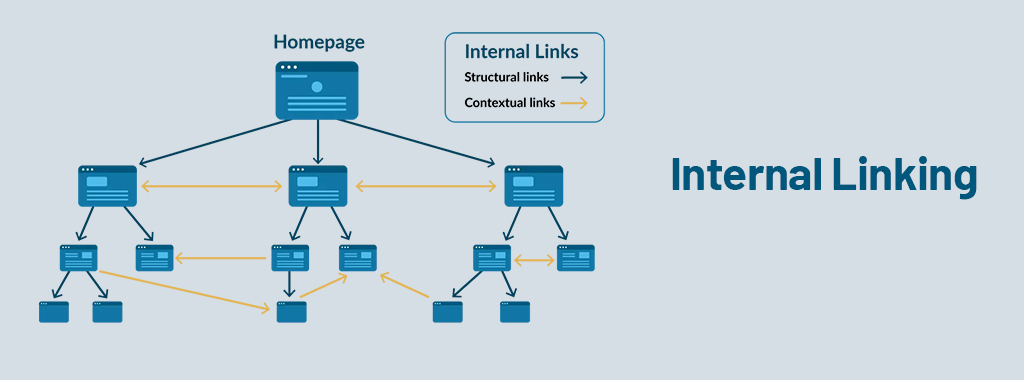
Internal linking SEO

Internal linking refers to the practice of linking between different pages on your website. An effective internal linking strategy has several benefits:

Improved Navigation: Strategic linking helps users find related content and navigate your website more easily.

SEO Benefits: Internal links distribute SEO value throughout your website, helping search engines understand the relationships between your pages and improve your overall ranking.

Tips for Internal Linking:

Link Relevant Content: Link to pages that are topically relevant to the current page.

Anchor Text: Use descriptive anchor text that includes relevant keywords.

Link Depth: Aim to have all your important pages accessible within 3-4 clicks from the homepage.

4. Leveraging Schema Markup
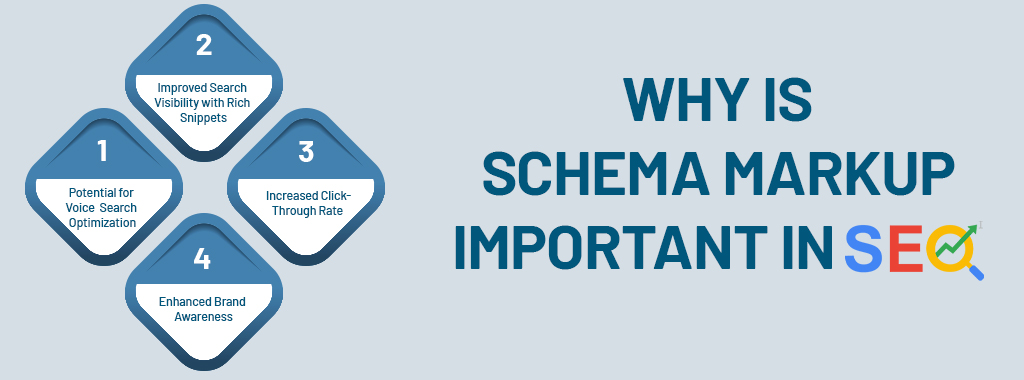
Schema importance SEO

Introduction to Schema Markup

Schema markup is code you add to your website to help search engines understand your content better.

Types of Schema Markup for E-commerce:

There are various schema markup types relevant to e-commerce websites. Here are two important ones:

Product Schema: This schema type provides detailed information about your products, such as:

Product schema markup

Review Schema: This schema type allows you to display star ratings and customer reviews from your website directly in search results. This can significantly boost trust and click-through rates.

Benefits of Schema Markup:

There are several compelling reasons to implement schema markup for your e-commerce website:

Improved Search Visibility with Rich Snippets: Rich snippets are enhanced search results that display additional information about your products beyond just the title and URL. This can include product images, ratings, pricing, and availability. Rich snippets tend to stand out more in search results, potentially leading to higher click-through rates.

Increased Click-Through Rates: By showcasing key product information like star ratings and pricing directly in search results, schema markup can entice users to click through to your website and learn more.

Enhanced Brand Awareness: Rich snippets with your brand logo can increase brand recognition in search results.

Potential for Voice Search Optimization: Schema markup can help search engines understand your content better, which might improve your website’s visibility in voice search results.

Implementation:

Schema markup can be implemented using various methods, including JSON-LD, Microdata, and RDFa. JSON-LD is generally considered the easiest and most recommended format. Many website builders and content management systems (CMS) offer plugins or extensions to simplify schema markup implementation.

5. User-Generated Content
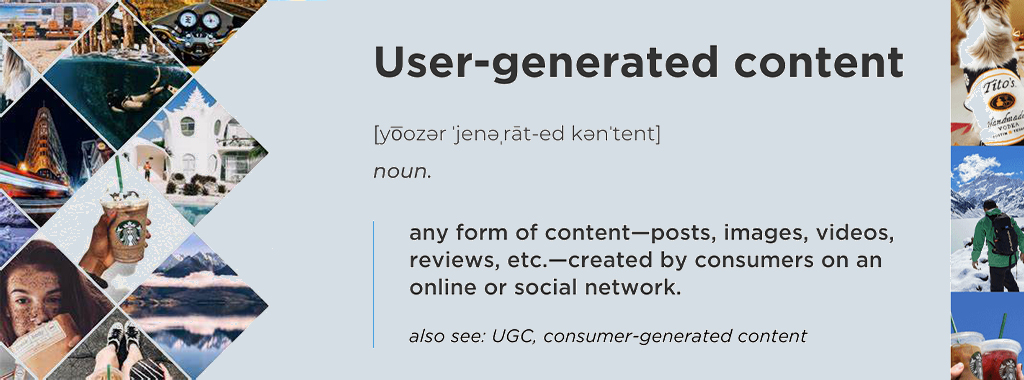
User generated content

Importance of User-Generated Content

  1. Reviews, ratings, and testimonials can boost ecommerce SEO marketing by providing fresh content and building trust.
  2. Encouraging Customer Reviews

Strategies:

  • Send follow-up emails requesting reviews.
  • Offer incentives like discounts or free samples.
  • Integrating User-Generated Content
  • Displaying Reviews and Ratings:
  • Add reviews and ratings to product pages.
  • Highlight positive testimonials in blog posts and social media.
  • Monitoring and Managing Reviews
  • Responding to Reviews:
  • Thank customers for positive feedback.
  • Address negative feedback constructively and offer solutions.

6. Optimize for Local SEO (if applicable)

If your e-commerce store has a local presence, optimize your website and listings for local searches.

Examples:

  • Include your city/region in titles and meta descriptions.
  • Claim your Google My Business listing.
  • Target local long-tail keywords like “best organic skincare products near me.”

7. Seasonal SEO

Identify Seasonal Trends:

  • Use tools like Google Trends to spot seasonal spikes in demand.
  • Plan content and promotions around these trends.
  • Content Optimization
  • Product Descriptions and Titles:
  • Update descriptions and titles with seasonal keywords.
  • Keep the content readable and natural.
  • Seasonal Website Design:
  • Use seasonal themes in your design.
  • Update banner images, color schemes, and layouts to match the season.
  • Blog Posts and Landing Pages
  • Create content focused on seasonal trends and buying guides.
  • Target long-tail keywords with high search intent.

8. Prioritize Voice Search Optimization
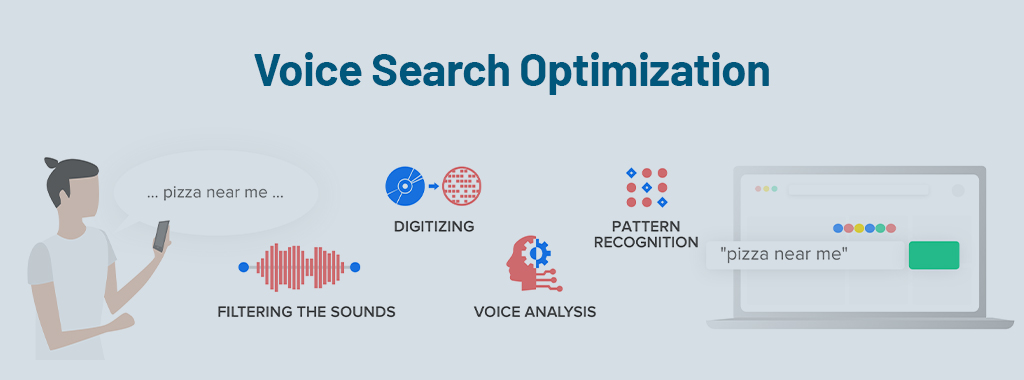
Voice search SEO

With the rise of voice search, optimize your product descriptions and content for natural language queries.

Understanding Voice Search Queries:

Conversational Language: Voice search queries tend to be phrased more like natural conversation than typed keywords. People ask questions and use longer phrases.

Focus on Intent: Voice search users often have a specific goal in mind. They might be looking for information, comparisons, or specific products.

Optimizing for Voice Search:

1. Target Long-Tail Keywords with Questions:

Shift from “buy shoes” to “where can I buy comfortable running shoes?” Instead of focusing solely on product-specific keywords, target long-tail keywords phrased as questions people might ask while searching by voice.

Think Location: If your business has a local presence, incorporate location-based keywords like “best [product type] near me”.

2. Leverage Natural Language Processing (NLP):

Understand Search Intent: While exact keyword matching is less important in voice search, understanding the user’s intent behind the query is crucial. NLP can help you analyze search queries and identify the underlying intent to optimize your content accordingly.

3. Incorporate FAQs into Your Content:

Anticipate User Questions: Create FAQ sections on your product pages and blog posts that address common questions users might ask about your products or the problems they solve.

Use Natural Language: Phrase your FAQs and content in a conversational tone, mimicking the way people speak in natural conversation.

4. Optimize for Featured Snippets:

Answer the Question Concisely: Voice assistants often read snippets from web pages in response to voice search queries. Aim to have your content answer the user’s question concisely and directly within the first paragraph or two, increasing your chances of being featured in a snippet.

Additional Techniques:

Mobile-First Optimization: Since most voice searches happen on mobile devices, ensure your website is mobile-friendly and offers a fast loading experience.

Structured Data and Schema Markup: While not a direct voice search ranking factor, schema markup can help search engines understand your content better, potentially improving your search visibility for relevant voice queries.

Examples:

Product Descriptions: Instead of just listing features, focus on how the product benefits the user.

Before: “Running shoes with maximum cushioning”

After: “Looking for comfortable running shoes that provide great shock absorption? Our cushioned running shoes offer maximum support for your long runs.”

Blog Posts: Create content that answers common user questions in a conversational style.

Topic: Best laptops for students

Title: “Struggling to find the right laptop for school? Here’s what you need to consider!”

9. Create a Data-Driven Internal Linking Strategy

Techniques for a Data-Driven Internal Linking Strategy:

1. Leverage Website Analytics:/p>

Tools: Utilize website analytics tools like Google Analytics to identify your high-performing pages. These pages are typically landing pages, blog posts, or product categories that receive significant organic traffic or user engagement.

2. Analyze User Behavior:

Go Beyond Traffic: Look beyond just page views. Consider metrics like time on page, bounce rate, and internal linking behavior within high-traffic pages. This can reveal user intent and how users are (or aren’t) navigating your website.

3. Identify High-Engagement Content:

Focus on User Engagement: Look for pages with high average time on page or low bounce rates. These pages are likely engaging users and keeping them interested.

4. Link to Relevant Lower-Traffic Pages:

The Bridge Builder: Use the insights from high-traffic and engaging pages to identify relevant lower-traffic pages that could benefit from being linked.

Optimize Anchor Text: When linking, use descriptive anchor text that incorporates relevant keywords related to the target page.

Benefits of a Data-Driven Approach:

Strategic Linking: By linking from authoritative pages to relevant lower-traffic pages, you distribute SEO value and can potentially improve the ranking of those pages.

Improved User Journey: Strategic linking guides users towards relevant content, keeping them engaged and exploring your website further. This can lead to increased conversions and sales.

Data-Backed Decisions: A data-driven approach removes guesswork from internal linking. You can prioritize linking opportunities based on actual user behavior and website performance data.

Examples:

High-Traffic Blog Post: A blog post on “Best Running Shoes for Beginners” has high traffic and engagement.

Lower-Traffic Product Pages: You can link from this blog post to specific product pages featuring running shoes suitable for beginners, using relevant anchor text like “lightweight running shoes” or “comfortable running shoes for new runners”.

By implementing these advanced SEO e-commerce strategies, smaller e-commerce businesses can effectively compete with industry giants and improve their online presence.

Top 5 IT Software Outsource Development Companies in Singapore

Singapore is a big tech hub in Southeast Asia. Most IT specialists come to this city due to world-class tech facilities, good law support for innovative initiatives, and the presence of skilled people. If you happen to be a Small-Medium Enterprise considering doing business with Singapore or seeking to outsource affordable IT-related services in Asia, it is of significance to you.

You have the option of having a small technical team. Therefore, it would make sense to contract out these responsibilities to third-party companies located in Singapore. This way, you can save time and money through IT services and software development.

The Basics of Outsourcing

Getting another party to perform some of your tasks is outsourcing. It’s like teaming up! Here’s a quick breakdown:

  • Onshore Outsourcing: Working with a company in an area with lower costs.
  • Offshore Outsourcing: Partnering Up with an overseas firm.
  • Nearshore Outsourcing: The Importance of Partnerships with Neighbours’ Companies.

Why This Matters to You?

If you are a businessman looking at Singapore or for cost-effective ICT solutions in the Asia-Pacific region, pay attention. You may not have a whole group if you begin with one or two people. Therefore, outsourcing software could actually be good. In this way, you will be able to access the best software development services at a pocket-friendly price.

Why Consider Outsourcing?

Outsourcing can be a boon if:

  • Cost Savings: Working through third-party vendors eliminates the necessity of investing in in-house benefits, office space, and resources. You can save more money if the vendor is operating from a region with good wage structures.
  • Core Business Concentration: This enables a sharp focus on your main business objectives boosting efficiency.
  • Expert Access: A particular advantage for start-ups is that they obtain seasoned expertise in IT by hiring the outsourcing team and thus, have superior performance.

Selecting the Right Software Outsourcing Company

Choosing a software development services company is not just a purchasing event; it may become a fruitful, long-term relationship. Trust is fundamental; with clear contract terms. Here’s what to consider:

  • Pricing: Assessing the economic feasibility of in-house hiring vs. outsourcing. Outsourcing towards cost savings. When outsourcing, compare different Software Development Companies in Singapore for a combination of quality and price.
  • Reliability: Research your potential partners. Measure their performance on different dimensions as well such as team competency, financial health, client feedback, etc. This insight can be pivotal.
  • Timeliness: Make sure that the software outsourcing companies you choose aligns to your schedule, ensuring timely deliveries. Pre-examined discussion initiates relations in advance.

Top 5 IT Software Outsource Companies in Singapore

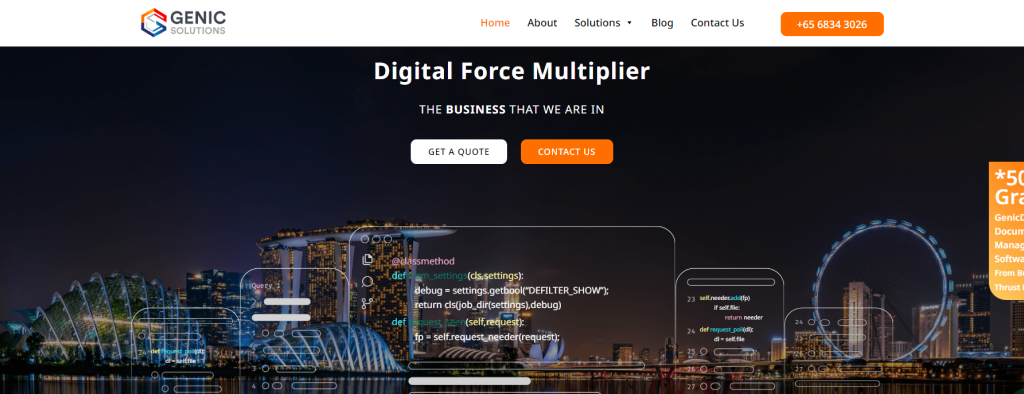
1. Genic Solutions

Genic Solutions

Services Include:
  • Field Service Management
  • Asset Management
  • Custom Software
  • Inventory Management
  • Warehouse Management
  • CRM
  • Document Management
  • Delivery Management
  • Mobile App Development
Company Website https://www.genicsolutions.com/
Price Model Not Hourly Rates
Charges Per Project Based on project size and industry

Genic Solutions is an innovation software development company in Singapore that was set up after an identified market failure in the country’s technology industry. Companies of all sizes and sectors are finding it hard to identify the right solutions to digitize, modernise, and disrupt their business to stay ahead of their competition. Genic Solutions is here to help you overcome this digital shortfall so that you can focus solely on your business, of growing the business.

They have a team of passionate, skillful, and ambitious software engineers who believe firmly in the power of digitalization to drive transformative change. And they have built out of this conviction, advanced enterprise solutions to remove operational bottlenecks, reduce work-errors, and improve operational efficiency in ways that you never thought were possible.

2. Win-Pro Consultancy

Winpro software image

Services Include:
  • Helpdesk services
  • IT Consulting
  • IT Hardware & Software vendor
  • Cloud Server hosting
Company Website Click Here
Price Model Hourly Rates
Charges Per Project $80 to $300.

Win-Pro was established in 1993, and they are a leading IT solutions provider in Singapore. They are committed to customer service and provides a range of services such as Outsourcing IT Hardware, Infrastructure Design, Deployment Services, and Support Services. They have helped more than 5,000 businesses implement IT solutions in Asia. Customer satisfaction is key to their success therefore they conduct surveys and regular reviews of their processes to ensure they adequately comprehend the needs and wants of their customers. Win-Pro Consultancy dedication to providing cost-effective solutions without compromising on quality, making it different from other software outsourcing companies in Singapore.

3. Fortunesoft IT Composition

Fortune Soft IT


Services Include:
  • Web Development
  • Mobile App Development
  • UI/UX Design
  • Cloud Services
  • IT Staff Augmentation
  • DevOps Services
  • Artificial Intelligence
Company Website Click Here
Price Model Hourly Rates
Charges Per Project $25 to $49.

Fortunesoft is a dynamic startup in Fintech, Healthcare, and Commerce, providing innovative software solutions aimed at businesses and new start-ups. They have emerged as a leading software development company based in Singapore. The team of experienced professionals applies modern technologies like mobile, web, cloud, analytics, blockchain, and AI with regard to the development of software for different platforms. They are effective in work and contribute to the growth of customers’ project ROI. They have over ten years of experience with branches in India, Australia, the U.S.A, and other places. The company excels in software product engineering, portal development, CRM solutions, E-Commerce apps, and many other things.

Read More – Successful Hallmarks of Creating Effectives Software Implementation Plan

4. Intelegain Technologies

Intelegain agency

Services Include:
  • Mobile App Development
  • Web Development
  • Analytics Solutions
  • Cloud Solutions
  • Digital Marketing
  • Supply Chain
  • SEO
Company Website Click Here
Price Model Hourly Rates
Charges Per Project $25 to $49.

Intelegain Technologies is one of the best-known Digital Transformation Companies, among the top 12 Software Development Companies in Singapore, offering development solutions for building top-level software and cloud applications powered by cutting-edge technology collaboration for start-ups, enterprises, and businesses. They are focused on helping businesses stay in this fast-growing competitive market and maximize customer value by making their creative, expert, and nimble product solutions. It offers services such as Custom Application Development, Microsoft Dynamics 365 & Power Platform, Azure Cloud Manage services, and Digital Marketing.

5. SF Technologies

SF Technologies

Services Include:
  • Enterprise Software Development
  • Requirements Analysis and Consultation
  • Solution Architecture and Software Design
  • Maintenance, Upgrades, and Optimization
  • Comprehensive CRM Solutions
  • Project Management (Waterfall or Agile methodologies)
Company Website Click Here
Price Model Custom pricing
Charges Per Project Varies by scope

SF Technologies is a trusted software development company in Singapore, specializing in custom enterprise software solutions. They conduct thorough internal and external analysis to create scalable, tailored software that meets clients’ needs. With experienced project managers, they aim to not only deliver high-quality software but also provide an excellent overall partnership experience. Their services help clients improve internal processes, cost efficiency, and delivery speed while offering protection for critical data and flexible solutions for further development.

How to Use TikTok Ads to Skyrocket Your Engagement

TikTok has quickly transformed from a trending social platform into an important marketing platform. It allows very unique formats and offers content creation tools that provide businesses with unrivalled access to both a massive and diverse audience. This is a comprehensive guide on how digital marketers, small business owners, content creators, and professionals of different kinds can use TikTok ads to take their digital presence to new heights. We’ll discuss the various TikTok ads that are made so that they can increase user activity in the app and give brand visibility. You may accomplish your marketing goals and fully utilize TikTok’s dynamic advertising capabilities by utilizing the crucial tactics and insights found here.

TikTok’s Allure for Businesses

TikTok has grown from a simple social media app into a global sensation, blending entertainment with opportunities for marketers to build real connections with consumers worldwide. The secret lies in its algorithm, which delivers content so engaging that users often spend over an hour on the app daily. It truly is a golden chance for businesses to seize attention in an environment where users truly open themselves up to innovative and creative messaging.

The Impact of TikTok in Singapore

As of May 2024, 52.5% of the population used TikTok regularly. Which makes it the most popular social media application in Singapore.

Singaporeans spend more time per month on TikTok than any other social media app. Underlining the app’s importance to the country’s online ecosystem.

Key Highlights:

  • Broad Reach:TikTok reaches 58.3% of Singapore’s internet users. Making it a major player in digital advertising at the start of 2024.
  • Balanced User Base:The split between female (49.3%) and male (50.7%) users on TikTok are nearly even.
  • Growing Popularity:TikTok is the fastest-growing user base among all the other social media apps, from June 2023, which holds the figure of 782,330 downloads in Singapore.

User Engagement and Demographics

Its user base ranges from all demographics, interests, and behaviors, allowing businesses of any size to reach their respective audience with proper accuracy. Whether you want to engage with teenagers, millennials, or the older generation. TikTok has access to all such groups of people who are ready to engage with the brands that sell stuff reflecting their lifestyle and preference.

Marketing Advantages of TikTok

Among these features, the most outstanding is the fact of some kind of community and involvement. That is what makes TikTok different from boring, old-fashioned, passive advertisements. Video watching by the viewer, comments, sharing, likes, and reposting by active user engagement—the most thrilling experience one could go through. It will boost not only the visibility of your ads but will also connect organically with your audience even better. On top of that, the creative format of TikTok is great for getting your brand’s personality and values across in fun and interactive ways.

Types of TikTok Ads

To effectively utilize TikTok for marketing, understanding the different types of ad formats the platform offers is crucial. Each type serves unique purposes and suits different marketing strategies.

In-Feed Ads

The user’s “For You” page has in-feed advertisements that show up when they browse through their feed. Because they fit in with the organic material, these advertisements are less obtrusive and are more likely to pique viewers’ attention. They offer a clear call to action that can successfully turn viewers into consumers, such as downloading an app or going to a website. Owing to their wide distribution and captivating quality, in-feed advertisements work especially well for promotions and special occasions.


TopView Ads

Imagine your ad being the first thing a user sees when they open TikTok. That’s the power of TopView ads. These ads offer prime real estate at the top of the user’s feed and play automatically with sound, maximizing impact and ensuring high visibility. They are perfect for capturing attention right off the bat and can be used to create memorable impressions that users are likely to remember and talk about.

Branded Hashtag Challenges

Branded Hashtag Challenges are a goldmine for marketers trying to get real with TikTok’s audience. With the use of a particular hashtag, these challenges inspire consumers to produce content centered around a subject or prompt connected to your business. In addition to encouraging connection and participation, this also results in the production of user-generated material that has a genuine and reliable feel. These kinds of initiatives have the potential to become viral very rapidly, giving your business enormous exposure and building a sense of community.

Methods for Increasing TikTok Ad Engagement

The key to optimizing the impact of your TikTok ads is careful planning, a deep understanding of your target, and the unique qualities of the site.

Here are some actionable strategies to ensure your campaigns not only capture attention but also drive substantial engagement.

Targeting and Segmentation

Use the powerful targeting options of TikTok to nail down, exactly, it is that you’re looking for. With TikTok’s advanced targeting tools, you will be able to segment your viewers into different groups based on interest, demographic data, and many more. A small company owner, targeting the younger generation, will be able to focus on users according to the age, geography, and interests aligning with the brand. This accuracy makes sure that the people who are most likely to interact with your content receive the ads you spend on them, which increases the effectiveness of your campaigns.

Content Creativity

TikTok thrives on creativity and innovation. Leveraging the platform’s focus on trends can help advertisements make a significant impact.

To connect with viewers, this might entail utilizing hilarious and relevant content, addressing current issues, or adding popular music. Recall that fans of TikTok want genuine, enjoyable material that isn’t overtly advertising.

Top Engagement Techniques

Interactions are more important than views when it comes to engagement on TikTok. Use polls, ask questions in your videos, or invite people to produce content and tag it with your brand to encourage user interaction. These interactive components have the power to turn inactive viewers into engaged participants, greatly increasing your campaigns’ engagement rates.

TikTok Ad Success Measurement

It’s crucial to grasp how to assess the effectiveness of your TikTok advertisements. Here’s how you can monitor and evaluate your campaign outcomes.

KPIs, or key performance indicators

Clearly identify your KPIs before you start promoting. The number of views, conversion rate, and click-through rate are examples of common metrics. You can apply these indicators to determine the efficacy of your advertisements. You can also determine and pinpoint areas that require improvement.

Utilizing TikTok’s Analytics

TikTok offers a thorough analytics platform that provides valuable insights. Use this information to track follower growth, video views, user interaction, and behavioral patterns. This information is crucial for improving later advertisements and tailoring your content to your target audience’s preferences.

Including TikTok in Your Whole Marketing Approach

TikTok must be included into your larger marketing plan in order to optimize your brand’s internet exposure. Here’s how to integrate TikTok into your whole digital marketing strategy.

Complementing Other Social Media Platforms

TikTok is already a powerful tool on its own. However, when paired with other social media sites, its impact may be greatly increased. To increase your audience, cross-post your TikTok videos to Facebook, Instagram, and Twitter. Additionally, make use of the special qualities offered by each platform to bolster your overall message and improve the visibility of your brand.

Seamless Integration Examples

Consider using TikTok videos as teasers for more extensive content on YouTube or your website. For behind-the-scenes material that contrasts with more polished Instagram postings, use TikTok. Your user experience will be more unified and engaging if you integrate every aspect of your marketing plan.

In summary

Ask your SEO company to include TikTok in your digital marketing strategy to have a unique opportunity to reach a big audience. By grasping the different types of ads offered, implementing innovative and precise campaigns, and tracking their performance effectively, you can greatly boost your brand’s online interaction. Keep in mind that achieving success on TikTok hinges on imagination, authenticity, and a strategic direction that matches your audience’s preferences and behaviours. Begin testing different ad formats and tactics today, and observe your engagement rates climb.

whatsapp