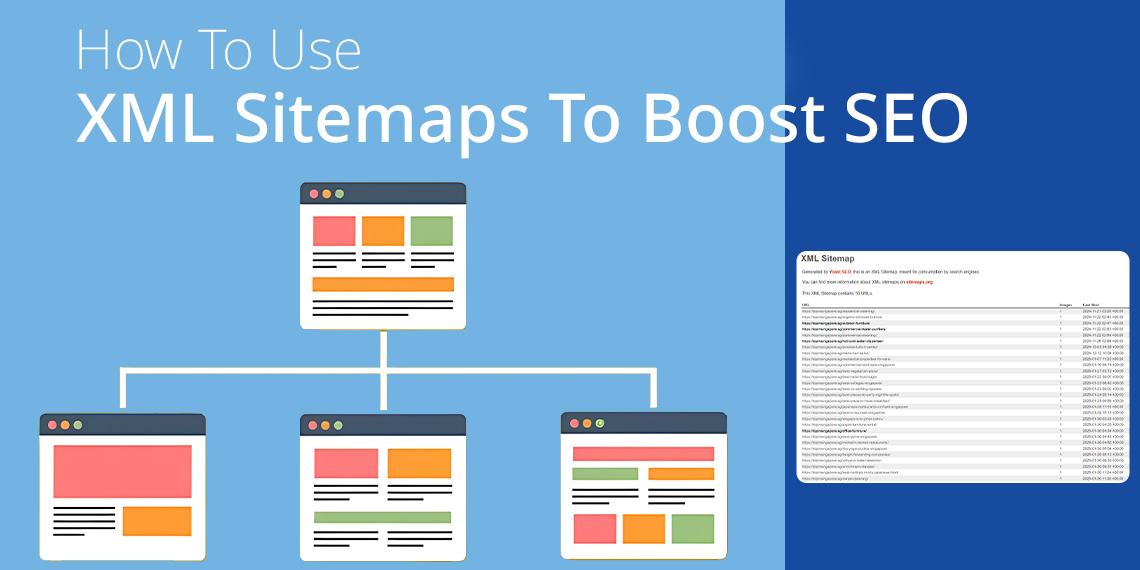
How To Use XML Sitemaps To Boost SEO

If you want more people to find your website on Google then you need an XML sitemap creator which is a special file that acts as a guide to helping search engines to discover and index your pages quickly.

In this guide, you’ll learn how to create an XML sitemap, the benefits of using a sitemap generator, common mistakes to avoid and how businesses can use sitemaps to enhance their SEO strategy.

What is an XML Sitemap?

An XML sitemap is a file that lists all the pages on your website which makes it easier for search engines to find and index them.

Think of your website as a huge city. Without a sitemap, search engines wander around, possibly missing key locations. Some pages might stay lost which makes it harder for people to spot them in search results. But with a sitemap, you hand over a clear map and ensure crawlers dash straight to the most important spots.

Why Do XML Sitemaps Matter for SEO?

1. Helps Search Engines Find Pages Faster

Search engines send bots to explore websites. If your site has a sitemap, these bots will quickly locate new pages instead of getting lost.

2. Guides Crawlers to the Right Pages

Big websites can have thousands of pages. A sitemap directs search engines to the most valuable pages first.

3. Finds Hidden Pages

Some pages don’t have links, so search engines skip them. A sitemap tells crawlers, “Look here too!”

4. Helps With Images and Videos

If your site has lots of images or videos, a sitemap creator ensures they appear in search results. This is useful for businesses which rely on digital content to attract customers.

Types of Sitemaps

Sitemaps come in different forms, each with a special job to help search engines and people move through a website smoothly. Here are the most common ones:

1. XML Sitemap (The Main One)

An XML sitemap works like a treasure map by guiding search engines to important pages on your website. It lists all key web pages which makes sure search engines spot and store them quickly. Whether you have a blog, an online shop or a business website, this sitemap helps search engines to track down every page that matters.

2. Image Sitemap

If your website bursts with images like online banners or poster services then an image sitemap is a must. It signals search engines to notice pictures by helping them pop up in search results and draw in more visitors.

3. Video Sitemap

For websites full of videos, a video sitemap points out important details like the title, length and category. This helps search engines grasp what each video is about. Media websites and businesses with video tutorials or promotions gain attention from this sitemap.

4. News Sitemap

A news sitemap pushes fresh articles in front of search engines quickly. News websites rely on this sitemap to send their latest updates straight to Google News in minutes. It helps spread breaking stories fast.

5. HTML Sitemap

An HTML sitemap lays out all website pages in a neat, easy-to-read list for visitors. It guides users to the right place without confusion. Large websites with tricky navigation depend on this sitemap to clear the way for users looking for information.

How To Create an XML Sitemap

1. Make a Static Sitemap

You can create a sitemap manually and upload it to your website. However, every time you add or remove a page, you must update the file.

2. Use a Dynamic Sitemap

A dynamic sitemap updates automatically whenever new content is added. A free sitemap generator can help automate this process.

To create an XML sitemap, follow these steps:

  • List all important pages: Include your homepage, product pages, blog posts, and contact pages.
  • Use the correct XML format: A proper sitemap contains <urlset>, <url>, <loc>, and <lastmod> tags.
  • Upload the sitemap: Place it at yourwebsite.com/sitemap.xml for search engines to find it.

For WordPress sitemap users, installing a plugin ensures automatic updates whenever new content is published.

Best Tools for Generating XML Sitemaps

Creating a sitemap manually takes time, but the right tools can speed up the process.

1. Free Sitemap Generators

A sitemap generator scans your website and creates a complete XML file in seconds. This is the simplest way to generate a sitemap for small or medium-sized websites.

2. CMS Plugins

If you use WordPress, a sitemap plugin automatically generates and updates your sitemap whenever you add new content.

3. Hosting Features

Some hosting providers include an XML sitemap creator as part of their service, helping you maintain a properly formatted sitemap.

Using these tools ensures that your sitemap remains updated, improving your site’s visibility in search engines.

How To Submit Your Sitemap to Search Engines

Google Search Console

  1. Log into Google Search Console.
  2. Click your website name.
  3. Go to Sitemaps.
  4. Type in your sitemap link (e.g., yourwebsite.com/sitemap.xml).
  5. Click Submit.

Bing Webmaster Tools

  1. Sign in to Bing Webmaster Tools.
  2. Select your website.
  3. Click Sitemaps.
  4. Type in your sitemap link and submit it.

If your site updates frequently, use a free generator to keep your sitemap current before resubmitting it.

How To Make Your Sitemap Work Better

1. Only List Important Pages

Do not include:

  • Deleted pages
  • Redirected pages
  • Pages that don’t need indexing (such as login pages)

2. Keep It Within Search Engine Limits

  • Your sitemap should contain no more than 50,000 URLs
  • The file size should be under 50MB

For large sites, break your sitemap into sections and use a sitemap index file.

3. Optimise Image and Video Sitemaps

If your site has rich media, ensure your WordPress sitemap includes <image:image> and <video:video> tags.

4. Update Your Sitemap Regularly

An outdated sitemap can slow down search engine indexing. Use an XML sitemap that refreshes the sitemap when changes occur.

5. Add Your Sitemap to robots.txt

To make sure search engines find your sitemap, add this line to your robots.txt file:

Sitemap: https://yourwebsite.com/sitemap.xml

Common Sitemap Mistakes to Avoid

Wrong URLs

Every link must be:

  • Correct (no broken links)
  • Consistent (matches your main website structure)
  • Open to crawlers (not blocked by robots.txt)

Adding Pages That Shouldn’t Be Indexed

If a page has noindex tag, keep it out of your sitemap.

Forgetting To Update Your Sitemap

A sitemap with old pages confuses search engines. A free sitemap generator can prevent this problem.

How an XML Sitemap Helps Businesses in Singapore

Businesses in Singapore like Bthrust SG stay ahead by using well-structured XML sitemaps. Whether a company builds WordPress or an XML sitemap it guides search engines straight to their content which ensures it gets noticed quickly.

For digital businesses, speed wins because if a company regularly adds new products, services or blog posts then search engines might lag in spotting these updates. An XML sitemap creator speeds up the process by signalling search engines to crawl and index fresh content instantly. This helps businesses that depend on organic traffic to attract more visitors and boost sales.

Singapore’s market moves fast and SEO helps businesses to catch the right customers. Without a strong XML sitemap, search engines might overlook important pages, pushing them lower in search rankings. A sitemap generator fixes this problem by listing all the right pages so that nothing valuable gets ignored.

A well-organised sitemap also makes websites easier to explore. Visitors can slide through pages smoothly and find what they need without confusion. Keeping an updated WordPress sitemap not only sharpens SEO but also gets more traffic and increases conversions.

If a company wants to rule search rankings then using an XML sitemap creator is not optional but essential.

Conclusion

An XML sitemap works like a map of hidden treasures for search engines. It points them to the best pages which help them to crawl, understand and rank your content faster.

If you haven’t refreshed your sitemap in a while then now is the time. Use a free generator or a WordPress sitemap tool to keep your website sharp. When done right, your sitemap will boost search rankings and bring more visitors to your site.

Want to strengthen your website’s SEO and grow your online presence? Bthrust SG delivers top-notch SEO services, sitemap solutions, and digital marketing strategies to help your businesses shine online. Visit us today and we will take your website to the next level! 🚀

Google Core Update March 2025: How It Affects Your Website

What Google Announcement on the March 2025 Core Update

Google officially announced the March Core Update 2025 to improve search results by showing more helpful and engaging content. This update aims to help people find better answers when they search.

Google also shared that the Google Core update in March 2025 will continue improving search rankings and making it easier for website owners to reach their audiences. Some changes have already been implemented, and more will follow later this year.

When and How the Update Rolls Out

This Google core update is the first significant change of 2025. It comes three months after the last update in December 2024. Google announced it will take about two weeks to finish rolling out.

During this time, search rankings may change. Websites may increase or decrease in search results as Google adjusts its system. Once the update is done, Google will share more details on its website.

Insights from Google’s LinkedIn Announcement

Google Search Central shared more information about the Google Core update in March 2025 on LinkedIn. The post reiterated Google’s goal to ensure search results show the best content. Google also reminded website owners to create valuable pages for users not just for search rankings.

The post included a link to Google’s ranking history page, where more details will be shared when the update finishes.

How This Update Affects Websites and SEO

The Google ranking algorithm update changes how websites rank in search results. Some sites may move higher, while others may drop. Google rewards websites that provide clear, trustworthy, and valuable content.

To maintain strong search rankings, website owners should:

  • Create Helpful Content: Write useful, easy-to-read pages that answer people’s questions.
  • Follow Google’s E-E-A-T Guidelines: Demonstrate experience, expertise, authority, and trustworthiness in every piece of content.
  • Improve Website Performance: Ensure pages load quickly, are mobile-friendly, and follow SEO best practices.
  • Keep Visitors Engaged: Encourage people to stay on the site by providing clear information and a seamless experience.

Rankings may change as the update rolls out, but focusing on quality content and an excellent user experience will help websites maintain strong search performance.

Introduction to SEO: What is SEO and Why It Matters?

Nowadays, businesses rely on search engines to attract customers. When people search for products or services, they usually click on the top results. If your website doesn’t appear on the first page, you miss out on potential customers.

This is where SEO services come in. Search Engine Optimisation (SEO) helps websites rank higher on search engines like Google. It ensures that people find your business when searching for relevant terms. Without SEO, even the best website may struggle to attract visitors.

This guide explains what SEO is, why it is important, and how businesses can benefit from it.

What Is SEO?

SEO stands for Search Engine Optimisation. It helps websites show up when people search for something online.

When someone types a question into Google, the search engine hunts through millions of websites. It picks the best ones and places them at the top. The higher your website appears, the more people visit.

Think of Google as a librarian who sorts books. It arranges the most useful and relevant books on the front shelves. SEO helps your website become one of those top books.

How Does Google Work?

Google doesn’t randomly pick websites to show on top. It follows a process.

1. Crawling

Google sends tiny bots, like speedy messengers, to race across the internet. They scan web pages, gathering details about each one.

2. Indexing

After gathering information, Google stores these pages in its vast digital library. If a website doesn’t get stored here, no one will find it in search results.

3. Ranking

When someone searches for something, Google sifts through its collection. It arranges websites based on usefulness, speed, and quality. The most valuable ones sit at the top.

Without SEO, your website might get buried under thousands of others.

The Key Parts of SEO

SEO isn’t about guessing. It involves smart strategies to help websites reach the top.

1. On-Page SEO

On-page SEO improves things inside a website.

  • Right Keywords – Find words people often type in Google. Use them naturally in your content.
  • Catchy Titles & Descriptions – Write interesting headings that grab attention.
  • Easy-to-Read Content – Arrange text properly with headings, bullet points, and short paragraphs.
  • Internal Links – Connect different pages within your website for smoother navigation.
  • Image Optimisation – Shrink image sizes so the website loads faster.

2. Off-Page SEO

Off-page SEO focuses on what happens outside a website. For example:

  • Backlinks – Other websites linking to yours boost your credibility.
  • Social Media Shares – Sharing content on social platforms spreads your website’s reach.
  • Guest Blogging – Writing articles for other websites increases exposure and authority.

3. Technical SEO

Technical SEO improves a website’s performance and structure. For example:

  • Speed Boosting – Slow websites lose visitors. Faster websites rank better.
  • Mobile-Friendly Design – More people use phones to browse. Your website must work well on all screens.
  • Secure Website (HTTPS) – Secure websites build trust and rank better.
  • Fixing Broken Links – Remove broken links that frustrate visitors.

Why Does SEO Matter?

A well-optimised website attracts more visitors. Here’s why SEO is a game-changer for businesses:

1. Brings More Visitors

Most people click on the top search results. If your website lingers on page two or three, hardly anyone sees it. SEO moves it up, increasing visitors.

2. Saves Money on Ads

Paid ads stop working when you stop paying. SEO brings free visitors even when you’re asleep.

3. Builds Trust

People trust websites that rank high. If Google places your site at the top, customers believe it’s reliable.

4. Outshines Competitors

If two businesses sell the same product, the one with better SEO wins more customers.

5. Works Non-Stop

Unlike ads that disappear once the money runs out, SEO keeps attracting people 24/7.

SEO Myths That Mislead Businesses

Many believe SEO is a magic trick. Some think it’s unnecessary. Here’s the truth.

1. SEO Is a One-Time Job

SEO isn’t like fixing a broken door. It’s like taking care of a garden. It needs watering, pruning, and new seeds to stay fresh.

2. More Keywords Mean Better Rankings

Stuffing a page with repeated words makes it unreadable. Google prefers natural, helpful content.

3. Only Big Brands Benefit from SEO

Even small businesses can shine with good SEO. A well-optimised small website can rank higher than big competitors.

4. Paid Ads Can Replace SEO

Ads bring visitors instantly, but SEO builds a long-lasting audience. A strong SEO strategy works like a magnet, pulling visitors without spending money.

How to Start with SEO?

SEO might seem tricky, but small steps lead to big results. Here’s how businesses can begin:

1. Pick the Right Keywords

Use Google’s keyword tools to find words people search for. Target words with steady search volume.

2. Create Helpful Content

Write articles and guides that solve problems. Clear, useful content ranks higher.

3. Improve Website Speed

Slow websites frustrate visitors. Compress images, use a reliable hosting service, and remove unnecessary elements.

4. Earn Backlinks

Get other trusted websites to link to yours. Search engines see backlinks as votes of confidence.

5. Optimise for Mobile Users

Most people browse on their phones. A website should look good and load fast on mobile screens.

6. Track Progress

Use Google Analytics to check traffic and rankings. Adjust strategies based on results.

How SEO Helps Different Types of Businesses

SEO isn’t just for big companies. It helps businesses of all sizes and industries grow. Here’s how different businesses benefit from SEO:

1. Local Businesses

Shops, restaurants, and service providers rely on local customers. Local SEO helps them appear in searches like “best bakery near me” or “plumber in London.” Google My Business listings, customer reviews, and location-based keywords improve their visibility.

2. E-Commerce Stores

Online stores compete with thousands of others. SEO helps them rank for product searches, bringing in buyers without paying for ads. Optimising product descriptions, images, and user experience boosts sales.

3. Service Providers

Consultants, freelancers, and agencies need clients. SEO helps them appear in search results when people look for experts in their field. High-quality blogs, case studies, and keyword-focused service pages build trust.

4. Educational Websites

Schools, online courses, and coaching centres attract students through SEO. Optimising course pages, adding helpful blog posts, and ranking for common questions bring in learners.

5. Healthcare Providers

Doctors, dentists, and wellness clinics use SEO to appear when people search for symptoms, treatments, or nearby clinics. Informative content, patient reviews, and mobile-friendly websites improve rankings.

How Long Does SEO Take?

SEO doesn’t work overnight. It’s like growing a tree—steady care leads to strong roots and lasting results. Depending on competition and strategy, websites see noticeable growth in three to six months.

SEO success depends on consistency. Websites that keep improving content, speed, and structure climb higher.

Final Thoughts

SEO isn’t just a trend—it’s a necessity for businesses. It boosts visibility, brings visitors, and builds trust. Businesses investing in SEO services gain an edge over competitors.

To ensure you choose the right SEO partner, check out this comprehensive guide on selecting the best SEO company in Singapore. By understanding the importance of SEO and applying the right strategies, any business can attract more customers, grow faster, and stay ahead in the online world.

At BThrust, we provide expert SEO services tailored to your business needs. Whether you’re a startup or an established company, our team helps you achieve higher rankings, increased traffic, and long-term growth. Let BThrust take your online presence to the next level!

Top ChatGPT Prompts for SEO: Boost Your Rankings Now

SEO strengthens your online presence and pushes your website to the top of search results. It determines how easily people find your content on platforms like Google. Yet, crafting high-ranking content demands precision and strategy.

This is where ChatGPT provides a powerful advantage. By using the right prompts, you can shape SEO-friendly content, identify high-impact keywords, and boost your site’s visibility.

In this blog, we’ll uncover the best ChatGPT prompts for SEO and explore how you can use them to sharpen your digital strategy.

What Are ChatGPT Prompts for SEO?

ChatGPT prompts serve as guiding cues or queries that direct the AI to generate precise responses. In SEO, these prompts ignite ideas, sculpt content, and sharpen website performance. You can instruct ChatGPT to uncover strategic keywords, compose compelling meta descriptions, or map out structured blog outlines.

Leveraging ChatGPT for SEO simplifies tasks and conserves effort. However, success depends on crafting well-structured content ChatGPT prompts. Below are some of the most effective ones to enhance your SEO strategy.

Why Use ChatGPT for SEO?

Before we examine the prompts, let’s grasp why ChatGPT proves valuable for SEO:

  1. Saves Time: Writing SEO-friendly content demands hours. ChatGPT accelerates the process.
  2. Generates Ideas: Struggling for content ideas? ChatGPT sparks creativity.
  3. Enhances Content Quality: With the right prompts, ChatGPT crafts engaging and optimised content.
  4. Keyword Research: ChatGPT suggests keywords and phrases to target.
  5. On-Page Optimisation: It aids in creating meta descriptions, headings, and more.

Now, let’s uncover some of the best ChatGPT prompts for SEO.

Best ChatGPT Prompts for SEO

Here are some of the top prompts you can employ to refine your SEO efforts:

1. Keyword Research Prompts

Keywords form the backbone of SEO. Use these SEO prompts to unearth the right keywords:

  • “Suggest 10 long-tail keywords for [your topic].”
  • “What are the most searched keywords related to [your industry]?”
  • “List low-competition keywords for [your niche].”

For example, if you manage a fitness blog, you could ask:
“Suggest 10 long-tail keywords for home workouts.”

If you’re looking to optimise your website with the right keywords, consider seeking professional help. Bthrust’s SEO services can provide tailored keyword strategies to improve your rankings.

For an SEO company, you could ask:

  • “Suggest 10 long-tail keywords for SEO services in Singapore.”
  • “What are the most searched keywords related to SEO agencies in Singapore?”
  • “List low-competition keywords for SEO services for small businesses in Singapore.”
    If you’re looking for expert assistance with your SEO strategy, Bthrust offers customised solutions for every business.

2. Content Ideas and Outlines

Creating fresh content remains essential for SEO. Use these prompts to generate ideas:

  • “Give me 5 blog post ideas about [your topic].”
  • “Create an outline for a blog post titled [your title].”
  • “What are some trending topics in [your industry]?”

For instance:
“Give me 5 blog post ideas about vegan recipes.”

3. Writing SEO-Friendly Content

Once you secure your keywords and ideas, use these prompts to draft optimised content:

  • “Write a 300-word introduction for a blog post about [your topic].”
  • “Create a meta description for a page targeting [your keyword].”
  • “Write a FAQ section for a blog post about [your topic].”

Example:
“Write a 300-word introduction for a blog post about digital marketing tips.”

4. On-Page SEO Prompts

On-page SEO involves refining individual pages on your website. Use these prompts:

  • “Suggest H1, H2, and H3 headings for a blog post about [your topic].”
  • “Write an alt text for an image about [your keyword].”
  • “How can I improve the readability of this content?”

For example:
“Suggest H1, H2, and H3 headings for a blog post about email marketing.”

5. Link-Building Prompts

Backlinks remain crucial for SEO. Use these prompts to uncover link-building opportunities:

  • “List 10 websites where I can submit a guest post about [your topic].”
  • “Suggest outreach email templates for link-building.”
  • “What are some strategies to build backlinks for [your niche]?”

Example:
“List 10 websites where I can submit a guest post about travel blogging.”

6. Technical SEO Prompts

Technical SEO ensures your website operates smoothly. Use these prompts:

  • “What are common technical SEO issues, and how can I fix them?”
  • “How can I improve my website’s loading speed?”
  • “Suggest tools to audit my website’s SEO performance.”

For instance:
“What are common technical SEO issues, and how can I fix them?”

How to Use ChatGPT Prompts Effectively

To extract the most value from Blog ChatGPT prompts for SEO, follow these tips:

  1. Be Specific: The more precise your prompt, the better the response. For example, instead of asking, “Write a blog post,” ask, “Write a 500-word blog post about the benefits of yoga for beginners.”
  2. Use Keywords: Incorporate your target keywords in the prompts. This helps ChatGPT generate optimised content.
  3. Edit and Refine: ChatGPT serves as a tool, not a replacement for human effort. Always review and tweak the content it produces.
  4. Experiment: Test different prompts to discover what works best for your needs.

Examples of ChatGPT Prompts in Action

Let’s examine some real-life examples of how these prompts function:

Example 1: Keyword Research

Prompt: “Suggest 10 long-tail keywords for digital marketing.”
Response:

  1. Digital marketing strategies for small businesses
  2. How to start a digital marketing agency
  3. Best digital marketing tools for beginners
  4. Digital marketing trends in 2023
  5. Social media marketing tips for startups
  6. Email marketing vs social media marketing
  7. How to measure ROI in digital marketing
  8. Digital marketing courses for beginners
  9. Content marketing vs digital marketing
  10. Affiliate marketing strategies for beginners

Example 2: Blog Outline

Prompt: “Create an outline for a blog post titled ‘Top 10 SEO Tips for Beginners’.”
Response:

  1. Introduction: Why SEO matters
  2. Tip 1: Conduct keyword research
  3. Tip 2: Optimise your meta descriptions
  4. Tip 3: Use internal linking
  5. Tip 4: Focus on mobile-friendliness
  6. Tip 5: Craft high-quality content
  7. Tip 6: Use alt text for images
  8. Tip 7: Improve page loading speed
  9. Tip 8: Build backlinks
  10. Tip 9: Monitor your analytics
  11. Tip 10: Stay updated with SEO trends
  12. Conclusion: Recap and final thoughts

Example 3: Meta Description

Prompt: “Write a meta description for a page targeting ‘best-running shoes for beginners’.”
Response:
“Searching for the best running shoes for beginners? Explore our top picks for comfort, support, and durability. Begin your running journey today!”

Common Mistakes to Avoid

While ChatGPT stands as a powerful tool, watch out for these pitfalls:

  1. Over-Reliance: Avoid depending solely on ChatGPT. Always review and adjust the content.
  2. Generic Prompts: Vague prompts yield generic responses. Be precise.
  3. Ignoring SEO Basics: ChatGPT aids, but you must still follow SEO best practices.
  4. Not Updating Content: SEO trends evolve. Regularly refresh your content to stay relevant.

Final Thoughts

Harnessing ChatGPT prompts for SEO transforms how you create content. From uncovering keywords to shaping well-optimised material, ChatGPT streamlines the entire process. Yet, it remains a tool, not a flawless solution. Blend its capabilities with your expertise to produce the most effective results.

Start experimenting with these prompts today and watch your website rankings soar. Happy optimising!

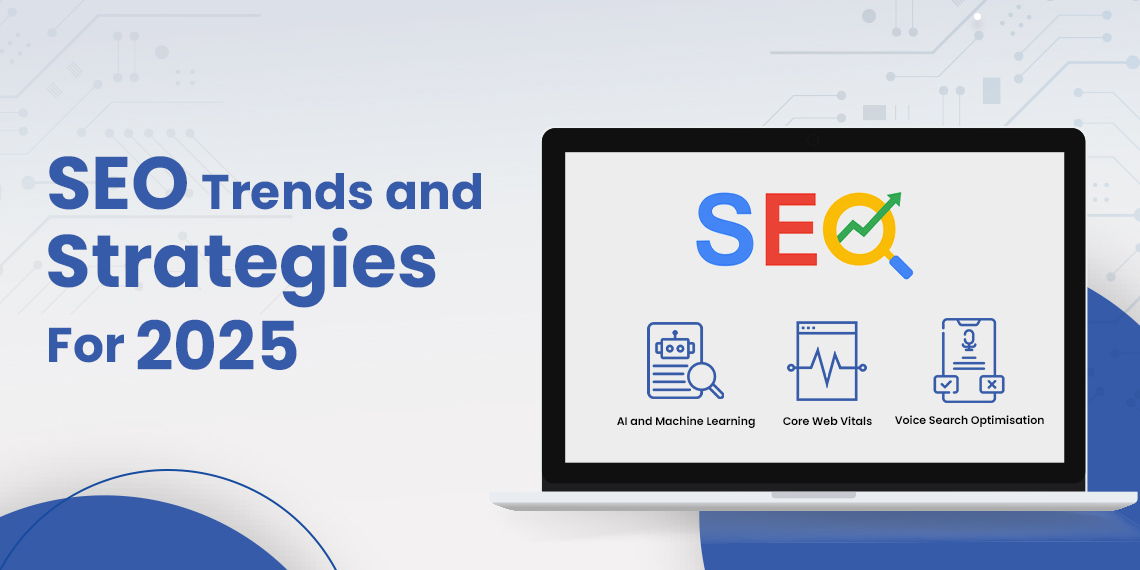
SEO Trends and Strategies for 2025: A Complete Guide

The world of SEO changes quickly. Staying updated on the latest SEO trends in 2025 keeps businesses ahead of their competitors. As search engines grow smarter and people search differently, companies must refresh their SEO strategies for 2025 to thrive.

Tools like AI, mobile-first indexing, and zero-click searches are reshaping SEO marketing. In Singapore, where businesses compete fiercely, mastering local SEO has become a vital skill. Search engines now focus more on how helpful, clear, and trustworthy content is, following E-E-A-T guidelines (Expertise, Experience, Authoritativeness, Trustworthiness).

This guide uncovers the trends defining the future of SEO in Singapore and around the world. Packed with practical SEO tips and actionable strategies, it shows how businesses can adapt, improve, and succeed in this ever-changing field.

Trend 1: AI and Machine Learning in SEO

AI tools like ChatGPT and Bard now drive big changes in SEO marketing. They help businesses generate ideas, refine keywords, and study audiences faster. These tools shape how content appears and how well it ranks.

However, AI has a tricky side. Relying too much on it can lead to dull, shallow content that lacks the quality search engines demand. Google looks for content that shows real expertise, matching its E-E-A-T guidelines.

How AI Shapes SEO in Singapore

  • AI speeds up keyword research and content writing.
  • It reveals trends and content gaps before competitors notice them.
  • It adjusts content to fit specific audiences, increasing engagement.

Practical SEO Tips for Using AI

  1. Blend AI’s speed with human creativity to keep content unique.
  2. Check AI-made content carefully to ensure it fits your goals.
  3. Craft content that feels thoughtful, insightful, and clear.

Businesses in Singapore can harness AI as a powerful tool in a competitive SEO race. But these SEO optimisation tips must guide it with human judgement to fully benefit.

Trend 2: Focus on Core Web Vitals

Google rewards websites that deliver smooth, fast, and stable experiences. Core Web Vitals—speed, responsiveness, and layout stability—show how well a site satisfies visitors. Poor scores drive users away and hurt rankings.

Why Core Web Vitals Matter

  1. Fast Pages: Visitors leave slow websites quickly, reducing engagement.
  2. Responsive Interactions: Sites must respond instantly to clicks and taps.
  3. Stable Layouts: Shifting text or images annoys users and breaks trust.

Steps to Improve Core Web Vitals

  • Shrink images and use modern formats like WebP.
  • Spread website content across servers with a content delivery network (CDN).
  • Clean up extra code in CSS, JavaScript, and HTML to make pages load faster.

For Singaporean businesses, prioritising Core Web Vitals sharpens their competitive edge. Faster, user-friendly websites not only win visitors but also improve rankings by enhancing visibility in SERP features, ensuring a stronger online presence.

Trend 3: Zero-Click Searches 

Search engines now answer many questions directly, creating zero-click searches. Featured snippets, knowledge panels, and other rich results give users what they need without clicking a link. Businesses must adjust to stay visible.

How to Optimise for Zero-Click Searches

  1. Add Schema Markup: Use structured data to explain your content to search engines.
  2. Write FAQs: Answer common questions clearly and directly.
  3. Focus on Local SEO in Singapore: Share contact information and target location-specific searches like “near me.”

Why It Matters

Zero-click searches don’t drive website traffic but improve visibility. Appearing in rich results builds brand trust and attracts future clicks. In Singapore’s crowded market, this strategy becomes vital.

Trend 4: Mobile-First and Voice Search Optimisation

More people search on mobile devices and by voice than ever before. Websites must adapt to mobile-first indexing and create content for natural, conversational queries.

How to Adjust

  1. Build mobile-friendly websites that adapt to smaller screens.
  2. Choose long-tail, question-style keywords that match voice search phrases.
  3. Use structured data to make content easy for voice assistants to find.

In Singapore, where mobile usage dominates, these adjustments make websites more accessible and increase engagement.

Trend 5: Local SEO for Singapore

More shoppers search online for local businesses. Companies focusing on local SEO in Singapore gain more customers and build stronger connections with their communities.

Steps to Improve Local SEO

  • Claim and complete your Google My Business listing.
  • Use keywords that include your location, like “SEO agency in Singapore.”
  • Ask happy customers to leave reviews and respond to feedback.

By focusing on local SEO, businesses build trust and attract people nearby.

Trend 6: Search Alternatives and Google’s Antitrust Trial 

As Google faces legal challenges, platforms like Bing and DuckDuckGo are growing. Businesses must prepare for search traffic across multiple platforms.

How to Stay Visible

  • Study ranking factors unique to each platform.
  • Strengthen technical SEO with schema markup and fast-loading pages.
  • Spread content to multiple platforms to reach broader audiences.

Businesses that embrace these changes can find new opportunities while others hesitate.

Trend 7: E-E-A-T and the Push for Originality

Google favours content that feels authentic, reliable, and useful. Following E-E-A-T guidelines ensures businesses meet these standards and rank higher.

How to Succeed

  1. Share personal experiences, research, or expertise.
  2. Refresh old content to keep it accurate and relevant.
  3. Add visuals like infographics and videos to deepen engagement.

Creating thoughtful, original content builds trust and loyalty among readers.

Trend 8: The User Versus the Keywords

Google now values meeting user needs more than stuffing keywords into content. Businesses must create material that answers real questions.

How to Focus on Users

  • Study search intent to learn what users want.
  • Solve problems or explain complex ideas clearly.
  • Write content that flows naturally and feels helpful.

By understanding user goals, businesses create content that connects.

Trend 9: Technical SEO Will Matter More Than Ever

The backbone of SEO lies in technical SEO, which makes websites easier for search engines to find and rank. Companies focusing on this area gain long-term benefits.

What to Improve

  • Fix navigation issues to make websites easy to explore.
  • Use schema markup to explain content better.
  • Speed up server response times to load pages faster.

Strengthening technical SEO ensures businesses stay visible and ready for the future.

Conclusion 

The future of SEO in Singapore offers new challenges and opportunities. Companies must embrace AI, master local SEO, and focus on user intent. Improving Core Web Vitals and staying updated on technical SEO secures long-term success.

Adapting these trends makes websites faster, more useful, and easier to find. Originality and trust will remain key. Businesses ready to act will lead the way.

SEO Content Brief – Complete Guide

Think of trying to make a sandwich without knowing what goes where. You might slap things together, but it could taste strange or fall apart. Writing without a plan feels the same. An SEO content brief works like a recipe. It shows you every step, helping your content shine and succeed.

SEO content briefs guide writers by explaining topics, audience, and purpose. They also include words like SEO content brief which make it easier for readers to find your work online. These briefs sharpen your ideas, making them clear, strong, and exciting.

With a good SEO brief, your writing not only grabs attention but also delivers what people need. In this guide, you’ll first learn how to write a brief, then understand why it matters, and finally discover how to use it to craft amazing content. Let’s begin this journey to better writing!

How to Write an SEO Brief?

Crafting an SEO brief takes focus and care. Start by picking your audience. Add words like SEO content brief and SEO briefs. List topics, ideas, and links. This brief becomes your map, showing the way to writing success.

Is the Work of Creating Detailed Content Briefs Worth It?

Yes, creating SEO briefs helps your writing sparkle. In fact, these briefs speed up work, clarify ideas, and prevent mistakes. As a result, writers feel more focused, and content climbs higher in search results. Moreover, with an SEO brief, your content impresses both readers and search engines.

Key Steps to Create an SEO Content Brief

Follow these steps to make a strong SEO brief. They will guide your ideas, excite your readers, and make your content a winner.

1. Discover Your Audience

Before writing, first, figure out who will read your words. For example, are the kids learning something fun? Or perhaps are parents looking for help? Alternatively, are workers searching for tools? Knowing this information, helps you pick the right words and tone.

Ask yourself questions:

  • What problems do my readers want to solve?
  • What makes them curious or excited?
  • How can I speak to them clearly and kindly?

When you know your audience, your writing becomes a friendly conversation they enjoy.

2. Gather the Right Keywords

Search for the most useful words, called keywords. These are what people type when looking for answers. Use words like content brief examples. Sprinkle them carefully so your writing stays smooth and helpful.

Tip 💡: Use Google Keyword Planner

3. Plan Clear Goals

Ask yourself: What do I want this content to do? Should it teach, explain, or sell? Ultimately, goals give your writing a purpose, which makes it easy for readers to follow and understand.

4. Map Out the Content

First, decide how your content will flow. Begin with a catchy introduction, and then proceed by adding clear headings and easy-to-read sections. Additionally, break big ideas into smaller, more manageable parts using lists or bullet points. By doing so, you’ll ensure a smoother and more engaging reading experience.

If writing about SEO content brief templates, organise the content into:

  • Why briefs matter
  • Steps to create one
  • Examples to inspire you

5. Add On-Page SEO Elements

Include tiny but mighty details like titles, headers, and short descriptions. Use your main keyword, like SEO content brief, in these areas so your content shines in search results.

Read The Related Article: Complete SEO Checklist

6. Suggest Helpful Links

Share links that add value. In addition, guide readers to your own pages or trusted sites. This not only keeps them learning but also shows that you care about their needs. Furthermore, pick links that fit naturally into your content.

7. Finish with a Strong call to action

End by telling readers what to do next. Do you want them to explore more, sign up, or buy something? In that case, say it clearly, like, For example, click here to learn more! Ultimately, a strong call to action leads them to the next step.

Examples of SEO Content Briefs

Blog Post Example

Blog page example

Imagine writing a blog for young learners. Your topic might be how to write an SEO brief. Use simple words and bright ideas to keep them curious. Include keywords like SEO briefs and content brief examples. Build the post step by step so it’s fun and easy to follow.

Your blog could look like this:

  • Start with a fun intro to grab attention.
  • Explain why SEO briefs help writers.
  • Share steps in a friendly tone.
  • End with a call to action inviting readers to try their own briefs.

Product Page Example

Product page example

For a product page, focus on SEO content templates. Write about how your product solves problems and makes work easier. Use clear, confident language to connect with readers.

Your product page could start with:

  • A simple explanation of the product’s benefits.
  • A list of features written clearly.
  • A final nudge to Buy now or Learn more.

These examples show how SEO briefs guide content creation and keep everything clear and helpful.

Conclusion

An SEO content brief works like a treasure map. It clearly shows writers where to dig and how to uncover the gold of great ideas. Without it, writing can easily wander and lose its way. However, with a brief, every word fits perfectly, ultimately leading to success.

Using SEO content brief templates not only sharpens your content but also strengthens your message and makes your writing more enjoyable to read. As a result, readers will find what they need, and search engines will notice your effort. Whether it’s a blog or a product page, briefs help make the process smooth, ultimately leading to rewarding results.

Start crafting your own SEO briefs today, and watch how they, in turn, transform your writing into something powerful and unforgettable. By following the right tools and steps, you’ll create content that not only sparkles but also shines in every corner of the web. So, go ahead—let your words soar!

Guide to Pinterest Advertising: Costs, Lead Generation, and Running Effective Business

Pinterest has become a treasure for businesses eager to connect with people searching for ideas. Unlike many other social media platforms, Pinterest works like a giant idea board. People use it to find inspiration, plan purchases, or explore solutions to their problems. This makes Pinterest advertising a powerful tool for businesses to reach users who already want to take action.

With Pinterest business ads, companies can showcase products, gather leads, or drive website visits. From Pinterest shopping ads that encourage purchases to Pinterest lead-generation ads that build contact lists, the platform delivers options for every business goal. Learning how to run ads on Pinterest effectively allows businesses to reach their audience without wasting money. Let’s explore the benefits, costs, and steps to launch great campaigns on Pinterest.

Benefits of Pinterest Advertising

Pinterest advertising brings a bundle of advantages that help businesses grow. Here’s why smart businesses invest in Pinterest ads:

1. Attracts Ready-to-Buy Shoppers

Pinterest users plan purchases. They actively hunt for ideas and solutions, often intending to act soon. This gives businesses a great chance to connect with people already primed to buy.

2. Builds Strong Visibility

With over 450 million users exploring Pinterest monthly, businesses can showcase their brand to a massive audience. Promoted pins blend naturally with regular content, ensuring ads feel helpful instead of pushy.

3. Offers Flexible Ad Choices

Pinterest business ads come in many styles. Whether you want to highlight a single product, a collection, or a story, formats like Pinterest shopping ads and lead generation ads meet different needs.

4. Stretches Budgets Further

Pinterest ads cost less compared to other platforms, giving businesses a chance to see big returns without overspending. Even small budgets can make an impact.

5. Boosts Website Visits and Sales

Pinterest ads guide users straight to your website or product pages, helping businesses increase sales and grow their customer base.

6. Delivers Valuable Insights

Pinterest offers tools to track results, showing businesses how their ads perform. These details help refine strategies for better results over time.

7. Keeps Momentum Alive

Promoted pins don’t disappear after campaigns end. Many continue gaining attention as they live on user boards, providing lasting value.

Types of Pinterest Ads

Pinterest ads types

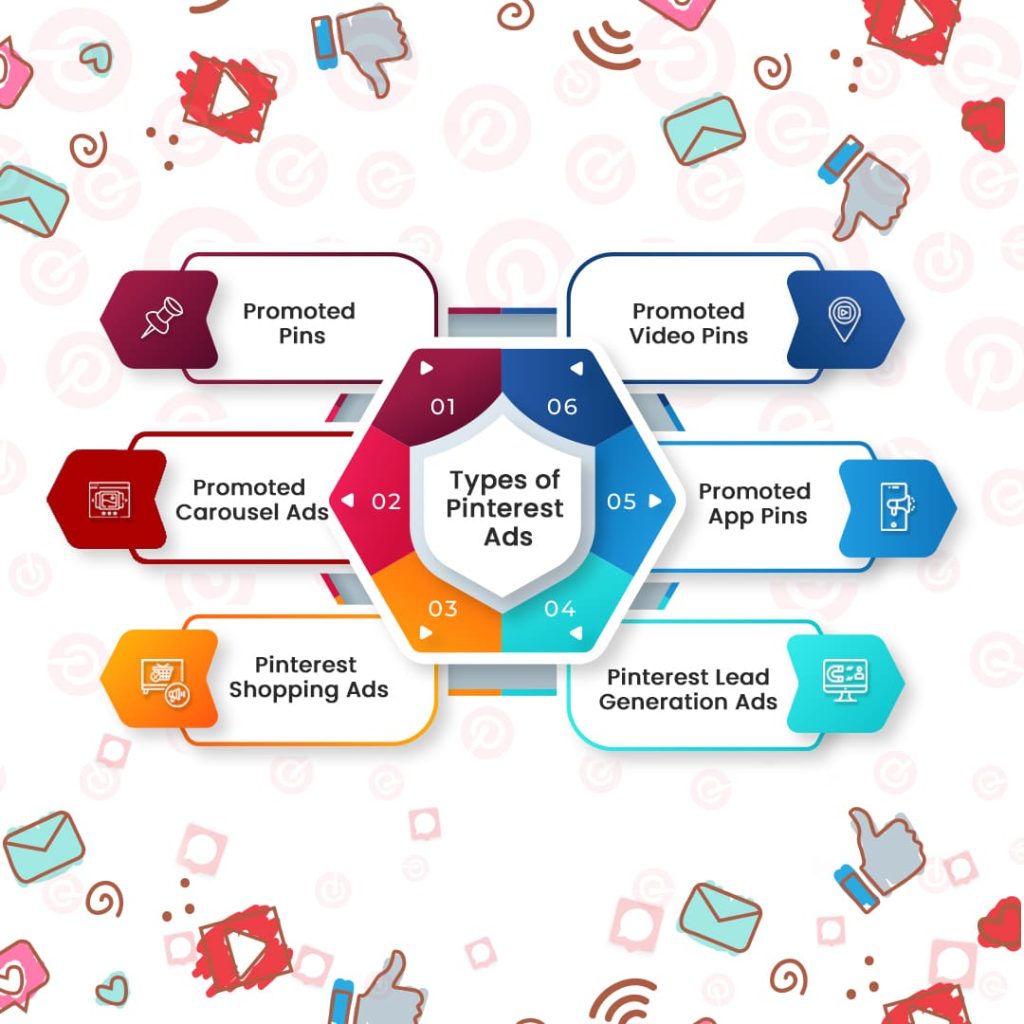
Pinterest provides several types of ads to suit every marketing goal. Each type allows businesses to tell their story or highlight their products creatively.

1. Promoted Pins

Promoted pins look like regular posts but appear more frequently in user feeds. They help businesses grab attention and drive traffic without feeling intrusive.

2. Promoted Video Pins

These ads use movement to captivate. Promoted videos play directly in user feeds and work well for product demos, tutorials, or behind-the-scenes content.

3. Promoted Carousel Ads

Carousel ads string together multiple images or videos in a swipeable format. They shine when showcasing a product range, steps in a process, or different angles of a feature.

4. Promoted App Pins

These ads focus on promoting mobile apps. They encourage users to download an app directly from Pinterest, targeting people likely to find it useful.

5. Pinterest Shopping Ads

Shopping ads highlight individual products to users interested in buying. These ads guide shoppers straight to product pages, making purchases simple.

6. Pinterest Lead Generation Ads

Pinterest lead generation ads collect details like email addresses from interested users. They help businesses build relationships with potential customers.

Cost of Pinterest Ads

Pinterest advertising works well for many businesses because of its flexible pricing. Pinterest ads cost less than on other platforms but still deliver excellent results.

1. Works with Clear Pricing Models

Pinterest ads use a cost-per-click (CPC) or cost-per-thousand-impressions (CPM) model. Businesses only pay when someone clicks or views their ad.

2. Fits Different Budgets

  • Cost Per Click (CPC): Prices range from $0.10 to $1.50 depending on competition.
  • Cost Per Thousand Impressions (CPM): Prices average between $2 and $5, providing affordable reach for most businesses.

3. Allows Flexible Budgets

Businesses decide how much they want to spend. Pinterest lets advertisers set daily or total budgets, ensuring they stay within their limits.

4. Factors That Shape Costs

Pinterest ads cost depends on:

  • Ad Format: Pinterest shopping ads may cost more because of their direct link to purchases.
  • Audience Targeting: Narrow audiences cost more to reach but deliver stronger results.
  • Bid Strategies: Higher bids lead to better placement but increase spending.

5. Delivers Strong Returns

Pinterest ads deliver high returns when optimized well. Businesses can keep costs low by designing creative ads and targeting the right audience.

Steps for Pinterest Ads Process

If you want to master how to run ads on Pinterest, follow these simple steps to build your campaign:

1. Open a Pinterest Business Account

  • Create a new Pinterest Business account or upgrade an existing account.
  • Gain access to advertising tools and performance tracking.

2. Define Your Goal

  • Decide what you want to achieve: Do you want more website visits, lead collection, or sales?
  • Choose ad formats that support your goals, like Pinterest shopping ads for purchases or lead generation ads for customer data.

3. Target the Right Audience

  • Use Pinterest’s targeting tools to narrow down by age, location, interests, and more.
  • Target people searching for products or services like yours.

4. Pick the Best Ad Type

  • Select an ad type that fits your strategy, such as promoted pins for broad visibility or carousel ads to display collections.
  • Align your choice with your business goals.

5. Set Your Budget

  • Choose a daily or lifetime budget for your ads.
  • Decide between automatic or manual bids to control spending.

6. Create Stunning Ads

  • Design visually appealing pins with crisp images, bold text, and clear calls to action.
  • Optimize ads for mobile viewing since most Pinterest users browse on phones.

7. Use Relevant Keywords

  • Add keywords to make your ads easy to find.
  • Focus on terms users often search for, like “Pinterest shopping ads” or “how to run ads on Pinterest.”

8. Launch the Campaign

  • Review all details before launching.
  • Start small, gather performance data, and improve your strategy.

9. Monitor Results

  • Check Pinterest analytics often to see how ads perform.
  • Identify weak points and adjust targeting, design, or bids.

10. Improve and Expand

  • Build on what works. Invest more in successful campaigns and try new strategies for continued growth.

Conclusion

Pinterest advertising gives businesses the power to reach people actively looking for solutions. By using Pinterest business ads like shopping ads or lead generation ads, companies can attract customers, increase sales, and boost website visits. With low Pinterest ad costs, businesses can advertise effectively without overspending.

To succeed, businesses must know how to run ads on Pinterest and create campaigns that resonate with their audience. From defining clear goals to designing creative ads, every step counts. Start running Pinterest business ads today to unlock new opportunities for growth and success!

B2B Content Marketing Tips For 2025

Content marketing transforms the way businesses attract and connect with their audience. As we move into 2025, companies must sharpen their strategies to inspire, engage, and convert business buyers. Whether you’re striving to enhance B2B lead generation efforts or uplift your B2B eCommerce presence, this guide will navigate you toward impactful results.

B2B content marketing goes beyond simple advertising. It empowers businesses to create meaningful relationships, showcase their expertise, and solve their customers’ problems. By crafting the right messages and delivering them effectively, you can steer your company toward measurable success.

This blog will help you with content marketing tips, examples, and insights to make your content marketing efforts stand out.

Why Does Content Marketing Matter for Businesses and Companies?

In today’s bustling digital world, content marketing empowers businesses to educate, inspire, and win over their target audiences. It serves as a dynamic tool to guide potential customers through their decision-making journey.

Educates Buyers

Business buyers often explore deeply before making choices. Content marketing arms them with essential knowledge, helping them understand and trust your offerings. Well-written articles or guides provide clarity and answer pressing questions.

Earns Credibility

Delivering clear and honest information strengthens your brand’s reputation. When companies share valuable content, customers view them as dependable allies who genuinely want to solve their problems.

Supports Long-Term Decisions

B2B purchases typically involve many stakeholders and careful evaluations. Content marketing clears up confusion and provides practical insights that simplify decision-making at every stage. Buyers feel confident when their questions are addressed effectively.

Attracts Quality Traffic

Strategically crafted content, enriched with keywords like “B2B leads” or “content marketing platforms,” draws interested and qualified visitors to your website. These readers often turn into loyal customers because the content directly aligns with their needs.

Adapts Quickly to Change

Content marketing allows companies to respond to new trends or challenges without delay. By creating relevant and timely materials, businesses stay agile and ahead of the curve, adjusting their messages to fit changing customer demands.

Content marketing is more than just a tool; it builds trust, connects companies with the right customers, and creates relationships that endure over time.

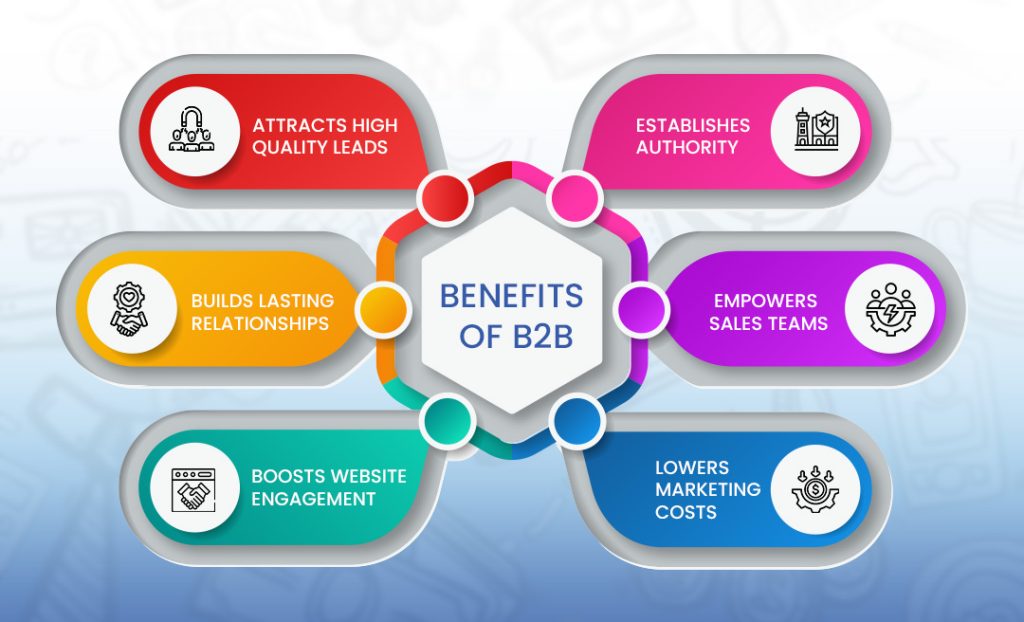
Benefits of B2B Content Marketing

B2B marketing benefits

B2B content marketing energizes businesses and unlocks remarkable opportunities. Here’s how it drives growth and nurtures success:

1. Attracts High-Quality Leads

Carefully crafted content speaks directly to decision-makers. A compelling case study highlights how your product solves specific problems and magnetizes the attention of potential buyers.

2. Establishes Authority

By offering original insights and showcasing expertise, businesses illuminate their leadership. This strategy earns trust and positions companies ahead of competitors in the industry.

3. Builds Lasting Relationships

Thoughtful, consistent content forges connections between companies and their audience. It makes customers feel appreciated and valued long before they choose to make a purchase.

4. Empowers Sales Teams

Sales teams often require resources to enrich their discussions with prospects. Tools such as white papers, instructional guides, and videos bolster their arguments and persuade buyers more convincingly.

5. Lowers Marketing Costs

Content marketing delivers value for a long time. A blog post or video continues to captivate and convert visitors well after its release, making it a highly economical investment.

6. Boosts Website Engagement

Content that aligns with audience needs captivates readers, encouraging them to linger on your site, explore your offerings, and take meaningful actions like downloading resources or subscribing for updates.

When businesses harness content marketing effectively, it fuels growth, nurtures trust, and helps them thrive in competitive landscapes.

Types of B2B Content Marketing

To succeed in content marketing, businesses must harness the power of variety. Different formats captivate audiences in unique ways, and each serves a specific purpose.

1. Blog Posts

Blogs educate readers on industry topics, solve common problems, and improve search engine rankings. A blog about “B2B eCommerce trends” can grab the attention of business owners eager for solutions.

2. Case Studies

Case studies recount success stories where a company helped its customers overcome challenges. These real-life examples convince potential buyers of your product’s value.

3. White Papers and eBooks

These long-form pieces dive deeply into topics. They are perfect for audiences who want detailed insights before making decisions.

4. Videos

Videos captivate viewers by showing rather than telling. Use them to demonstrate products, explain complex topics, or feature customer testimonials.

5. Infographics

Infographics simplify complicated ideas through visuals. For example, an infographic on “How Content Marketing Generates B2B Leads” can deliver insights clearly and quickly.

6. Webinars

Webinars invite audiences to engage directly with experts. They allow businesses to share knowledge, answer questions, and showcase expertise in a live setting.

7. Interactive Tools

Polls, quizzes, and calculators add an engaging layer to your content. They encourage participation while providing valuable data about your audience.

Using a blend of these content types ensures that your message reaches and resonates with diverse audiences.

Buyer Journey Through B2B Marketing

To guide buyers effectively, businesses must understand the journey buyers take. Each stage requires unique content that connects with specific needs.

1. Awareness Stage

Here, buyers identify their problems. Your goal is to attract their attention and provide answers. Create blogs, videos, or infographics that explain solutions.

2. Consideration Stage

Buyers explore options and evaluate solutions. Offer white papers, case studies, or comparison guides to help them weigh their choices.

3. Decision Stage

Buyers finalize their decisions and choose a provider. Deliver content like testimonials, live demos, or product guides to strengthen their confidence.

Understanding this journey helps businesses craft content that connects and converts at every step.

Platforms Where Content Marketing Can Be Done

Content marketing relies on finding the right platforms to reach your audience. Each platform serves a unique purpose in your overall strategy.

1. LinkedIn

LinkedIn enables businesses to connect with professionals, share insights, and publish thought leadership articles. It excels as a platform for B2B marketing.

2. Company Website

Your website is your digital foundation. Use it to host blogs, case studies, videos, and resources that attract and inform visitors.

3. YouTube

As a video platform, YouTube allows businesses to showcase their expertise through tutorials, webinars, and engaging product demonstrations.

4. Email Marketing

Email reaches audiences directly. Use it to nurture leads by sharing newsletters, announcements, or exclusive content.

5. Social Media

Platforms like X (ex-Twitter) and Facebook amplify your message, connecting with broader audiences through updates, links, and visuals.

6. Third-Party Publications

Publishing guest articles on industry websites or blogs extends your reach and enhances your credibility.

7. Industry Communities

Engage in online forums and groups to share expertise, answer questions, and connect with potential customers in your niche.

These platforms expand your audience and elevate your content’s impact.

Examples of B2B Marketing

Great examples inspire action. Let’s look at how top companies excel with their content strategies:

1. HubSpot’s Comprehensive Resources

HubSpot offers blogs, templates, and online courses tailored to marketers and sales teams. This wealth of content consistently draws in and nurtures B2B leads.

2. IBM’s Data-Driven Content

IBM produces extensive research reports on emerging technologies like AI and cloud computing. Their content positions them as industry leaders and attracts enterprise clients.

3. Mailchimp’s Practical Tools

Mailchimp guides users with tutorials and webinars, making complex tools like email automation easier to understand and implement.

4. Slack’s Customer-Focused Stories

Slack uses real-life customer stories to highlight its product’s ability to enhance teamwork and simplify communication.

5. Adobe’s Creative Case Studies

Adobe creates engaging content that shows how companies use their solutions to solve creative challenges and deliver measurable results.

These examples showcase the impact of strategic and well-crafted B2B content marketing.

Conclusion

B2B content marketing in 2025 calls for bold creativity, sharp relevance, and precise execution. When you understand your audience’s needs and craft content that mirrors their journey, you ignite trust, spark interest, and drive meaningful results.

From engaging blog posts to insightful webinars, every content type plays a distinct role. A well-chosen combination of formats and platforms amplifies your message, ensuring it resonates with and reaches the right people. Content marketing does more than promote—it educates, builds connections, and transforms audiences into loyal partners.

Begin shaping or improving your strategy today. Offer genuine value, resolve challenges, and position your company as a dependable ally. Through steady, thoughtful efforts, content marketing can unlock lasting growth and propel your business toward enduring success.

Complete SEO Checklist: Covering 45+ Technical Points

Technical SEO lays the groundwork for a website to succeed in search engine rankings. Without tuning these technical elements, even the best content may never reach its readers. This blog highlights a detailed on-page SEO checklist covering 45+ essential points to supercharge a website’s performance and improve its chances of ranking higher.

Why Technical SEO Is Important?

Technical SEO helps search engines discover, understand, and rank a website more efficiently. It enhances everything from load speed and mobile usability to structured data and error handling. By focusing on technical SEO, you can captivate users, reduce bounce rates, and draw in more visitors who stay longer on the site.

Essential Technical SEO Tools

Using the right tools makes the technical SEO analysis smoother and faster. Here are some top choices:

  • Screaming Frog: Dives into a website and reveals technical problems.
  • Ahrefs: Known for uncovering backlink analysis, keywords, and robust site auditing.
  • Semrush: A versatile tool that explores keywords, checks site health, and offers competitor insights.
  • Ubersuggest: An affordable tool for finding keywords and auditing technical issues.
  • SERanking: Tracks rankings and gives deep insights into on-page SEO and beyond.

45+ Technical SEO Fundamentals for Better Rankings

1. SSL (Secure Sockets Layer)
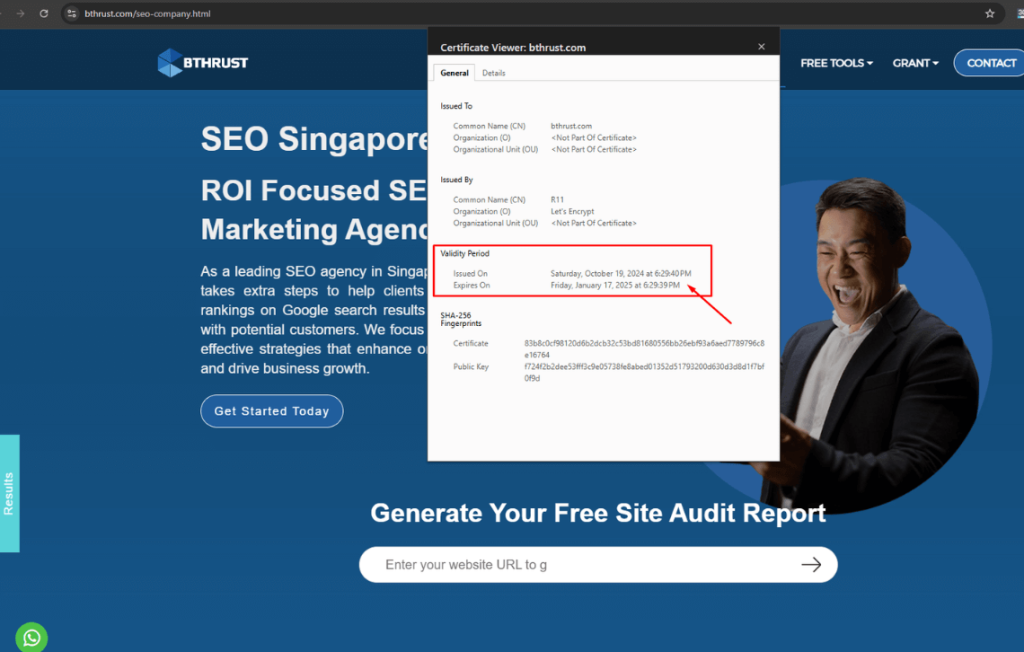
SSL security certificate


An SSL certificate locks up data as it moves between your website and visitors, keeping it safe. This is super important for sites that gather sensitive information like passwords or credit card numbers. With SSL, Google rewards your site by pushing it higher in search results. It also reassures users when they see the padlock symbol, letting them know the site is secure. Without SSL, browsers warn visitors that the site isn’t secure, which can scare them away.

2. HTTPS Redirection

After setting up SSL, make sure all visitors land on the HTTPS version of your site. Redirecting from HTTP to HTTPS directs everyone to the secure version. It also stops search engines from seeing HTTP and HTTPS as two separate pages, which could cause confusion and hurt rankings. Set this redirection so all your site’s ranking power flows into one secure page.

3. Internal URL Canonical Issues (www & index.php)

URL consistency is key! If your site works with both “www” and “non-www” or has “index.php” at the end, search engines may see these as different pages. This can dilute your website’s power in search rankings. Use canonical tags or redirects to show search engines which URL version you want to prioritize. This helps with clearer rankings and makes it easier for visitors to find your page.

4. Trailing Slash URL Canonical

Sometimes URLs with and without trailing slashes (like “/”) can look like two different pages to search engines. To avoid this, pick one style for your URLs and set canonical tags. This small step keeps all your ranking strength focused on a single URL, making your site easier to find and access.

5. Uppercase URLs
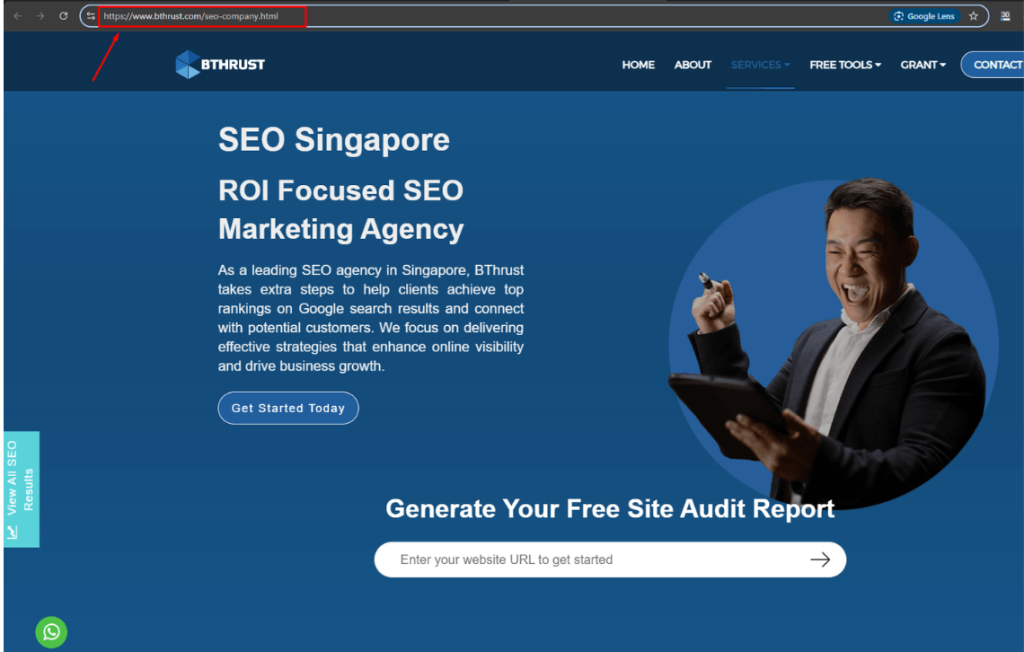
Uppercase URL issue

Search engines see uppercase and lowercase URLs as different pages. Using uppercase can split the power of your site’s links and confuse visitors. Stick with lowercase letters to keep everything simple and direct all SEO strength to one spot.

6. Mobile Page Speed

Since most people use mobile phones to browse, making sure your mobile page speed is fast is vital. Google rewards quick-loading pages with better rankings. Tools like Google PageSpeed Insights give helpful tips on how to shrink images, cut down on big files, and make the site speedy for mobile users. A fast site keeps visitors happy and boosts your search ranking.

7. Desktop Page Speed

Desktop page speed matters too! Slow pages annoy users, leading them to leave before even seeing your content. Techniques like compressing images, caching, and minimizing code can help speed things up. A quicker desktop speed means happier visitors and higher chances of ranking well in search results.

8. Mobile Responsiveness

Being mobile-friendly is a must in today’s world. Making sure your site is mobile-ready will improve the user experience, keep visitors around, and help boost search engine rankings.

9. Favicon
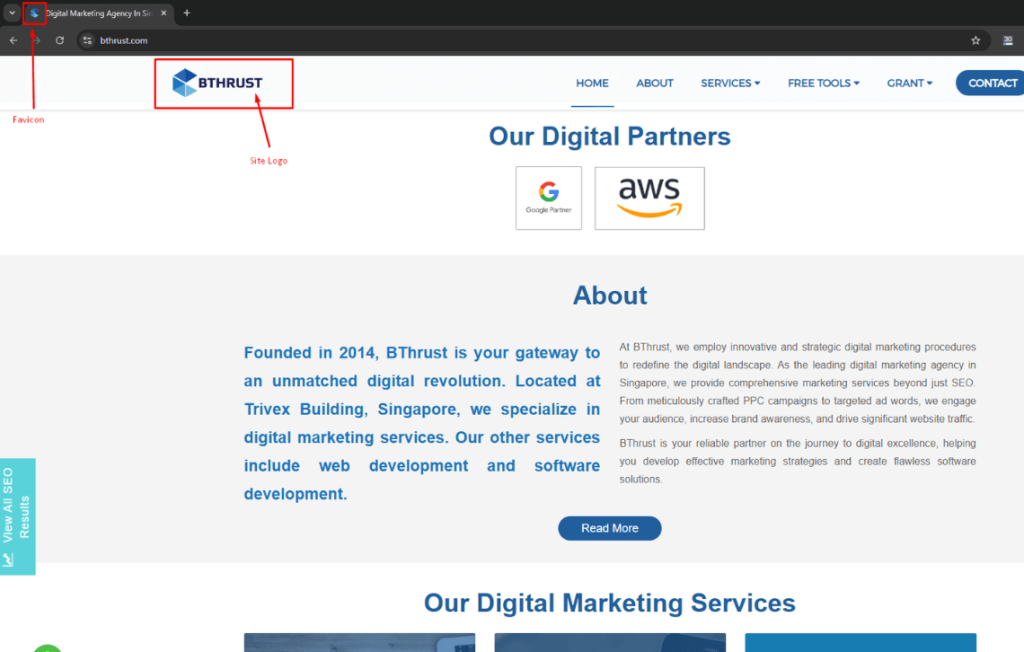
Website favicon icon

The small icon, or favicon, that appears in the browser tab might seem minor, but it’s important! A favicon helps users find your site in a crowd of tabs and makes your website look polished and professional. It may not directly improve your SEO ranking, but it does make the experience better for users, which helps with SEO over time.

10. HTTP Links

When a secure HTTPS site contains links that still use HTTP, browsers may warn visitors about “mixed content.” This can discourage users from continuing and harm your site’s credibility. Make sure all links use HTTPS to keep the experience safe and consistent, improving both trust and SEO.

11. Redirected Links

Redirected links lead users through multiple steps before reaching the final page, slowing things down and hurting user experience. Search engines may get lost in the redirects, too. Regularly check for these and update links so they go straight to the final destination. This will help your site work faster and keep search engines focused.

12. Broken Links (404 Not Found)
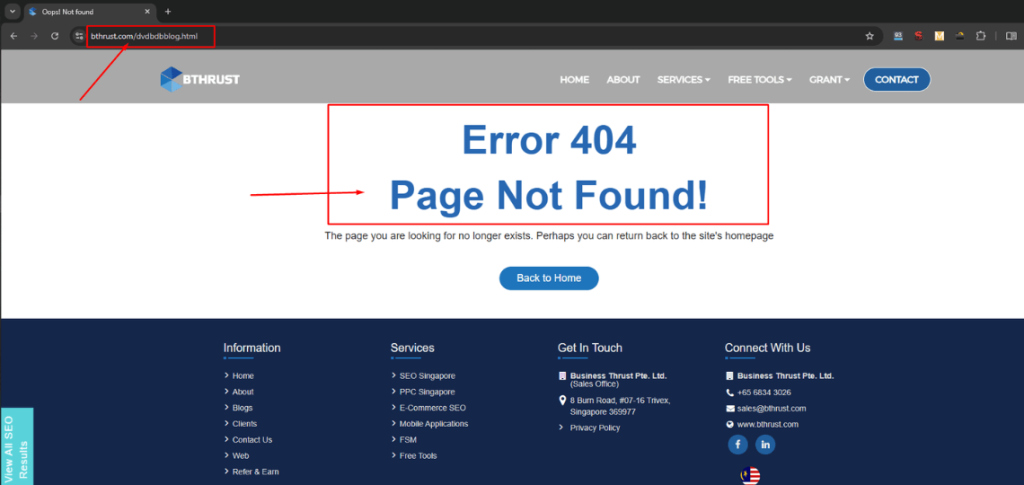
404 error page

Broken links take users to nonexistent pages. These can frustrate visitors and waste search engines’ time. Regularly check your site for broken links, and either update, redirect, or remove them. Fixing broken links keeps visitors on your site and helps search engines understand that your site is healthy.

13. Soft 404 (Blank or Little Content) Pages

Soft 404 errors appear when pages hold almost no content or have little value. These pages make it look like something’s wrong on your site. Either add valuable content to these pages or redirect them to relevant ones. This helps show search engines and users that your website is full of helpful information.

14. External Linking

Good external links to trusted websites add value and make your content more credible. Be careful, though! Links to irrelevant or low-quality sites can weaken your own site’s strength. Regularly check your links to ensure they lead to reputable sources and avoid dead ends. Quality links boost trust, making users—and search engines—value your page more.

15. Custom 404 Error Page

A custom 404 page can rescue visitors when they reach a broken link. Create a helpful 404 page that guides users back to useful content on your site. A well-designed 404 page keeps people on your site longer, improving their experience and reducing the chance of a high bounce rate.

16. Schema Code
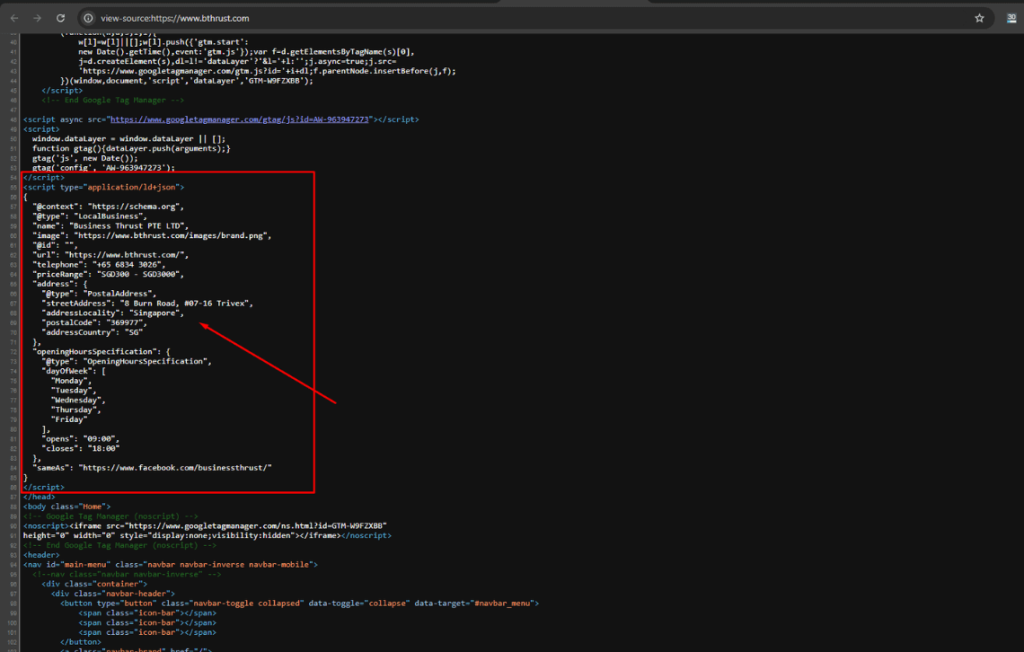
Schema markup code

Schema markup, or structured data, helps search engines grasp your content better. Adding schema lets search engines display rich snippets, like reviews, prices, or event details. This extra detail can attract more clicks and lift your page in search results, boosting both visibility and SEO.

17. Robots.txt File

The robots.txt file acts as a guide for search engine crawlers, telling them which parts of your site to explore or ignore. A well-set robots.txt file prevents crawlers from wasting time on pages you don’t need indexed and lets them focus on the valuable stuff. This way, your important pages get noticed, making your site more efficient in search rankings.

18. XML Sitemap
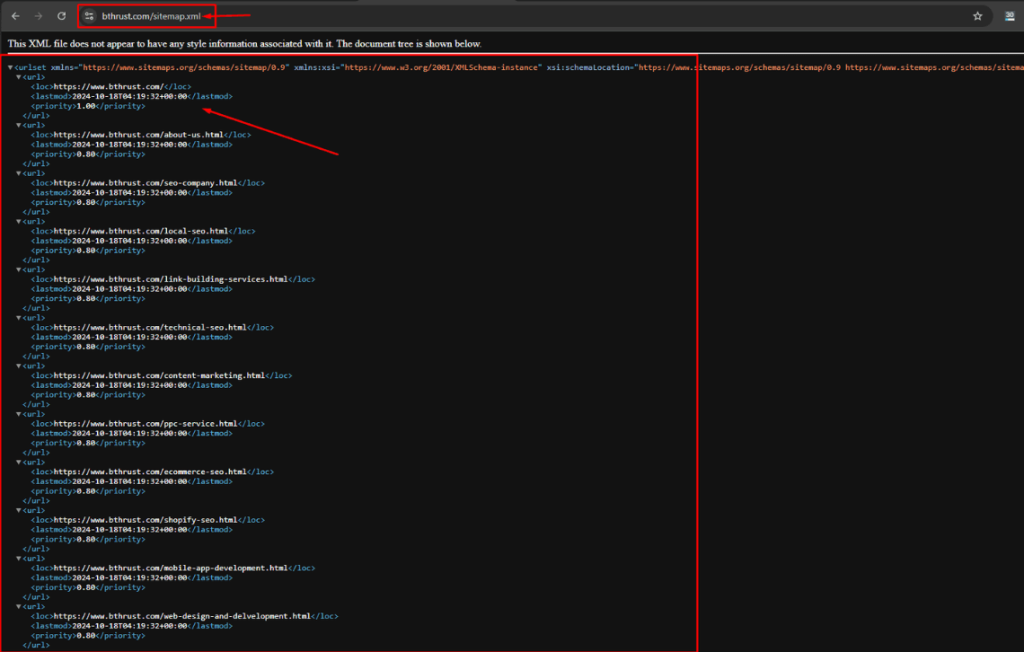
XML sitemap structure

An XML sitemap maps out all your website’s pages and helps search engines find and index them. Updating and submitting your sitemap regularly ensures that fresh content reaches search engines. A complete sitemap enhances the way crawlers navigate your site, helping it perform better in search results.

19. HTTP URLs in Sitemap for HTTPS Sites

For HTTPS websites, make sure all sitemap URLs also use HTTPS. If any URL still uses HTTP, it may confuse search engines, create duplicate content, and hurt your site’s SEO. An HTTPS-only sitemap strengthens your site’s security and makes it easier for search engines to index the correct pages.

20. Title Tag

Title tags help search engines and users grasp what each page is about. Think of them as a “name badge” for your web pages. Write title tags that show clearly what the page covers and include main keywords. Keeping titles between 50-60 characters makes sure they appear fully in search results, boosting clicks and engagement.

21. Meta Description Tag

Meta descriptions act as mini summaries under your title tag in search results. These summaries attract users to your page by telling them why it’s worth a visit. Although Meta title and description don’t directly impact rankings, a clear, concise summary with keywords can help boost clicks to your site.

22. H1 Tag Issues

The H1 tag is like the headline of a page and should clearly explain the main topic. Each page needs just one H1 tag, which helps search engines understand its main subject. If you use multiple H1s, it might confuse search engines. Ensure every H1 tag reflects the page content so search engines and visitors understand its focus.

23. Image Size Optimization

Big, bulky images can slow down a page, making users impatient. Resize and compress images to speed up loading times while keeping their quality high. This simple action will make both users and search engines happier since fast-loading images improve the browsing experience and keep people on your site longer.

24. ALT Tags for Images

ALT tags describe images for those who can’t see them, like users with visual impairments or search engines. When you add ALT tags, describe the image briefly and use relevant keywords to add context. ALT tags make your site more accessible and help search engines understand image content.

25. Footer Optimization
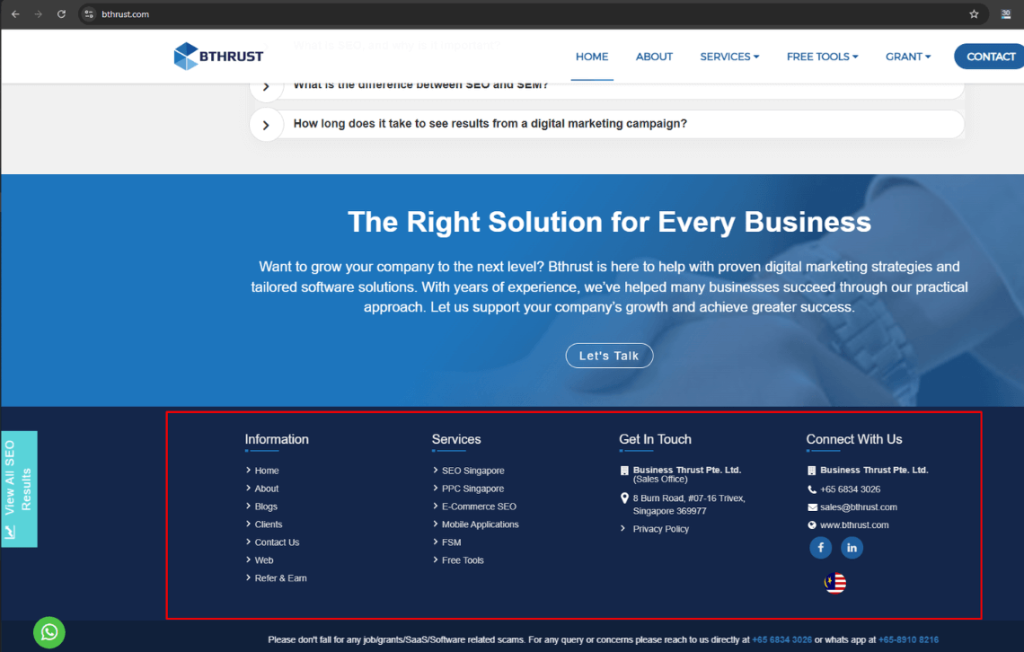
Website footer section

The footer is like a mini-directory at the bottom of your website. Use it to add links to essential pages like Contact, Privacy Policy, and About Us. Avoid cluttering the footer with too many links. A clean footer enhances user navigation and helps search engines better understand your site’s structure.

26. Google Analytics Integration
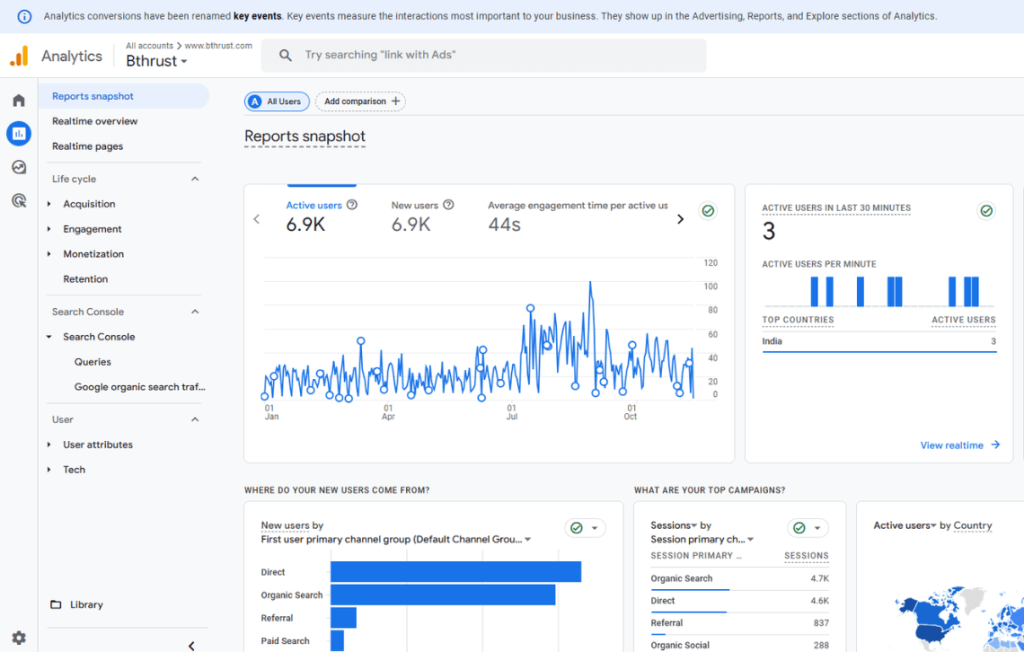
Website analytics dashboard

Google Analytics tracks what visitors do on your site. By observing behaviour patterns—like how long users stay or which pages they visit—you can adjust your content to meet their needs better. Regularly checking these insights helps improve SEO performance and keep your site engaging.

27. Google Search Console
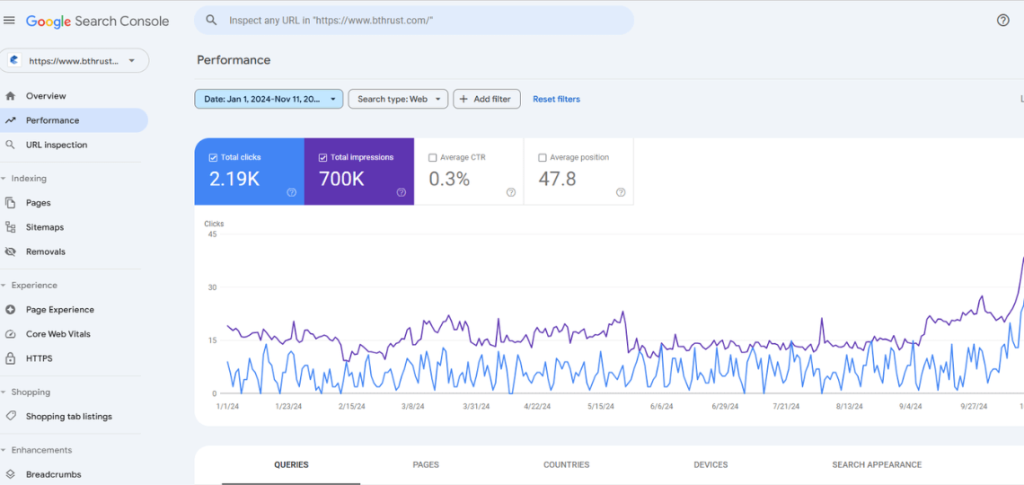
Google Search Console

Google Search Console gives a behind-the-scenes look at how Google views your website. You can spot problems like broken links or mobile usability issues. It also shows search data, click rates, and average ranking positions, helping you keep your site optimized and visible to users.

28. Open Graph Protocol

Open Graph tags make your content look attractive when shared on social media. They define how titles, images, and descriptions will appear on platforms like Facebook and Twitter. Optimizing Open Graph tags makes your posts eye-catching, encouraging more clicks and visits to your site.

29. Canonical Tag
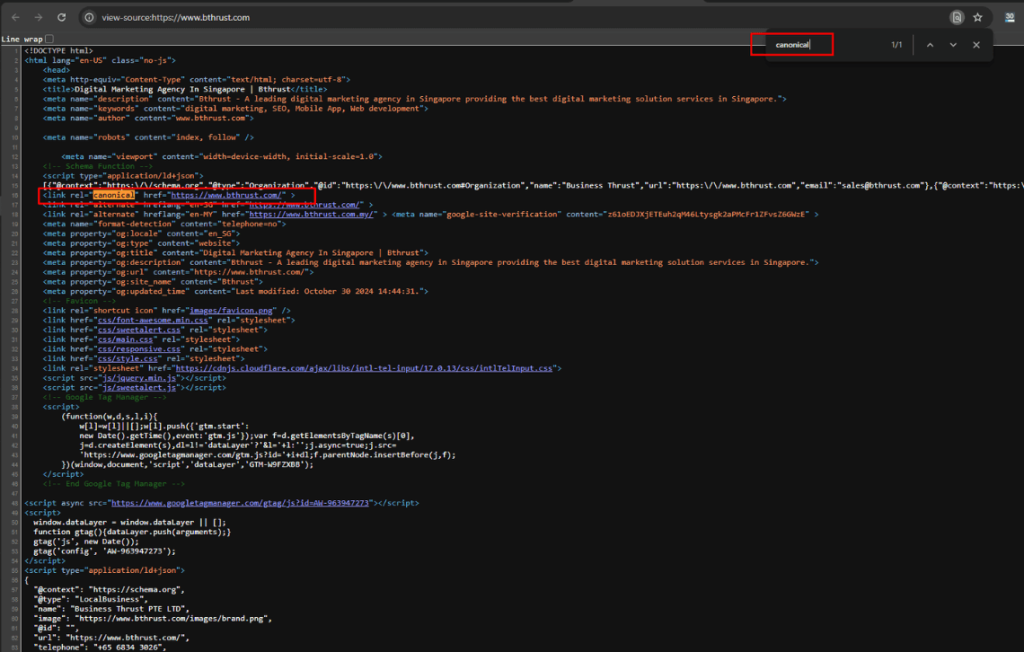
Canonical tag SEO

Canonical tags signal the main version of a page when similar pages exist. If you have several versions of a page, a canonical tag shows search engines which one is the primary version. This helps concentrate SEO strength on one URL and reduces the risk of duplicate content issues.

30. Non-SEO-Friendly URLs

User-friendly URLs are easy to read and tell visitors what to expect. Avoid including random characters or numbers, as these can confuse users. Use simple, descriptive words with hyphens instead of underscores. Clear URLs improve user experience and make it easier for search engines to interpret the page.

31. Duplicate Content

Duplicate content can happen if the same text shows up on multiple pages. This makes it hard for search engines to know which page to rank, dividing the SEO value. Fix duplicate content by merging pages, using canonical tags, or deleting redundant text to keep content fresh and effective.

32. 5XX Status Codes

A 5XX error signals a server problem that keeps users from seeing the page. Monitor your site for these errors, like 500 or 503 errors, and solve them to maintain a seamless browsing experience. Regular checks keep users and search engines engaged and ensure your site stays dependable.

33. Viewport Tag

The viewport tag scales a webpage to fit any screen, especially on mobile. Without it, the page may appear too small or too large on mobile devices. Adding a viewport tag ensures your site adapts to different screen sizes, providing a consistent experience and boosting mobile friendliness.

34. Large HTML Size

An oversized HTML file can slow down the page, irritating users. Trimming unnecessary code and using external files for CSS and JavaScript can slim down the HTML. A lightweight HTML structure loads quickly, pleasing both users and search engines.

35. Hreflang Values Errors

Hreflang tags help search engines display the right language or region-specific page for users in different areas. Errors in these tags can lead to the wrong page showing up for certain users. Correctly setting hreflang values ensures users see the content that matches their location, improving their experience.

36. Expiring SSL Certificate

An SSL certificate that’s about to expire causes browsers to show security warnings, which can scare away visitors. Regularly check and renew your SSL certificate to keep your site safe and maintain users’ trust. A secure site also helps SEO, as Google values user security.

37. Canonical to HTTPS Homepage from HTTP Version

Setting a canonical tag from the HTTP version to the HTTPS homepage directs search engines to the secure page, avoiding confusion. This step combines the SEO value of both versions and ensures users land on the secure site, reinforcing trust and SEO strength.

38. Redirect Chains and Loops

Redirect chains happen when one redirect leads to another, creating a chain that can slow down the page. Redirect loops, on the other hand, endlessly bounce between pages, frustrating both users and crawlers. Minimize chains and remove loops to improve navigation and keep search engines on track.

39. Excessive On-Page Links

Too many links on one page can overwhelm visitors and reduce link effectiveness. Instead, focus on linking only to the most essential pages. This practice directs users and search engines to key areas of your site, improving site structure and making navigation clearer.

40. Temporary Redirects

A temporary redirect (302) suggests that a page’s location is only briefly changed, but it doesn’t pass on SEO value. Use a permanent (301) redirect when you change a page’s location for good to keep its SEO benefits intact. Choosing the right redirect strengthens your SEO.

41. Missing Hreflang and Lang Attributes

Hreflang and lang attributes guide search engines to the correct language or region for multilingual sites. Without these, international users may see the wrong version, affecting engagement. Adding hreflang and lang attributes improves targeting, ensuring users find content suited to their language.

42. Declared Character Encoding
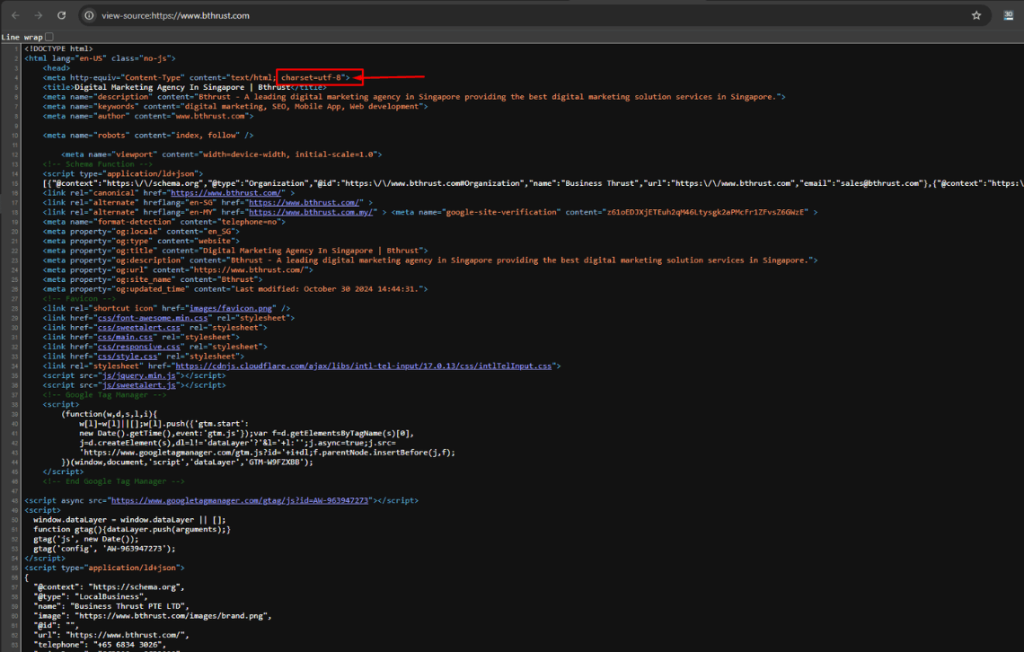
Charset website example

Character encoding tells browsers how to interpret and display text. Declaring an encoding type like UTF-8 helps avoid misinterpreted text or characters. A clear character encoding keeps content readable and supports a smooth user experience, which search engines appreciate.

43. Underscores in URLs

URLs with underscores can confuse search engines and users alike. Hyphens separate words in URLs, making them easier to read and more SEO-friendly. Replacing underscores with hyphens ensures that URLs are clear and accessible for search engines and users.

44. ASCII Characters in URLs

Non-ASCII characters in URLs may cause encoding issues, making the link unreadable. Using only ASCII characters guarantees that URLs display properly across different systems. ASCII-only URLs keep things simple and make it easier for search engines and users to navigate.

45. Sitemap.xml Structure Optimization

XML sitemap structure

A well-structured sitemap.xml acts as a roadmap of your website for search engines. It helps them find and index your content quickly. Regularly update your sitemap so search engines can locate new or updated content, keeping your website fresh and visible.

46. HTML/CSS Errors and Warnings

HTML and CSS errors make pages look odd or load slowly, affecting the user experience. Use validation tools to spot and fix these issues, creating a cleaner, smoother site. Resolving errors makes the website look better and improves SEO.

47. Keyword Stuffing

Overloading text with keywords can make it awkward to read and may lead to penalties. Instead, use keywords naturally to maintain readability. Well-placed keywords make the content enjoyable and keep users engaged, all while boosting SEO.

48. Interlinking

Interlinking connects pages within a website, helping visitors and search engines explore related content. Good interlinking keeps users engaged and builds structure for search engines, distributing SEO value throughout the site.

Conclusion

Technical SEO is an essential foundation for any successful SEO strategy, improving your site’s accessibility, user experience, and overall performance. By addressing each of the above seo site audit checklists and leveraging the recommended tools, you can ensure your website is well-prepared to rank effectively in search engine results. Remember that SEO is an ongoing process, so revisit these points regularly to maintain optimal performance and stay ahead of competitors.


SEO Pricing in Singapore – Complete Insights

On average, SEO costs in Singapore range from SGD300 to SGD 3,000 or more per month, depending on the package and services.

Understanding SEO Costs in Singapore

In today’s digital world, Search Engine Optimization (SEO) plays a key role for businesses wanting to improve their online presence. But how much does SEO cost in Singapore? This blog will give you a full explanation of SEO pricing, the factors that shape the cost, and tips on choosing the right package for your business. Understanding SEO pricing in Singapore helps you make smart choices that lead to long-lasting success.

Let’s Understand SEO Services Before Pricing

SEO works by boosting your website’s rank on search engines like Google. Higher rankings help people find your business online, increasing traffic and customer inquiries. In Singapore, SEO services offer a variety of tasks tailored to business needs, including:

  • Keyword Research
  • On-Page SEO
  • Off-Page SEO
  • Technical SEO
  • Local SEO
  • E-commerce SEO
  • SEO Copywriting

Knowing the services included in different SEO packages helps you make an informed choice. Look for agencies offering a transparent breakdown of tasks and deliverables.

SEO Pricing in Singapore

Here’s a breakdown of typical costs:

  • Freelancers: SGD 200 – SGD400 per month
  • Basic SEO (Agencies): SGD400 – SGD700 per month
  • Advanced SEO (Agencies): SGD700 – SGD3,000 per month

The total cost can increase depending on factors like the number of keywords, additional services, or the desired speed of results.

Factors Affecting SEO Costs in Singapore: A Comprehensive Guide

SEO infographic

In Singapore, the cost of SEO services varies based on several factors, from the size of your business to the complexity of your website. This guide provides a clear and comprehensive breakdown to help you understand what influences SEO pricing and make an informed decision.

1. Business Size and Goals

  • Small Businesses:
    Focus on local SEO for visibility in specific areas, which typically costs less. For example, a café targeting nearby neighbourhoods might need basic local SEO services costing SGD 300–500 per month.
  • SME: Small and medium size businesses in Singapore usually spend between SGD 300 and SGD 1,500 every month on SEO. The exact price jumps around based on how big the business is, how tough the competition feels, and how fast they want results.
  • Large Enterprises:
    Require advanced strategies for multiple regions or international markets. For instance, an e-commerce company targeting Southeast Asia might need SGD 2,000–3,000 per month for comprehensive SEO campaigns.

2. Industry Competition

Highly competitive industries like finance, real estate, or technology require intensive efforts such as:

  • Advanced keyword research
  • Extensive content creation
  • Strong backlink strategies

For example: A law firm targeting high-ranking keywords like “best lawyer Singapore” will likely incur higher costs due to the intense competition.

3. Number of Keywords Targeted

The cost of SEO increases with the number of keywords targeted.

  • Basic Packages: Focus on 5–10 keywords, suitable for small businesses.
  • Enterprise Packages: Focus on 20-40 Keywords, Suitable for enterprises.
  • Advanced Packages: Optimize 50+ keywords, ideal for enterprises or e-commerce stores with diverse products.

For Example: Targeting additional long-tail keywords like “affordable digital marketing agency Singapore” can drive niche traffic but requires additional investment.

4. Website Size and Complexity

  • Small Websites: Blogs or informational sites with fewer pages are easier and cheaper to optimize.
  • Large Websites: E-commerce sites with thousands of pages need more technical SEO, site architecture improvements, and content updates.

Example: A retail business with 100+ product pages will need detailed optimization, increasing costs compared to a portfolio website.

5. Current Website Performance

Websites with existing technical issues such as:

  • Slow loading speeds
  • Broken links
  • Non-responsive design
  • New Page Creation
  • Design Changes

These require additional resources for technical fixes, adding to the initial SEO costs.

6. Geographic Targeting

  • Local SEO: Costs less as it focuses on specific markets (e.g., “best dry cleaning Singapore”).
  • International SEO: Involves multilingual content, advanced research, and global strategies, increasing costs.

Example: A company targeting both Singapore and Malaysia will need SEO campaigns in multiple languages, adding complexity.

7. Desired Speed of Results

  • Standard Campaigns: Cost less and deliver results within 3–6 months.
  • Aggressive Campaigns: Use advanced strategies like premium backlinks for quicker results, driving up costs.

For example, A startup launching during the peak holiday season may need an aggressive campaign to rank faster.

8. SEO Scope and Services Required

Each type of SEO comes with varying efforts and costs:

  • On-Page SEO: Content optimization, meta tags, and internal linking.
  • Off-Page SEO: Building high-quality backlinks.
  • Technical SEO: Improving speed, mobile responsiveness, and fixing errors.
  • Local SEO: Targeting specific geographic areas.
  • E-commerce SEO: Optimizing product pages for better visibility.

Example: A business focusing solely on Local SEO will pay less compared to one requiring all services.

9. Content Creation Needs

High-quality content creation is a crucial factor in SEO success. Costs depend on:

  • Blog posts
  • Landing pages
  • Infographics or videos

Example: An IT company publishing weekly blogs will spend more than a portfolio website requiring minimal updates.

10. Backlink Strategy

  • Standard Backlinks: Affordable, often sourced from directories.
  • High-Quality Backlinks: From authoritative websites, significantly increasing costs.

Example: Securing a backlink from a reputable publication like “Straits Times” will cost more but deliver higher value.

11. Reporting and Analytics

  • Basic Reporting: Monthly updates on keyword rankings and traffic.
  • Advanced Analytics: Detailed insights using premium tools like SEMrush or Ahrefs.
    Agencies offering frequent and in-depth reports may charge more, but these insights are crucial for ongoing success.

12. Long-Term Maintenance and Support

SEO is not a one-time effort. Sustaining rankings requires ongoing:

  • Content updates
  • Competitor analysis
  • Technical audits

Example: Businesses in fast-changing industries like fashion or technology must allocate a recurring budget to stay competitive.

SEO costs in Singapore change established trade needs, instrumentality knowledge, and aid opportunity. Here’s a active survey of current styles:

  • Monthly Retainers: Range from SGD 1,000 to SGD 5,000, tailor-made to campaign complicatedness.
  • Custom SME Packages: Typically SGD 1,000 to SGD 1,500 per temporal length of event or entity’s existence for narrow trades.
  • Performance-Based Models: Pricing firm to listing or traffic betterings.
  • One-Time Projects: Website audits or optimizations cost SGD 2,000 to SGD 10,000.
  • Freelancers vs. Agencies: Freelancers start at SGD 500, while instrumentalities offer inclusive plans.
  • AI-Driven Strategies: Competitive fixing accompanying progressive electronics unification.

Pros and cons of cheap SEO services

Pros

  • Affordability: Ideal for narrow trades or startups accompanying restricted budgets.
  • Basic Optimization: Covers essential SEO tasks like keyword research and on-page addition.
  • Entry Point for New Businesses: Helps trades ask outside important commercial obligation.
  • Quick Implementation: Affordable services frequently devote effort to something transfering results fast, helping to trades expect immediate changes.

Cons

  • Limited Expertise: May lack the occurrence and possessions of premium instrumentalities.
  • Risk of Low-Quality Work: Cheap aids power use hopeless-headpiece methods that harm hierarchy.
  • Minimal Long-Term Results: Often devote effort to something temporary gains a suggestion of correction tenable development.
  • Poor Communication: May not offer formal refurbishes or see-through newsgathering.
  • Hidden Costs: Additional payments for critical duties like content invention or link construction.

Bundling with Other Services:

Reducing overall costs by combining SEO with other digital marketing services. Opt for packages that include SEO, PPC, or social media management.

SEO Pricing Models in Singapore

SEO agencies in Singapore offer several pricing models to meet diverse business needs:

  • Monthly Retainers: Fixed monthly costs for ongoing SEO services.
  • Hourly Rates: Pay-per-hour pricing for specific tasks or consultations.
  • Project-Based Pricing: Fixed fees for one-time projects like website audits or optimisations.

Comparison Table of SEO Pricing Models

Pricing Model Pros Cons
Monthly Retainers Long-term support, consistent strategy Higher upfront commitment
Hourly Rates Flexible for small tasks, easy budgeting Costs can escalate with larger projects
Project-Based Pricing Defined scope and timeline Limited to specific deliverables

The Real Value of SEO: Is It Worth It?

While the initial costs of SEO may seem high, it delivers long-term value. Once your website ranks higher in search results, it attracts consistent organic traffic without the ongoing costs of paid ads.

SEO and ROI (Return on Investment)

SEO offers one of the best returns on investment in digital marketing. Good rankings continue to generate traffic and leads long after the initial investment. This sustainable growth helps businesses thrive over time.

Key Tips for Maximizing Your SEO Investment

Follow these strategies to get the best return on your SEO investment:

  1. Start Early: Begin your SEO efforts as soon as possible to see quicker results.
  2. Pick the Right Keywords: Focus on keywords that align with your target audience and business goals.
  3. Track Your Progress: Use detailed reports to monitor results and optimize strategies.
  4. Stay Consistent: Maintain ongoing efforts to protect your rankings and stay competitive.
  5. Work with Experts: Choose experienced agencies that provide tailored strategies.

Top SEO Agencies In Singapore

BThrust

BThrust agency image

BThrust, created in 2014, shines as a top digital marketing company in Singapore. It crafts creative solutions like SEO, PPC advertising, and social media marketing to help businesses grow. BThrust doesn’t just help brands get noticed—it sparks connections and drives traffic to their websites. It also partners with Google, ensuring top-notch campaigns. Nestled in Trivex, Singapore, the team mixes technical skills with fresh ideas to help companies soar in the digital world.

Services Offered:

  • Builds SEO plans to make websites easy to find.
  • Crafts exciting social media campaigns.
  • Designs online stores and Shopify setups.
  • Creates PPC ads that bring fast results.

Opening Hours:
Opens on weekdays from 9:00 AM to 6:00 PM.

Address:
8 Burn Road, #07-16 Trivex, Singapore 369977

Phone Number:
+65 6834 3026

Website:
www.bthrust.com

Impossible Marketing

Impossible Marketing agency

Impossible Marketing, launched in 2012, zips ahead as a homegrown agency that boosts local businesses. Its lively team designs SEO plans, catchy social media ads, and smart PPC campaigns. They tackle challenges head-on, using creativity and a sprinkle of tech magic. Being a Google, Meta, and TikTok partner, they stay ahead of the game. Plus, with PSG grants, small businesses save money while growing big.

Services Offered:

  • Shapes SEO strategies for great Google results.
  • Creates ads that pop on social platforms like TikTok and Instagram.
  • Guides businesses with reputation tools to stay loved by customers.

Opening Hours:
Works Monday to Friday from 9:00 AM to 6:00 PM.

Address:
14A Yan Kit Road, Level 2 & 3, Singapore 088266

Phone Number:
+65 6208 8111

Website:
www.impossible.sg

OOm

OOM agency image

OOm, born in 2006, speeds forward as a trusted digital marketing partner for small and big businesses. The team dreams up creative plans using SEO, SEM, and social media ads to grow companies. They build unique ideas instead of repeating the same old stuff. With a bag full of awards, OOm leads with energy and commitment, always pushing businesses to stand out.

Services Offered:

  • Draws up sharp SEO campaigns to win top Google spots.
  • Runs SEM and social ads to grab attention fast.
  • Builds creative content that connects with customers.

Opening Hours:
Welcomes you from 9:00 AM to 6:00 PM, Monday to Friday.

Address:

OOm Pte Ltd (Reg No: 200617554M)

1 Grange Road, Orchard Building,

Level 7, Singapore 239693

Phone Number:
+65 6391 0930

Website:
www.oom.com.sg

First Page Digital

First Page agency

First Page Digital, starting in 2011, leaps as a leader in digital marketing, guiding businesses to new heights. The team cooks up brilliant ideas with SEO, social media ads, and even cool services like NFT marketing. As partners with Google and Meta, they unlock tools others don’t have. Using their smart tech, SENTR™, they keep campaigns smooth and clients happy.

Services Offered:

  • Designs SEO plans that outperform competitors.

  • Writes social ads for Facebook, Instagram, and TikTok.
  • Fixes bad reputations online and keeps businesses shining bright.
  • Crafts strategies for exciting markets like NFTs and Metaverses.

Opening Hours:
Opens doors from 9:00 AM to 6:00 PM on weekdays.

Address:
120 Robinson Road, #05-01, Singapore 068913

Phone Number:
+65 6270 2193

Website:
www.firstpagedigital.sg

Choosing the Right SEO Agency in Singapore

To select the right SEO agency, consider these key points:

  • Look for transparent pricing and detailed service breakdowns.
  • Check for proven results through client case studies and testimonials.
  • Ensure the agency uses ethical SEO practices (no “black hat” techniques).
  • Evaluate the level of support and reporting offered in their packages.

Adding a checklist or red flags to watch out for (e.g., promises of “guaranteed rankings”) can further assist readers in making informed choices.

BThrust’s SEO Pricing Models

At BThrust, we offer specialised SEO services for businesses of all sizes. Our packages are designed to deliver measurable results and improve your website’s rankings on Google.

Our Pricing Models Include:

  1. Starter Packages for small businesses.
  2. Advanced Packages for competitive markets.
  3. Custom Plans tailored to specific business goals.

Each package includes continuous monitoring, detailed monthly reporting, and dedicated support. For more information, contact BThrust to discuss the right package for your needs.

SEO Service:- https://www.bthrust.com/seo-company.html

Conclusion: Is SEO Worth the Cost?

Overall, SEO is a smart investment for businesses in Singapore. For instance, regardless of your size, SEO increases visibility, drives organic traffic, and boosts sales. However, the key is choosing the right package that aligns with your goals and budget.

Moreover, the sooner you start, the quicker you can reap the benefits of consistent, organic growth. Let SEO be the cornerstone of your digital success.

whatsapp