
All About Website Images Optimization

To get your website ranked you must focus on your SEO. Search engine optimization involves many factors, and one of them is website image optimization which is often neglected. Images on your website play a great role in attracting your audience and making your content engaging. But if they’re not optimized, traffic will slow down your website.

What Is Image Optimization?

Image optimization is defined as images with the ideal format, and high quality to provide the best user experience on a website. Images with large file sizes usually reduce the speed of your website or web page, so they have optimized in a way that their quality remains the same. It also reduces the burden on the page, network sources, and data usage.

Images play a great role in defining the speed of your page so if your images are optimized, they are most likely to get ranked in Google search engines.

The power of optimized images for SEO is unbelievable. It plays a role in getting your website ranked and generate greater revenue for your business.

Impact of Image Optimization for Search Engines

– A research showed that more than a billion queries are made in Google images, and represents about 30% of queries generated across the search web.

– Images optimized with the right keywords are most likely to be viewed by a user.

– Images with reduced size will load your page quickly and increase the click through rate.

– Optimized images reduce the chance of bounce rate.

Increase Your Conversion Rates with Images SEO

Adding informative content on your page alone is not sufficient however if you go on adding optimized images, it will attract viewers. Here are some facts;

– A research was conducted which showed that the images on your page increase user engagement by 80-90%.

– Almost 60 to 70% purchase of your product depends upon the quality of your image.

Optimizing images is all about generating organic traffic on your website and increasing your sales. So, let’s discuss ways how you can optimize images for a website.

How to Optimize Images for Website
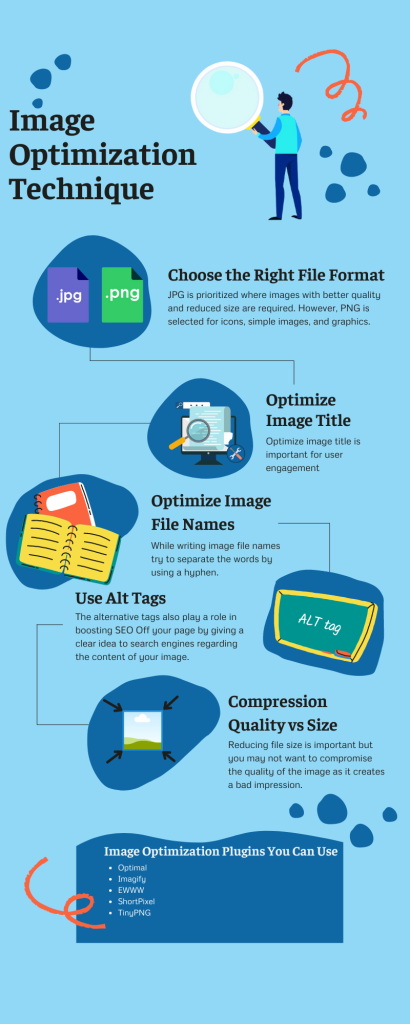
Image optimization SEO
As we know that the images on a web page determine its speed because it consumes more bytes than any other part of the website. Keep in mind that images with reduced size complete backup easily.Following are some of the steps that you need to follow to optimize your images.Choose the Right File FormatThe file size is important when it comes to images. The various types of files that you must know are as follows.PNG – Images with high quality and large file size. The format of images losslessJPEG – Quality and file size is adjustable and the format is lossy and lossless.GIF – Best for animated images, and uses lossless compression.PNG and JPG are the two most commonly used image formats for web pages. The selection of all formats depends upon the requirement of a website. JPG is prioritized where images with better quality and reduced size are required. However, PNG is selected for icons, simple images, and graphics.JPEG XR and Web P Are some other types of files but they are not supported by all the browsers so it is ideal to stick to JPEG and PNG.

Optimize Image Title

The title of the image used must define the image, and it should be the same as that of the file name. Optimize image title is important for user engagement but it doesn’t play a direct role in SEO Singapore.

If you select an image from WordPress then it’s most likely to have an image title the same as that of the name of the file, which you can use as it is. But if you don’t use it from WordPress then don’t forget to rename it with an appropriate title same as the filename.

Optimize Image File Names

Keep in mind that the file names play an important role in search engine optimization, and must contain relevant keywords. While writing image file names try to separate the words by using a hyphen. Because if you use underscores or any other symbols, the Google search engine is unable to identify them.

Use Alt Tags

When images can’t be loaded due to some error or glitch, insert circumstances alternative text explains the image.

The alternative tags also play a role in boosting SEO Off your page by giving a clear idea to search engines regarding the content of your image. Try to keep your alternative text within 10 to 15 words, you can also use your brand-relevant keywords to generate visibility. Note that alternative tags require a little more detail than filename.

Add Captions

The captions are written under the images solely for user engagement. They give an idea to the viewers that what information does an image contain, which leads to a better user experience.

Resize Your Images

The dimensions of an image define its size. Resizing images before uploading them to your web pages is important because if you upload an image with a large file size then it will require great time to load and lower your page speed. The more time your page takes to load the more chances there are for bounce rate. So always focus on reducing pixels of your image to provide a better user experience.

Research showed that a user is most likely to leave your website if it takes longer than 3-4 seconds to load.

Compression Quality Vs Size

One thing to keep in mind while compressing your image is to look after the quality of the image. Reducing file size is important but you may not want to compromise the quality of the image as it creates a bad impression. It is advisable to keep the image size between one and two MB. What you need to do is to find the appropriate compression medium for your image, that reduces file size without compromising the quality.

So next time when you do web design in Singapore, follow the above steps for image optimization and stay one step ahead.

There are several plugins available that will compress your images automatically.

Image Optimization Plugins You Can Use

The plugins come with handy features, not only they will compress images automatically but also compress the images that are already present or uploaded on your website.

Following are some of the best tools which are used for image optimization.

Optimal – It optimizes the images according to user screen and device.

Imagify – Provides high compression features and interface.

EWWW – No file size limitation to work on this tool but keep in mind that it works on your server.

ShortPixel – Provide some of the best features of image optimization and interface.

TinyPNG – Best image optimization and is simplest among all interfaces.

All of the above-mentioned, tools will optimize your images in the best possible way, so it is completely your choice that which tool would you like to use.

In Conclusion

Are you struggling in formatting your images to achieve SEO? Don’t stress anymore. By following the above-mentioned, strategies on how to optimize your images, you will boost search engine results, and your page will load fast which will increase your user engagement and traffic.


How to Make Your Website Mobile-Friendly for SEO?

Do you wish to see your website rank higher in search results but don’t know how to achieve it? Here we will discuss tips and tricks on how you can make your website mobile friendly so you can increase traffic on your website.

What is a Mobile-Friendly Website?

The term mobile-friendly website refers to the optimization of a website so that it appears well on any screen size, functions smoothly, and provides a great user experience. In other words, mobile-friendliness is how efficiently a website runs on a mobile device.

The fact that almost 70% of the people visit and shop from any website from their mobile phones has led to an increased focus on a mobile-friendly website.

Does Mobile-Friendly Affect SEO?

Many companies continue to ignore the importance of SEO in Singapore which ultimately affects their website’s reach and perception of their business. Would you risk your business’s image? A research study showed that on average 52% of people will not engage with your website if they have an unpleasant user experience.

So, if you want to improve your website mobile SEO then you must start working now.

Let’s discuss in detail how mobile-friendly ultimately affects SEO.

Greater Usage of Mobile

As we all know, 70%-80% of people browse websites from their mobile phones. To attract the audience to your website/webpage you must ensure a positive user experience.

  • Repeated Visits On The Website

If your website runs smoothly and is mobile friendly, then there are 70% chances are that users might visit it again. This will ultimately have a positive impact on your business.

  • Positive Perception Of Business

An optimized and mobile-friendly website ensures your audience has the best experience and builds a positive perception of your business. When more people have a positive experience on your website, it will help your business grow and increase your ranking.

  • Increase Purchase Rate

A website that runs efficiently and smoothly attracts more audiences and ultimately leads to increased sales.

  • Google Priority List

If your website is mobile-friendly, then Google puts it in the mobile-first-index list means that google will show your website in top search results. So, if you want to appear in the first few search results and increase your revenue, then it’s time you should start working on improving the mobile-friendliness of your website.

How to Check If You Have a Mobile-Friendly Website?

Do you wish to improve the mobile-friendliness of your website? Well, before you start working on your website, you must check the current status of your website i.e., if it is mobile-friendly or not. Just follow the steps mentioned below stepwise and you will get an idea about your website in no time.

Steps

1. Search For Tool

There are tools available online form where you can check your website i.e., Google’s mobile page testing tool.

2. Enter URL

Once you go on the tool, enter the URL of the website or webpage that you want to check for mobile friendliness, and then click on ‘Test URL’

3. Results

The tool will generate a report, categorizing your website according to the issue. It will give you an idea of your website’s mobile-friendliness.

Once you are done with your analysis, you will get a much better idea of the weak points of your website and make an SEO strategy accordingly.

Digital marketing concept

Best Practices for Creating an Effective Mobile-Friendly Website

As we have discussed how mobile-friendliness is important for business, now let’s talk about ways how you can work to create an effective Mobile-Friendly website.

Responsive Web Design

Responsive web development is the most important step while the development of a website, it ensures that the user gets the best experience of your website when opened from any device i.e., mobile phone or tablet.

If you don’t make your website by responsive web development then your audience will get the view of the desktop version from their mobile. The desktop version means that the overall look of the page will seem crowded, the text will be unreadable, and the user will have to zoom in and out to read it.

With responsive web development, you can make it easy for your audience to read the information on your site.

Improve Your Site’s Load Time

A website must have a fast loading time to have a better user experience. If your website takes time to load information, chances are that the audience will bounce off your page.

Now you must be thinking how can you check the loading time of your website? Simply go on Google and search Google Page Speed Insights, it will provide you all the necessary information about your website’s loading time. It will inform you about the flaws of your website and solutions to improve it.

If you are not aware of coding techniques, then you can contact a digital marketing company and let them handle it for you.

Focus On the User Experience

Positive user experience is what matters the most if you wish to increase the traffic on your webpage. Responsive web development is one of the elements in creating a better user experience. On the other hand, a thumb-friendly design, easy-to-find calls to action, and appropriate font size altogether boast the user experience.

Optimize Image Size

Image size is something that must be optimized i.e., not larger than needed as it increases load time. Also, prefer to choose images with PNGs format with less than 16 colors. Use CSS sprites as it combines your various images into a single image that loads at once so the user won’t have to wait.

Eliminate Pop-Ups

Pop-up is a commonly used strategy used to attract the audience’s attention. Pop-ups may appear as a result of specific action i.e., when you open the page, or when you reach a specific part. Note that the pop-up strategy is not as effective for mobile users as it may cover the whole screen which may leave the user frustrated and cause them to leave the page. But if you still wish to use the pop-ups then use them carefully, and only on the parts where it’s necessary as you may not want to cover other important details. And the pop-ups must appear with ‘X’ on the side so the user can get rid of them easily.

Implement a Clean, Easy-To-Use Navigation Bar

Mobile-friendly navigation also plays a role in improving the user experience. If your navigation is difficult to understand the users will drop from your site.

Use the hamburger menu as it makes it easier for the audience to reach out the information. It shows three-line on top of the page and when the viewer tap-on these lines a menu appears which leads to different pages they can view on that site.

Create Mobile Content

To make your website mobile-friendly you must also focus on creating mobile content; it is a great SEO technique. It makes it easier for users to scroll through the website, creating a positive experience. Provide short and informative content on your website as users prefer to read shorter paragraphs rather than longer ones. Make your content attractive by adding photos and videos this will also keep your audience engaged. Moreover, the content added to your website must have the right keywords as it will help you in getting ranked.

Start Optimizing For the Mobile-Friendly Website Today

If you are running an online business, then your website must be mobile-friendly as it will be beneficial for your business. Don’t know how to do mobile SEO? Worry no more; hire us today and let us do what’s best for your business. We have a team of experts, with years of experience, who will come up with the best solutions to increase traffic on your website and get it ranked.

Contact us now and let our strategist help you.

Complete Beginner’s Guide to Page Speed Optimization

If you have worked around the world of website creation, you will know just how important it is to make it rank, and offer the best possible user experience! One of the pivotal factors that affect any website experience is speed! The speed or rapidity at which your pages, graphics, texts, and content load can either make or break it for you!

It is essential for any web developer to understand that the audience doesn’t have days or even a few hours for you! If they take the courtesy to visit your website, and check out some of the content, it’s indeed a privilege for you! What separates the best web developers from others is the way they make the best out of that time!

In this world, things, today, move in instants. Everything from social media posts to our physical presence is nothing but a matter of a glance. The biggest example is that of Instagram that makes the best use of this, and has earned itself a place as being the one of most used social media platforms. The reason is obvious: you see a post, double tap to like, and scroll onwards! No delays!

When it comes to creating a website, you need to adopt the same strategy. Extract the most out of what you get! It’s not just all about having the best content, the most valuable blog posts, or the most user-friendly UI designs. Everything boils to the fact that how great of a distance you have curtailed through various speed optimisation techniques! This is why all professional and expert web developers devote hours and weeks of their expertise to reducing the time it takes the website to load itself.

Moreover, if we take things into consideration from a wider eye, it’s true that website speed optimization also helps with SEO. Hence, that is why this blog came into existence to help you do the trickery, and make your website supremely optimised for an enhanced user experience!

Page Speed Optimisation

If we delve into specifics, page speed is formally referred to the time it takes for any website to download its content from the hosting server, and put it onto the requesting internet browser.

If we were at a time some 20 years back, we would not be having this discussion. This is because things aren’t always meant to be fast, and intuitive. At the time, the internet and all our mobile devices and computers were fairly new, meaning the technology was in its growing periods or stages. Developments were yet to be made, and the novelty factor was alone the biggest hype!

However, as things improved and we progressed, the user experience became more and more important! And today, we have reached a stage where the most optimally correct page loading time should be 400 milliseconds, less than what it takes to blink an eye!

Having read the figure, one thing you shall have recognised is the fact that our information transmission is incredibly quick. Today, you can have the best online products in the world, and still suffer from poor website performance thanks to your slow loading times! Hence, page loading times hold the greatest significance for businesses. We don’t go out of leagues when we say that poorly optimised websites have the capability to bring your entire online interaction down! Therefore, if you have never focused or given time to loading speed, this is your perfect shot!

How to Check Page Speed Optimization?

Now that you are extremely keen to know more about page loading times, you might be wondering exactly how you can check one for your own website. Well here is the trick, you can go onto Google and search for a reliable tool that gets the job done. However, it is to be noted that many of those tools are nothing but trash; they can produce vague and bogus results, often distracting you. For instance, you may have loading times that demand improvement and your online tool could be giving great tidings! Moreover, these online tools aren’t recommended for large-scale businesses that cannot afford to compromise on even a few milliseconds!

Hence, here comes our expertise! Bthrust is an SEO Agency that you can rely on for all types of website-related tasks! Our experts know their way around complex website optimisation to ensure that you have the most supremely functional and honed website. We know that your business needs every bit of that extra millisecond to stay ahead of the curve, and win gains!

Our experts can get into the specifics of your website, and break down precisely how well it performs. Moreover, we can also create and forge strategies to make them perform better, helping you secure valuable peace of mind that your business is in the right hands!

SEO beginner guide

How Do I Know If Page Speed Affects SEO?

One of the biggest uncertainties we have with Google is that we don’t know how Google measures page speeds! We are yet to even gain a hint of how it sets its benchmarks and threshold that must be exceeded in all cases. Similarly, we are also unaware of the exact units it uses! Does it go deep enough to filter based on the tiniest of milliseconds or offers the leverage to keep it within seconds only?!

These unknown factors play an integral role in how Google sets its algorithms up for ranking different websites. However, one thing that we know for sure is people love rapid sites!

How Should I Optimise My Website For Page Speed?

Now that we have got everything out of the way, we can focus on individual techniques and strategies to achieve the best webpage loading times!

Enable Compression

Compression is your first best friend when taking on poorly-optimised websites as it helps reduce the file sizes, and makes things breathable! Large and bulky files for graphics and other CSS or HTML files can take a very long time to download from the hosting server. Hence, you should use Gzip for compressing all files exceeding 150 bites in size.

As for pictures, compression software can really take a big toll on the image quality. Thus, you should hit back to basics; use Photoshop for toning down the images.

Minify CSS, Javascript, and HTML

The longer the code you write, the more time it takes for everything to load! Hence, curtailing unnecessary punctuations such as commas, and eliminating spaces along with unwanted lines can play a big role in enhancing the overall performance of your website.

Reduce Redirects

Redirects can be irritating because every time a user clicks on them, it wastes a few additional seconds of their time. Having multiple redirects can make that time add up, and reduce the efficiency of your website.

Use Cache

Cache is handy at storing a number of website elements such as graphics, pictures, Javascript files, and much more. This stops your website from loading every time a user visits it, leading to much better loading times.

You should use it to your advantage as much as you can unless you update the design of your website very frequently. There are countless tools to set a cache expiration date that you should consider using!

Optimise Images

Images can be the most intensive part of your entire website. High resolution and quality pictures often come at the expense of poor loading times. You should avoid unnecessary images as much as you want while ensuring you get the format of the image done the right way! Graphics go best with png, while jpeg is great for pictures.

Conclusion

Putting it to an end, we cannot stop but stress just how important page loading times are! If you want the best out of your website, we can help you build every foundation for top-notch website optimisation. When talking about SEO in Singapore there are a lot of SEO companies, but it is our expertise that helps us top the charts every year!

Everything You Want To Know About the Meta Robot Tags

In recent times, Google search engine ranking and SEO have changed by significant margins. New innovations are discovered just about every other day in the SEO field, promising better results and faster outputs. These tricks and techniques are used as quickly as they are found with hopes that websites bag more traffic, generate higher leads, and the business grows. SEO is the key to the growth and prosperity of online businesses today. If more and more people find you on the search engine, you will have greater chances of converting your leads into valuable customers while creating a strong brand identity.

In this blog write-up, we will discuss everything about meta robot tags. Our expertise and experience in SEO have allowed us to share some very incredible information regarding the tag. Bthrust is the ultimate SEO agency that guarantees results that speak for themselves. Our goal is to help national and global businesses succeed with unprecedented numbers and figures.

Meta robots tag, in general, is used in SEO to tell a search engine how effectively it crawls through pages. Well, yes, there are a whole lot more details about it, let’s just keep it that way for now!

Before we can focus on meta robots tag, you must know how a search engine works. Any search engine, let’s just take Google for the sake of things, uses a combination of simple and complex algorithms along with virtual robots to do its job. The primary function of search engine is to showcase results in correspondence to what a user searches. But have you ever wondered how that happens!?

Before we can focus on meta robots tag, you must know how a search engine works. Any search engine, let’s just take Google for the sake of things, uses a combination of simple and complex algorithms along with virtual robots to do its job. The primary function of search engine is to showcase results in correspondence to what a user searches. But have you ever wondered how that happens!?

Well, a search engine has robots called crawlers that crawl through billions of web pages and sites online. Every time a user makes a search on Google, the search engine allocates its crawlers to crawl through web pages that are in line with what’s being searched. It uses keywords to ensure that it gives accurate results. A crawler goes through online resources, looking for all relevant results that must be displayed on the screen. All of this happens in just mere instants. Once relevant search results are found, they are all sorted in terms of Search Engine Optimization before being listed.

So that’s how a search engine skims through the massive database to provide results that are both relevant and valuable.

Meta tags SEO

What Is A Robots Meta Tag?

A robots meta tag is used in the header portion of the webpage. It serves to tell which web pages should and shouldn’t be crawled. In this way, it lets a website owner determine which pages shall not be displayed on the search results.

Robots meta tag comes in handy in multiple instances. Different users use it for different purposes. Let’s go through some of them!

A website owner may use robots meta tag to omit web pages that hold zero to minimal value for the user. Any page that is non-valuable for the reader is better left out because it only degrades the user experience. You don’t want any of your potential customers to click on a page that gives no valuable information about the product and services, and lose them in the process. Moreover, such pages also devalue your brand’s identity. People on the internet seek the best, and anything that disappoints them is seen as useless.

Moreover, omitting thin pages from the mass user base also saves a crawler’s time. There is a certain time limit the robots spend on a particular website. Meta tags help you carve out an overall more efficient use of that time!

Robots meta tag also comes in use when dealing with pages that are meant for future use. Such pages may be relevant to future product launches or upcoming promotions that you don’t want the mass market to find about.

Massive websites that consist of hundreds of web pages also use meta tags to stop certain pages from showing up. Such pages can be meant for admin use only with confidential information you don’t want the world to know.

Indexation-Controlling Parameters:

Certain parameters control how a crawler indexes a webpage. These are a valuable part of the entire meta robots tag as they give incredibly specific instructions and govern the robot’s behaviors.

Here is a list of all those parameters that you are likely to come across in your lifetime.

Noindex

No index parameter followed by a webpage URL instructs the crawler not to crawl through that page. It could be done for several reasons such as omitting confidential pages or duplicate content.

Index

Index, as the name suggests, permits search engines to index and crawl through a webpage. You don’t have to use this parameter as it is set as default.

Follow

The Follow parameter allows the crawler to follow every link available on the page.

Nofollow

The Nofollow parameter instructs the crawler not to follow any link on the same page and stay away from giving link equity.

Noimageindex

The Noimageindex tells the search engine not to index pictures or images on a webpage.

None

None parameter gets two jobs done simultaneously. If someone wants to use both Noindex and Nofollow parameters at the same time, they can use None parameter only once and it will get the job done!

Noarchive

Noarchive tells the crawler not to crawl through the links in the cache.

Nocache

Noarchive and Nocache are essentially the same parameters. The only difference is that Nocache works on Mozilla Firefox and Internet Explorer.

Nosnippet

Nosnipper parameter is a special tag that prevents the search engine from showing the URL of the page.

Noodp/noydir

This tag has become obsolete for modern web browsers today. However, its function was to prevent a search engine from using DMOZ as the snippet of a page.

Unavailable_after

A special tag that lays forward a date after which the search engine should stop indexing and crawling a web page.

How do you set up the robots meta tag

If you have benefited from all the information we have provided in this blog and consider setting up robots meta tags for your website, here is how you can do it. The process is a fast and efficient one; therefore, you don’t have to worry about getting into technicalities.

If you use HTML for your website and have an editor in the form of Notepad or MS word, you just have to add the tag in the head section of the webpage. Do that and you will be good to go.

As for WordPress, you need to go into the advanced setting for your web page. There, you will find an option for your robots meta tag and simply add it according to your requirements. All parameters like index, noindex, nofollow will show up in a drop-down menu. Once done, save the changes and now you can control how your search engine indexes and crawls your website.

Common Meta Robots Mistakes

There are certain mistakes that we have found out from our first-hand experience working in this digital field of SEO regarding Meta Robots. Here is our list of them:

Never Add Noindex to Pages Disallowed In Robots.Txt

Once you have deindexed a page in robots.txt, avoid the mistake of preventing it from crawling. This makes the search engine stop the reindexing process.

Dont Remove from XML Sitemap.

Even after you have deindexed a page, do not omit it from the XML sitemap. This can make the crawling process take more time than usual.

Keep Your Confidential and Secret Pages Still a Secret

If you have a promotional page for future use, it’s in the best of your interest to keep it a secret until you allow large-scale access to it.

Bthrust is an SEO agency that understands the field better than anyone else! Our experts and engineers are incredibly talented, and they have the expertise to deal with all sorts of SEO-related issues – even other than meta robots tags. We can help you make your website SEO-friendly to land greater leads and convert them into customers.

Best Practices in Line With Robots Meta Directives

You should always try to use noindex and nofollow tags instead of robots.txt to hide web pages from the search results. Also, you don’t have to use meta robots and x-robots simultaneously; it’s essentially worthless and a waste of time.

Robots.txt: The Ultimate Guide

If you are intrigued by the realm of web development, the chances are that you must have across the word Robots.txt and may have wondered what it is exactly. We have all been there; undoubtedly, this is a confusing term! However, in this blog article, we will show you that it has nothing to do with any human-like robots but is an integral part of web development. In order to understand Robots.txt, we should first delve into the way a search engine works.

So starting with the search engine, it works when a user inputs a search query in the search bar. There are billions of web pages and sites online, and the search engine must look through many of them. It doesn’t mean that it goes through each web page and site but instead relies on keyword integration and other metrics to find relevance between the search and the result. It does that through crawlers (specially designed robots) that crawl through pages present in the index. These robots must move from one web page to another until they can display a bunch of relevant results. In this way, this web of pages enables the crawler to quickly move and be on the quest.

However, what if you could hide a particular page from the crawler and prevent it from showing up in the search results. Now, that’s where Robots.txt comes to the surface and makes it happen! So before we delve into tidbits of the topic, let’s just understand that it helps a website owner mark certain pages and prevent them from the crawlers reach. Putting that out of the way, let’s get into it!

What Is A Robots.txt File?

Robots.txt refers to a particular file that instructs the search engine robots or spiders with their navigation. It tells them which web pages to land on and therefore show on the search results. In this way, this file acts as a guide for the spiders to move through billions of pages and ignore those that the website owner wants it to. Before a search engine can jump from one web page to another, it must look for any Robots.txt file to act in compliance with the requirements set by the developer. Many web developing experts use it to hide certain pages from the outside world and keep valuable information secure.

For example, if I have a Log-in web page made only for my employees, I can use the Robots.txt file to stop the rest of the world from randomly landing on it. Or if I have specific information that I can neither afford to let be accessible nor can put it down from the internet, I can use this file to save myself from trouble.

Is A Robots.txt File Necessary?

The choice to use the Robots.txt file is entirely dependent on the website owner. If you feel the need, you should definitely take full advantage of it. Such a need can arise from wanting the spiders to use their time more efficiently and go through essential pages. All search engine spiders have a predefined time to crawl through different pages on a particular site. Once that time is reached, it must hop on to the other site. This time is known as the crawl budget. If someone thinks that the spider is not utilising its time the best, he can use this file to prevent it from going through unimportant pages and focus on variable content only.

Similarly, if your website consists of many different pages and suffers from poor ranking, you can consider Robots.txt files to make better use of time and enhance your ranking performance.

Besides, if a web developer structures many query parameters within site, the spider tends to crawl through every possible URL. For instance, if you have got an eCommerce store with filters like high to low price and alphabetical ordering, there are just countless numbers of URLs. Having to crawl through each one of them takes a lot of time and may prevent the spiders from crawling through the main pages. That’s also one of the instances when using a robot.txt file becomes more than just necessary.

Earlier, we had said that Robots.txt files could also stop certain pages from showing up on the search results. Well, that was just not to confuse you at the time. The bigger picture is a bit different. If the search engine finds a substantial number of links to your blocked page, it will make it show up on the results- just without knowing what the page includes. Therefore, if you want to go hardcore with page blocking, you should rely on the index tag.

Moreover, another thing to consider is that these blocked pages are eliminated from any link value. So even if there were a vital link building on your blocked page, the spider wouldn’t be able to navigate through this path.

The Most Common Use of Robots.txt

Robots.txt file is primarily used to stop spiders access to unimportant media files such as pictures and scripts. This is done by taking everything into account and ensuring that blocking these files does not hamper the website’s performance. Many web developers and website owners use this technique.

When it comes to SEO Singapore has at the receiving end of our top-notch services. We have used our expertise and experience to produce groundbreaking SEO results. You can be one of those companies too that have benefitted from our knowledge and skill!

Where Should I Put My Robots.txt File?

Robots.txt guide

With all that said, it’s obvious to ask where should one put these robot.txt files! Well, you need to add these in domains and leave robot.txt written at the end of your websites URL. This will help the search engine land on your file and get valuable instructions.

There are certain things that need your consideration before using them. These files are to always be in small letters, as they are case sensitive. Any error will stop the search engine from accessing these files. Also, you must add these files to the top-level directory of your website to make them stand out. Besides, anyone with the URL link to your robot.txt file can know exactly what you are hiding from the crawler.

Robots.txt Syntax

Robots.txt files are a combination of directives and user agents. Directives inform if the page is allowed or disallowed to be accessed, while user agents are the names of specific spiders you want to address. For example, if you’re going to address Google, you should use the user agent name ‘Googlebot’. This is the same for other search engines like Yahoo and Bing.

The User-Agent Directive

When a spider lands on a specific Robots.txt file and sees its name in the user-agent directive, it quickly knows its role by following the command. A Search engine like Google has several different kinds of spiders, such as one for news, one for pictures, etc. So, therefore, you need to be precise in your code to address the right spider only.

Disallow Directive

Disallow directive tells the spider about pages and media files that are not meant to be crawled upon. It is the second part of the block of the directive. If left empty, it gives the spider full access to all the site content.

Wildcards/Regular Expressions

Although robot.txt files do not support wildcards and regular expressions, you can still use them at your convenience because all search engines can easily understand them.

Allow Directive

The allow directive tells the search engine about the website content that is open to crawling.

The Crawl-Delay Directive

A crawl directive tells the spider to slow down its crawling process and spend more time on the site looking for different content.

The Host Directive

This tells whether to add “www.” before the URL or not. However, you should know that Google doesn’t understand it.

The Sitemap Directive for XML Sitemaps

It helps the search engine locate the XML sitemap that contains the entire bird eye view of your website and its individual pages.

Validate Your Robots.txt

Although there are numerous tools to validate Robots.txt files, in our experience, Google Search Console is the best option, especially if you are dealing with Google as your search engine.

Where Does Robots.txt Go On A Site?

Robots.txt guide

Your Robots.txt file should always go in the main directory. That’s where the search engine spider looks out for them.

Robots.txt Vs Meta Robots Vs X-Robots

Meta robots and X-robots dictate indexation on individual web pages. However, robots txt file is a text file that governs crawling on a broader level.

We hope this article puts all of your queries about Robots.txt to the bay and enhances your SEO knowledge.

A Complete Guide to XML Sitemaps

As the world changes, the internet evolves too! Every day is marked with a discovery, thanks to various engineers and the nature of technology. Amidst this, Google and its ranking is put under constant evolution, with an influx of new and novel ways algorithms treat online resources and rank them. Today, search result ranking factors have changed so much that you cannot simply a modern website or blog with conventional ways and schemes.

An XML sitemap is one of those factors. Even right now, if you search the word on google, you’ll find a plethora of results, both valuable and misleading. You may nail every practice you find online and still suffer to get in the top ranks. That’s what such saturation leads to!

If you too want to know more about XML sitemap and only want to access the right information, this blog has found you at a perfect time. Being an SEO agency, every word penned in this write-up is supported with knowledge and expertise; therefore, you can rely on it!

What is an XML Sitemap?

In case you aren’t associated with the term XML Sitemap, here is our take on it. Although it may sound quite complex and technical, it isn’t! Here is every detail you need to know about it.

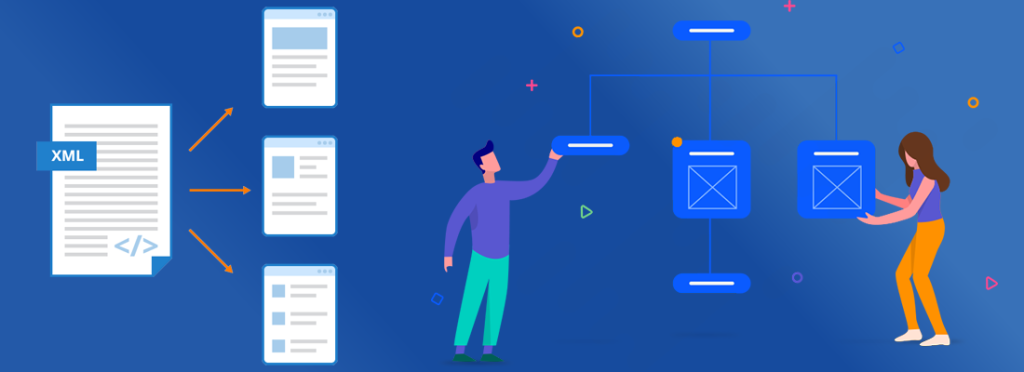
XML Sitemap refers to the structural architect of a website. It includes a pathway from one page to another within the same site. You can view it as a web or connection, in which hierarchy determines the position of the page. For instance, a Homepage will be at the top, and it will divide into its connecting pages.

For example, if you have a skin-care products website, the homepage will include all your products’ general information, and the leading pages will concern individual products.

XML sitemaps are used mainly by large and extensive websites that entail a ton of content. Similarly, website owners who consistently add new content and pages to their site also tend towards XML sitemaps to help search engines locate different pages of their site. Besides, those who have to deal with poor internal linking also use these sitemaps to enhance their site’s performance.

Why is it Essential to Have Sitemaps?

XML sitemap guide

Sitemaps offer benefits primarily related to improving a website’s performance in terms of ranking and visibility when a search engine looks for billions of online resources in the index.

Some of the benefits include:

Allow the Search Engine Bots to Look For Each Page on Your Website

XML sitemaps are greatly useful in helping various search engine bots look for different pages of a website. Offering a proper roadmap of a site allows the search engine to know exactly which pages to index and see when getting all the relevant search results.

Using these sitemaps, all search engines can effectively go through different URLs and identify pages that otherwise would have been overlooked. Thanks to sitemaps protocols, google bots have navigation to every page where they can look for relevancy with what’s being searched by a user.

Moreover, since sitemaps include all the changes made on a site together with a comprehensive summary of what’s being added, nothing goes out of sight. Besides, they help save the time it takes crawlers to crawl through online resources and may bring to the surface those URLs which were previously not found.

Make it Easy to Follow Pages.

There are two significant reasons for duplicate content; accidental and intentional.

User experience can either break or make for you! Sitemaps allow your website visitors to easily access various pages on your site and save valuable time. Sitemaps include all the additions, including pictures, graphics, and videos on your site and individual URLs, which makes it a breeze to instantly know what a particular website is about.

Many website owners make the mistake of not adding sitemaps and therefore suffer from low engagement metrics and diminished performance as the majority of the time a user spends on the site is wasted aimlessly navigating all the pages. However, you can avoid that by categorizing different pages and making it an instant task for your user to visit a specific page.

Moreover, if there are a lot of sitemaps, you can add them on different pages. This yields significant lead conversion and makes your site get in the top results.

Convenient For Coders to Add Sitemaps

XML sitemap guide

Since sitemaps contain a universal protocol that is standard across all search engines, it is effortless and convenient for web developers to create them. It addresses their concern of creating a different sitemap for every search engine; instead, they can rely on a single map and make it work on Google, Bing, and all.

Moreover, since sitemaps need to be updated regularly, especially if you keep adding new content and pages, it negates the struggle of doing it multiple times. Instead, you can simply make additions at one location and mimic that on others too.

If you think that sitemaps are still technical and fall out of your realm of expertise, you can contact Bthrust to construct well-optimized and fully functional sitemaps for you. With our knowledge and experience, you will see an immediate improvement in your website’s performance. With our solutions relating to SEO Singapore businesses have remarked about groundbreaking success for their online platforms.

XML Sitemap Format

Creating an XML sitemap is marked by following a format that will ensure you are doing everything the right way. Some of the aspects in the format include:

Loc (a.k.a. Location) Tag

Loc tag is imperative when it comes to XML sitemap. It must contact the exact URL of the page without any room for change. It indicates the site’s protocol type and gives the choice of either adding or excluding www.

For a user with a multilingual or multi-regional site, in which he targets user bases from different regions, the Loc tag should also contain the hreflang tag to let the search engine know the area you want to target with a particular page. This comes in handy for someone with different versions of the same website content.

Lastmod (also called Last-Modified) Tag

Lastmod Tag is one of those things you just cannot afford to ignore! It includes the date and time you made your last modification on a particular page. Many IT experts have conceived its importance when a search engine is crawling through various online pages.

One thing you need to consider when using it is that you only change the modification date when you have made a significant update to your site or content. Besides, it helps the search engine know that you are the website’s original owner as all the changes made are associated with you; therefore, the chances of visibility are strengthened.

Change Frequency (Change Freq) Tag

Change frequency tag has been there for a very long time. It has often been believed that it creates a significant impact in helping the search engine find your page and offer excellent results. As the name suggests, it is relevant to the number of changes you make to your content. This can come in handy for the robots to identify if you are the genuine owner of a site.

However, it has been found that it does little to nothing in reality. If you only mention the date when you made a modification, it’s enough to assist the search engine. Therefore, the choice is yours, whether if you want to use it or not.

Priority Tag

Priority tag lets the search engine know exactly how relevant your page is to other online resources. It does that by determining a specific value to the page. It is an optional tag and the choice to use it is always yours. Many IT experts have negated any advantage associated with it!

Which Pages to Include in Your XML Sitemap?

XML sitemap guide

It’s always a good practice to see if you want your user to be redirected to another page. You can determine that by identifying the value of content on a particular page or measuring the engagement, it could bring.

However, it is always recommended to add new blogs and media to your sitemap. Your blog will benefit from it because you need online traffic, and it offers an excellent way to do precisely that. As for media and images, you can avoid it, but if you think some particular pictures can hold great significance, it’s recommended to include them in the sitemap.

What are Some of the Leading Practices to Use When Creating a Sitemap?

When it comes to internet marketing in Singapore, business environment has always tended towards sitemaps to maximize the chances of better visibility. They primarily rely on specific practices, which could be testing sitemaps multiple times, changing dates when making substantial upgrades, using exact URLs, ensuring the map is small and much more.

These are some of the practices that we can recommend using, based on our personal experience and skill in the field. And we believe these will yield excellent results for you too!

How to Deal with Duplicate Content

In the modern age, everything from lifestyle to business has become digital. Gone are the ancient days when physical real estate was an imperative before doing anything. People are behind the screen, constantly looking to improve their life with content creation. Content is something that sells quickly. This is due to its multidimensional nature as being informative or fun and suiting the artistic needs. Every company needs good content to sell its services or products and ensure well-being.

Dedicated writers and teams are hired to forge content strategies before venturing into the global market. Increasingly, digital marketing sectors are growing beyond predictions and taking full advantage of the opportunity. Indeed, the internet has opened a casket full of new shots for people to take and test their luck.

Well, this is all good except the fact that content can get duplicated too!

What is Duplicate Content?

Duplicate content refers to the replication of content in different sites or webpages. It can either include a full-fledged exact copy or certain portions being alike. Just like in our physical world, there are addresses to locate each other, search engines acquire URLs to navigate different webpages, and if the same content shows up in two distinct addresses, you are indeed facing a detrimental issue.

As the internet grows and blooms into becoming the largest platform for businesses, content duplication is taking a road towards normalcy. While there is no prescribed penalty, it entails massive significance in your site ranks and is treated by Google.

Search engines love new and novel content! With duplicate content, you take a toll on your user experience and are deteriorating your gamble with the algorithms. Therefore, it becomes crystal clear that we do not want content duplication under any circumstances, so we need to explore how to deal with it. This blog has everything you need to know when encountering duplicate content!

Why Does Duplicate Content Matter in SEO?

For search engines, duplicate content poses several problems. Most of them can be rounded off towards sheer complexity. Whenever a user searches for something, a search engine scrolls through the directory of results looks for relevance by skimming through pages before finalizing the results it will display. This is a task performed best when every page is distinct in terms of content and everything. Now, if there is duplicate content, the search engine won’t know which page to showcase.

Secondly, search engines find it cumbersome to determine the cleavage between directing link metrics to a page and keeping it separated among different versions. Once again, it adds up to the overall complexity and worsens your bet with the algorithm.

Moreover, with duplication, it’s likely, your webpage won’t show up, thanks to the deterioration in the search engine’s cohesive work.

Duplicate Content Issues for Search Engines

In case you want to be educated with even more issues related to duplicate content, we are here with all the details.

For instance, when content gets duplicated, it casts a shadow over your efforts. This is because the search engine becomes unable to categorize which page to include in its indices. Ultimately, this transpires into events like full-fledged separation from the main index, leading to the burial of hopes with SEO.

Besides, link equity receives a toll on itself too. This is brought about because an inbound link connects with several pages instead of one and worsens one’s chances of substantial visibility.

This is everything you can ignore if you hire BThrust for your work! With skilled, talented and adroit individuals, we bring performance, unlike everything you have seen before!

How Do Duplicate Content Issues Happen?

There are two significant reasons for duplicate content; accidental and intentional.

When talking about accidental occurrences, we give the benefit of the doubt. Such a saturated user base can likely result in linking ideas that could be executed in the same way. In most instances, accidental duplication happens with small parts of the overall content rather than the entire thing. Under no logic can we conceive that full-fledged duplication could be a product of an accident.

However, deliberate content duplication, especially full-fledged copying, is deemed to be a kind of stealth. No matter how much our minds can relate and correspond to each other, execution can never be a full-on exact match. With no benefit of the doubt, this type of duplication is one to forsake strictly.

Some of the other reasons for content duplication are as followed.

URL Variations

URL parameters include analytic code and click tracking. One of the primary reasons for duplicate content is this! The order in which you add parameters matters, as similar versions can lead to duplication. Similarly, duplicate content can also happen when a user is given a session ID different from the one stored in the URL. Moreover, having pages with printer-friendly modifications can also lead to duplication as several versions can get stored in the index.

To all these technical SEO problems, BThrust is the solution! With years of experience and top-notch strategy implementation, we are ready to treat your SEO problems as ours and deal with even the most severe of duplicate content cases.

HTTP vs. HTTPS or WWW vs. non-WWW pages

Having multiple URLs for distinct pages can also lead to duplicate content. Essentially, the thing is to assign different content to a different address. However, negating intricacies like the irregularity in the use of WWW for a specific page can create problems. For instance, if you assign the same page two URLs, one with WWW. and one without it, you are summoning the search engine to treat it as two. Ultimately, this results in difficulty determining what must be entered within the index, and so your page may never find its place there.

These issues are prevalent on the internet. BThrust deals with them just about every other day and is proficient in helping you eradicate your problems with solutions marked with excellence.

Scraped or Copied Content

Copied content is becoming a norm, especially with the rise of e-commerce sites. Just imagine 1000 global websites selling the same product with the same description. It will definitely lead to duplication, right?

Well, of course, it will! Some people copy content such as blog posts from different portals and post them online. Once again, copied and scraped content, no matter how possessed, will be subject to duplication. Hence, we ascertain that duplicate content is fatal to your online life! While being unethical, it’s one of the practices people consider with seriousness and tend to use.

However, we negate such means and only go for ways that inspire confidence and belief in your company.

How to Fix Duplicate Content Issues

With problems come solutions! A multitude of them! No matter how the content gets duplicated, we want to know if the original version of it. This can be done by several techniques that we use and definitely recommend as a top-notch SEO company. Since we talked about the fact that not every duplicate content is an instance of thievery, you need to approach the problem with peace of mind that gives you complete control over the situation before identifying the best solution.

Every solution that we will be discussing is marked with its very own effectiveness and usability. These have been learned through the first-hand experience, meaning you can be sure of their fruitful outcomes.

301 Redirect

What would you say if we tell you that you can merge all the duplicate pages into one? Sounds like magic, right!? While, to some extent, it is. The trick here is to use 301 redirects on the duplicated page to the original page. This is a widely acknowledged practice as it also eradicates the competition between the two pages and lets both grow. As this technique equates good for the original piece, you should always have it in your realm of considerations.

Rel=”canonical”

This is a more intense and groundbreaking strategy. It tells the algorithm that certain specified pages are duplicates of the original, so all performance metrics must be applied. As a result, one single page takes the cut for the most benefits, in contrast to what happens with 301 redirects.

Meta Robots Noindex

A meta robots tag with a prescribed Noindex value prevents a particular page from entering the index. The search engine can still crawl the page but is stopped from searching it in the index.

A company like Bthrust SG is structured on utmost comprehension of this and other strategies and can help you fix your duplicate content issues with ease. We believe that the internet should be the least of your concerns and thus attire ourselves with all the necessary skills to make your online life easier and better. We mark everything with perfection and sublimity and no duplicate content leaves our sight before getting squashed.

How to Make Your URL More SEO Friendly?

A site’s URL structure needs to be optimized if you want to champion the SEO strategy. It should be as simple as possible while being logically structured, so it can be intelligible to humans. This is why it is crucial that you pay attention to the URL on your website and optimize them accordingly. This guide will support you in formulating your URL structures in a more appealing and SEO-friendly manner. Stick with us and read on.

What is an SEO-Friendly URL Structure?

Consider the following URL:

http://www.example.com/index.php?id_fenae=639daw232fdje9sid&anr32223n9hndwe8

This URL is not only very unappealing, but it can also affect your SEO strategy. Instead, a well-optimized URL structure will be more beneficial to your website. There are various reasons why URLs get structured with unnecessary numbers.

For instance, many websites offer different views of the same items or search results. In this way, users often have the ability to filter out the results with defined criteria. When the filters are arranged in an additive manner, the numbers in the URLs (that are actually views of data) can bombard its structure.

On the other hand, the dynamic generation of documents can also cause changes in the URL structures, mainly because of timestamps and counters. Parameters in the URL can prove to be problematic, for instance, when it comes to session IDs.

Moreover, broken relative links can result in numerous infinite spaces due to repeated path elements. A dynamically generated calendar might result in links pointing to the future and previous dates if there are no restrictions on the start and end dates. Therefore, it also comes down to how you have optimized the elements on your website to structure the URL.

Easy to Read

Refer back to the previous URL we showed you. The URL is both unappealing and less readable. Users prefer URLs that are more readable. This is because they allow the users to identify what the page is offering. Accessibility is also one of the most crucial elements when it comes to SEO strategies.

Search engines want to ensure that the best results are offered to the users. In doing so, they use data signals to determine how and what people are engaging with. In this way, if the users are avoiding the website due to the lengthy URLs that make no sense to them or look suspicious, then the search engine might not recognize your website well. This is why readability should be your top priority.

Keyword-Rich – Use Your Keywords

Using the right keywords in the URLs is also extremely crucial. If you still didn’t know this, numerous keywords can be used in the URLs for targeting your desired rankings. This is because the keywords in the URL indicate what the page is about to offer. When an individual comes across your site’s URL on social media, email, or Meta filter, they can hover over it before clicking in order to know what they will be getting and can expect from the website.

On the other hand, URLs are copied and pasted quite frequently, especially when there is no anchor text used in the link. The URL acts like the anchor text itself. So, for instance, if you are linking a page on a social media post, the URL will be pasted in the post. In such a case, a well-optimized URL structure with keywords will look far better and increase the rankings as well. Therefore, you should ensure to search for the right keywords and use them in your URL.

Consistent – Construct a Sound Structure for the Future

URL structure SEO

It is incredibly crucial to choose the right URL that can work in the future as well. Site structure plays a very imperative role when it comes to SEO . For instance, consider the following URL structure:

http://www.example.com/url-structure

The aforementioned URL specifies the year 2019. In this way, the users might not be able to open this URL in the year 2021 or after that.

Instead, it will be much better to have a URL structure as follows:

http://www.example.com/url-structure-2020

This URL structure does not mention any year, and therefore, it can be easily updated and accessed at any time in the future.

Static – Minimize Dynamic URL Strings

There are two types of URLs – dynamic and statics. The dynamic URLs have numerous parameters that vary from time to time. On the other hand, static URLs are always consistent. When it comes to creating the URLs, it is preferred to avoid the dynamic ones.

An example of a dynamic URL is:

http://www.example.com/structure/?cid=4324

Conversely, static URLs are much easier to read since they do not contain any parameters. When creating static URLs, you should also avoid mentioning a lot of folders because that will increase the number of slashes in the structure.

It can also get complicated for the search engines to understand the meaning of your URL. Typically, it is preferred to limit the total number of folders to a maximum of two. In this way, your URL will have an appropriate length. Static URLs have descriptive keywords, and thus, they are more user-friendly as compared to dynamic URLs.

Comprehensive – Fuse the Different Versions of Your Site

URL version fusion

There are two prevalent versions of any domain indexed in the search engines. These include the www and the non-www version. Then, the use of HTTPS and HTTP can also complex the domain versions.

When more than one domain version exists, many SEO companies use the 301 redirects for pointing to the other version. In this way, the search engine can know that the particular URL has been shifted to another destination. You can also specify the preferred version of the domain in the Google Search Console.

However, many of your backlinks might still be pointing to the unpreferred version of your domain. In this way, it is essential to consolidate all the versions of your site to establish a constructive link between them. This can be done with a canonical tag as well.

Submitted to Search Engines – Create an XML Sitemap

Search engines rely on crawling the websites instead of manually searching for them. If you want your site’s URL to be identified, then you should consider submitting it to the search engines. This can be easily attained by creating a comprehensive XML sitemap.

The XML is basically “Extensible Markup Language.” Doing so will allow you to improve your website and help the crawlers in ranking your site. The crawlers can also see what is available on the website and how it is organized. A well-organized XML sitemap can also show when and how many times the page was updated.

Use Canonical Tags

The canonical tags are basically pieces of tags that can be created if you have multiple versions of the same page. By incorporating these tags in your site, you can help the search engine to recognize which page version is preferred.

The canonical tags only work for showing which page version is preferred. For any redirection, redirects should be used. On the other hand, for paginated content, it is much better to use the rel=”next” and rel=”prev” tags.

Don’t Use Superfluous Words & Characters

When the users look at the URL, they don’t expect to see crampy words and characters. Not every single conjunction or preposition has to be part of your URL structure. Even words like “the” or “and” serve as distractions. They can affect the URL structure quite badly.

After all, the users can understand what the page is offering without the use of these words. In the same way, search engines can also derive the meaning from the URL structures without requiring such words.

On the other hand, you should also avoid repeating the keywords within the URL structure. By adding the same keywords over and over again, you can create a spammy URL structure instead of having any benefit for your search rankings. Here is an example:

http://www.example.com/seo-strategies/singapore-seo-strategies/company/seo-strategies-company-singapore

The repetition of the keyword for the first two times is sufficient. But repeating it over and over again is only affecting the URL structure.

You should also restrict the use of hashes. You can use hyphens for separating the words, while underscores can be utilized for joining the two words. It is also a good practice to restrict the URL length to 512 pixels because, after this length, Google can truncate the URL in the search engine result pages.

SEO Friendly URLs Are Simply Must

It goes without saying that a well-optimized URL can be much more beneficial for your site than a cramped one. In this way, it is imperative that you employ the aforementioned tips and improve the structures of your site’s URL. Not only will you be able to advance your SEO efforts, but a well-optimized URL will help customers in identifying what your website offers. There are numerous resources available only that can further help you in searching for relevant keywords, optimizing your canonical tags, and creating XML sitemaps.

A Guide To Favicons: Importance for SEO Strategies

Favicons have recently started to become very popular in the digital space, even though they have existed for a very long time. They are considered to be a critical part of SEO strategies as well since they allow the websites or brands to visually represent themselves. Therefore, it makes sense that you employ favicons for your site, too, and increase the chances of your site being recognized in the digital world. The following blog covers more about the favicons and why exactly you need them.

What is a Favicon?

Website favicon icon

Favicons are basically the icons used to represent a site or brand. They are small images, usually in the size of 16×16 pixels. They can be viewed next to the page titles in the mobile search results of Google. They can also be seen in bookmarks, browser tabs, and history. It is usually preferred that the Favicon of a site be the same as the logo of the business or brand. In this way, the representation of the overall brand can be coherent.

When websites don’t have a favicon available in the source code, the browser tends to use a generic icon to represent the site. Many companies that create web applications, such a Google, tend to use different favicons for each one of the web property and application. For instance, Google Maps, Google Images, and Google Search Console each have a different favicon. The favicons can be added to the page in the <head> section of the site with the help of the following code:

<link rel=”shortcut icon” href=”https://www.example.com/favicon.ico” />

The URL basically refers to the stored image file. It is preferred that the .ico file format is utilized for the favicons. However, the major browsers also support GIF and PNG files.

Fave Icon History

The name “favicon” basically combines two words: favorite and icon. The name is a result of the concept formulated by Microsoft Internet Explorer. The Internet Explorer 5 that was released in 1999, used the file as a shortcut icon in the rel element. At this time, Microsoft Internet Explorer was fighting with Netscape Navigator for the control of the market. Eventually, the release of the Favicon provided a breakthrough to the internet explorer and allowed Microsoft to dominate the market.

The company allowed the users to add websites to their favorites list as well while introducing the Favicon, so the users could easily navigate through tons of websites. In other words, favicons were preferred because they allowed users to differentiate between different websites. Microsoft chose the .ico format for the favicons since it was extensively employed by the operating system of Windows.

The Favicon was eventually standardized by W3C that stands for World Wide Web Consortium. It is now a defining feature of the browser. They are also fun to use, as businesses and brands can make their favicons in any way they want, showing creativity and innovation.

Importance of Favicon for SEO

Website favicon icon

Favicons have numerous benefits when it comes to brand representation in the digital world. It is important to remember that there are no apparent effects of favicons on the ranking or the SEO of the website. However, favicons can indirectly affect the SEO of the websites. For instance, they increase the usability of the website. The usability of the site has an association with improved search engine rankings.

With a favicon together with the title of the site on history archives, bookmarks, browser tabs, and other parts, users are able to save time by quickly identifying the site. They can then browse through the intended site without any trouble. While favicons might only affect the usability of a site by a small percentage, they are still crucial for SEO.

It appears that favicons are also helpful in allowing the sites to be easily saved and bookmarked on the browser. Various search engines like Google make use of the Chrome browser for users by which they can identify multiple search ranking signals for the websites bookmarked on the web. In this way, websites with favicons might get bookmarked, and they can be identified with the Chrome browser. In case of no favicon on the site, your site might not get bookmarks and indirectly lose the search ranking signal.

Design a favicon

Website favicon icon

Favicon images need to be adequately designed, so they can be appropriate to use. The size of the favicons also matters because the designed logo should be recognizable from wherever they can be seen. One good example of Favicon is the Google logo since it works effectively for the more giant screens as well as the small screens. The favicons also need to be adequately designed, so they can be seen as a shortcut icon, bookmark icon, or tab icon in an effective manner.

Accordingly, favicons need to be recognizable first of all. Whatever your design, the users should be able to see them easily. Therefore, it is mostly preferred to cut the need for adding texts and instead focus on the colors and design of the icon. In doing so, it is also essential to make sure that Favicon can attract users. On the other hand, if you are designing a favicon for your business, you should consider using your logo or any other symbol you want the users to associate with your brand. In this way, the users will be better able to link a particular logo with your business. In case your logo is not proper to fit the quadratic canvas, you can use a recognizable part of your logo.

Another thing to consider is how clear and transparent your Favicon is. Favicons are not traditional marketing tools. So it makes no sense to see it as a price tag or an announcement banner. Accordingly, texts should never be part of the favicons. On the other hand, it is also not appropriate to use a photo for the Favicon because it will be unrecognizable then. You can also have two versions of your Favicon. One can be on the transparent background to be used on the URL bar and bookmarks lists. Another can be on the solid fill that can be used for getting a uniform look on the devices and browsers.

Favicon specifications

Favicon size is also something to consider when designing you on the icon. Here are some common favicons and their sizes:

  • A browser favicon with size 16×16
  • A taskbar shortcut icon with size 32×32
  • A Desktop shortcut icon with size 96×96

Apple Touch Icons

Apple touch icons

The Apple iOS consists of a feature known as “Add to Home Screen” that makes the site on the mobile look like an application. The apple-touch icon, accordingly, offers a device-specific application icon. Therefore, the sizes of the favicons in apple are a bit different. Here are the updated sizes:

  • iPhone Retina in iOS 7 with the size 120×120
  • iPhone 6 Plus in iOS 8+ with the size 180×180
  • iPad Retina in iOS 7 with the size 152×152
  • iPad Pro in iOS 8 with the size 167×167

Windows

Windows 10 also makes use of a tile format in order to display its app icons. This icon is a bit complex if compared with other methods. Here are some common sizes:

  • 70×70
  • 270×270
  • 310×310
  • 310×150

Common reasons your Favicon is not showing up

There are some reasons why favicons might not appear on the web. Firstly, syntax errors can be the main reason for the absence of the Favicon. Even a simple syntax error in the code can prevent the Favicon from appearing. Whether your href link does not have closing quotes or is not structured correctly, the Favicon will not appear appropriately.

A wrong file path can also result in the Favicon from appearing. In case your icon is in the images folder, then there will be an appropriate file path for your icon. Therefore, it is essential to use the proper file path when referring to it.

There are also various browsers like Safari and Chrome that do not always display the favicons if they are considered to be local. Browsers like Chrome also do not show the favicons when they are present in the downloads folder. On the other hand, if your Favicon’s link is not present in the right location, then it can also be challenging to show it up on the browser. It is essential to place the Favicon in the header section of the webpage only. When they are placed in other locations, they will not show up. Another way by which your favicons might not show up is that you have still saved it with the default filename.

In The End

Favicons are essential to be included in the webpage, next to the title of the website, in order to ensure that the users can recognize the website or brand. They are also crucial because they somehow add to your SEO strategy and ensure your site can be acknowledged appropriately. Accordingly, make sure you have a favicon for your business or brand as well.

Complete Guide to Internal Linking for SEO

When it comes to Search Engine Optimization, linking is on the top of the charts. Without effective link-building, you cannot amp up your SEO strategy. Therefore, if you are thinking of dominating the online arena and want customers to visit your site, then this blog is for you. We will stream you through the basics of linking and highlight why links are essential.

First, you need to know that there are two types of linking: internal and external.

Internal Linking

Internal linking strategy

Internal links are basically hyperlinks that tend to target at a domain on which the link already exists. In other words, internal links basically target pages that are already available on the same site. This means the source domain and target domain in internal links are the same.

The Purpose of Internal Linking

Internal linking usually employed for navigation. They allow the users to stream through the site, establish information hierarchy, define the architecture of the site, and also amp the ranking power or link equity.

There are quite a lot of benefits for building internal links.

    1. Improves the Usability with Anchor Texts

Internal linking helps the people to navigate from one to another on the website. If you use proper and user-friendly links, you can improve the way users interact with your site. Therefore, it is crucial that your anchor texts link to relevant content, which appears interesting to the readers.

    1. Establishes Authority and Spreads Link Juice

Linking basically ensures that the credibility and authority of your site are established. Internal linking makes it possible to spread the link juice across different pages on the site. Creating backlinks for a specific page on the site makes it possible to link to other pages on the site.

    1. Enhances Page Views

Qualitative anchor texts can make it easier for visitors to navigate through the site. But relevancy of the content can also ensure that your visitors not just visit other pages but also interact with them. Doing so can increase the conversion rates of the site and help new visitors discover your site.

    1. Improves PageRank

It is a metric that measures the importance of web pages depending upon how many backlinks a webpage receives. The score ranges is from 0 to 10, and therefore, it is a very crucial ranking factor. A page with a high PageRank can also benefit from internal linking and boost the authority of your site.

    1. Reducing the Bounce Rate

When you link more relevant sites for the audience to get information, you can keep them longer on the site and decrease the bounce rate, which basically describes a visitor viewing a page only for a short time and leaving the site immediately. Therefore, to reduce the bounce rate, it is crucial that the visitors remain on the site for longer by giving the real value.

Link equity, link value, or link juice are all the same terms to describe the ranking factor of the search engine. This factor is based on the notion that links tend to transfer value and authority between the pages. The factor is dependent upon various elements such as the topical relevance, authority of the linking page, HTTP status, and many more. Here are some essential questions to consider when link equity is considered:

  • Is the website authoritative?
  • Does the link follow?
  • Is the link crawlable and relevant?
  • How many links are found on the page and where?
  • What is the HTTP status of the page that has been linked?

Internal linking strategy

Internal linking strategy

When formulating a strategy for internal linking, various things need to be considered.

    1. The Structure of the Site

The way pages are organized on your site is exceptionally crucial. As a rule of thumb, it is an effective practice to think of your site as a pyramid where the topmost level consists of the homepage, followed by categories/sections, and finally individual pages.

    1. Decide What is Important on Your Page

You need to identify which is the most essential content for your site, something that lies at the centre of your business, and you want people to find when looking for a particular product or topic. When you know which content is crucial, you can add various links to it.

    1. Link Relevant Pages

When linking pages, think what is relevant to the topic. You can’t be writing about one thing and then linking a page that is entirely different from the topic at hand. Therefore, the relevance of the links is crucial.


    1. Get Hierarchical Pages for Linking

In case your site has hierarchical pages, it is a good practice to link parent pages with the child pages. You can also link sibling pages according to what makes sense.

    1. Link Popular Posts

You can also link the newest or the most popular posts on your site. It is preferable that these sections appear on the footer or the sidebar of your site, so the readers cannot miss them.

Use Anchor Text

Anchor text refers to the clickable text available in the hyperlink. By using the anchor text, you can easily refer to the page you want to target.

Link Deep to Orphan Page

Orphan pages are those pages on the site that are unlinked to any other page. Therefore, orphan pages cannot be accessed from any other page available on your site. And, this is why orphan pages cannot be found or crawled. By linking deep to the orphan pages, you can improve your SEO efforts and increase the authority of your site.

How Many (Internal) Links do You Need?

The total number of internal links on your website depends upon what your users want. Adding a link where the readers might be exploring your site further is a good practice. If you have a relevant blog or certain products associated with the topic, then you should link to those pages. The total number depends upon the type of content too. Instead of thinking of an absolute value, consider what is relevant to the users.

Outbound Linking

Outbound links SEO

What Is An Outbound Link?

An outbound or external link basically links your site to another site. In this way, with an outbound link, you are taken to a different website. Just like the internal links, outbound links are also significantly for improving SEO.

Why are Outbound Links Important?

Outbound links make it easier for the audience to discover relevant and useful content. They build trust, improve organic traffic, develop authority, and also facilitate the relationships between different businesses. Therefore, SEO Company in Singapore like B Thrust focus a lot on outbound links.

Outbound links play a significant role in linking a site to high-quality external sources. These links bring balance and authenticity to the overall SEO strategy. It also helps in strengthening the topic signal to Google. Accordingly, a page linking to related content can be considered to do better than a page having no links.

These links also add more trust in the content. When people know that their links to the other sources, they will know that the author has done the research and has not constructed content solely on opinions. Therefore, external links also add more value to the overall content, which users will like to share with others.

On the other hand, when thoughtful external links are added in the content, they can encourage other experts to link your site as well. In this way, external links can be an excellent opportunity to promote your site, eventually improving your overall SEO strategy.

When considering outbound linking, think about what you should be linked. You can either site your sources with the help of outbound links, help the readers in navigating a partner’s site, and motivate the users to interact with other relevant sites on the search engine. A no-follow link is also helpful since there is nothing wrong in monetizing a site or blog. Influencer marketing is already very popular.

You can also identify various outbound links with the help of site audit tools. This is crucial, so relevant issues in your SEO strategy are identified and resolved. Links in your content should also be natural. This means you shouldn’t shove outbound links wherever you can. Instead, they need to be carefully placed in your content, so it is easier for the users to interact with them and also make the content digestible. Forcing the links in the content is an extremely problematic approach.

In The End

Linking is an essential strategy when it comes to SEO. You need both the inbound and outbound links in order to improve your SEO marketing. This is because a single strategy might not be enough to promote your site. Instead, a careful mix of both inbound and outbound links can help you reach out to your target audience, improve your site’s ranking, and enhance the viewership of your content.

whatsapp